Frame Rate Solution (Really Works!)

Forum dedicated to Microsoft FS2004 - "A Century of Flight".

Re: Frame Rate Solution (Really Works!)

Postby sonic » Tue Mar 08, 2005 6:19 pm

Yea I was wondering that too I put radeon
Specs
E6300, 3 gigs 800 Ram, 8800GT oc, 400gig Sata drive, Windows XP Pro 64 Bit..
sonic
Captain
Captain
 
Posts: 835
Joined: Wed Feb 02, 2005 8:52 pm

Re: Frame Rate Solution (Really Works!)

Postby JBaymore » Tue Mar 08, 2005 8:39 pm

But I took a large rock and suspended it atop My huge PC speaker, (right channel).


Congo,

ROTFL   ;) :D ;D


best,

...................john
Image ImageIntel i7 960 quad 3.2G LGA 1366, Asus P6X58D Premium, 750W Corsair, 6 gig 1600 DDR3, Spinpoint 1TB 720

User avatar
JBaymore
Global Moderator
Global Moderator
 
Posts: 10020
Joined: Sat May 24, 2003 9:15 am
Location: New Hampshire

Re: Frame Rate Solution (Really Works!)

Postby chomp_rock » Tue Mar 08, 2005 9:01 pm

[quote]still, you are probably "lucky in love"
AMD Athlon 64 3700+
GeForce FX5200 256Mb
1GB DDR400 DC
Seagate 500Gb SATA-300 HDD
Windows XP Professional X64 Edition


That's right, I'm now using an AMD! I decided to give them another try and they
User avatar
chomp_rock
Major
Major
 
Posts: 2411
Joined: Wed Jul 10, 2002 2:23 pm

Re: Frame Rate Solution (Really Works!)

Postby commoner » Wed Mar 09, 2005 2:43 am

Yea I was wondering that too I put radeon

 Here is the entry for my Ati Radeo 9200....

[DISPLAY.Device.RADEON Drivers on Win2K/XP ]  

........commoner  ;)
Image"In theory, there is no difference between theory and practice. But, in practice, there is."
User avatar
commoner
Major
Major
 
Posts: 3221
Joined: Sat Aug 28, 2004 2:26 am
Location: Yorkshire. England. UK.

Re: Frame Rate Solution (Really Works!)

Postby Saitek » Wed Mar 09, 2005 2:57 am

This is super.
I am not sure what to put for mine. In the sim it calls itself a R9600XTurbo.0 and also on the computer - but it says ion the box/drivers/instructions it is a 9550.
Can someone help me here and suggest the script for me?
Windows 7 Pro 64bit
Intel Core 2 Duo E2180 2GHz
GA-P35-DS3L Intel P35
Kingston HyperX 4GB (2x2) DDR2 6400C4 800Mhz
GeForce 8800 GT 512MB
2 x 22" monitors
200GB Sata
Be Quiet! Straight Power 650W

Flying FS
Saitek
Lieutenant Colonel
Lieutenant Colonel
 
Posts: 5274
Joined: Thu Jun 19, 2003 3:04 pm
Location: UK

Re: Frame Rate Solution (Really Works!)

Postby commoner » Wed Mar 09, 2005 3:01 am


What does that mean?

lol...just part of an old saying the meaning of which is basically that you can't be lucky in everything and providing you are happy in your love life, don't worry about minor things in your life...things like pushback aren't too important..commoner.
Last edited by commoner on Wed Mar 09, 2005 5:34 am, edited 1 time in total.
Image"In theory, there is no difference between theory and practice. But, in practice, there is."
User avatar
commoner
Major
Major
 
Posts: 3221
Joined: Sat Aug 28, 2004 2:26 am
Location: Yorkshire. England. UK.

Re: Frame Rate Solution (Really Works!)

Postby Saitek » Wed Mar 09, 2005 3:12 am

Commoner, or anyone else would this exact copy work for me too as it did for you?

[DISPLAY.Device.RADEON Drivers on Win2K/XP ]
Windows 7 Pro 64bit
Intel Core 2 Duo E2180 2GHz
GA-P35-DS3L Intel P35
Kingston HyperX 4GB (2x2) DDR2 6400C4 800Mhz
GeForce 8800 GT 512MB
2 x 22" monitors
200GB Sata
Be Quiet! Straight Power 650W

Flying FS
Saitek
Lieutenant Colonel
Lieutenant Colonel
 
Posts: 5274
Joined: Thu Jun 19, 2003 3:04 pm
Location: UK

Re: Frame Rate Solution (Really Works!)

Postby commoner » Wed Mar 09, 2005 4:08 am

Commoner, or anyone else would this exact copy work for me too as it did for you?


...No harm in trying Saitek if it's a Radeon card...make a copy of the FS9.cfg if you like but with this particular .cfg you can always delete it if you mess up and get a nice shiny new one when you restart the sim...commoner ;)

BTW....If any thing has changed your sim will probably start first in 800x600 res. Just change it back in the settings  ;)
Image"In theory, there is no difference between theory and practice. But, in practice, there is."
User avatar
commoner
Major
Major
 
Posts: 3221
Joined: Sat Aug 28, 2004 2:26 am
Location: Yorkshire. England. UK.

Re: Frame Rate Solution (Really Works!)

Postby Saitek » Wed Mar 09, 2005 7:25 am

I put that over the top and it never changed my resolution and I see no change either in frame rates.

Below is what I have. I only changed the display bit, but I paste the rest just to give the background. Anyone have any ideas?

SOUND_FADER6=0.800000
SOUND_QUALITY=2
[DISPLAY.Device.RADEON Drivers on Win2K/XP ]
Mode=800x600x32
[DISPLAY]
UPPER_FRAMERATE_LIMIT=45
TEXTURE_BANDWIDTH_MULT=40
Windows 7 Pro 64bit
Intel Core 2 Duo E2180 2GHz
GA-P35-DS3L Intel P35
Kingston HyperX 4GB (2x2) DDR2 6400C4 800Mhz
GeForce 8800 GT 512MB
2 x 22" monitors
200GB Sata
Be Quiet! Straight Power 650W

Flying FS
Saitek
Lieutenant Colonel
Lieutenant Colonel
 
Posts: 5274
Joined: Thu Jun 19, 2003 3:04 pm
Location: UK

Re: Frame Rate Solution (Really Works!)

Postby Saitek » Wed Mar 09, 2005 7:33 am
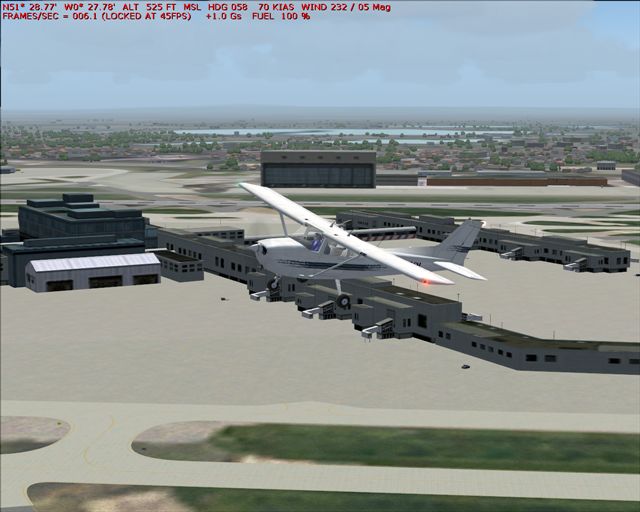
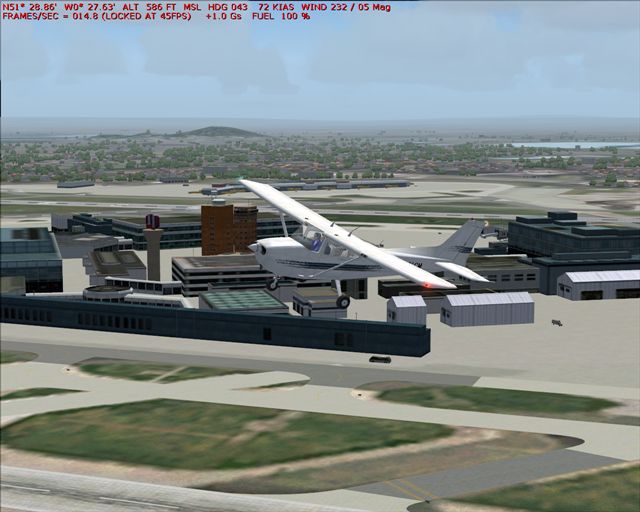
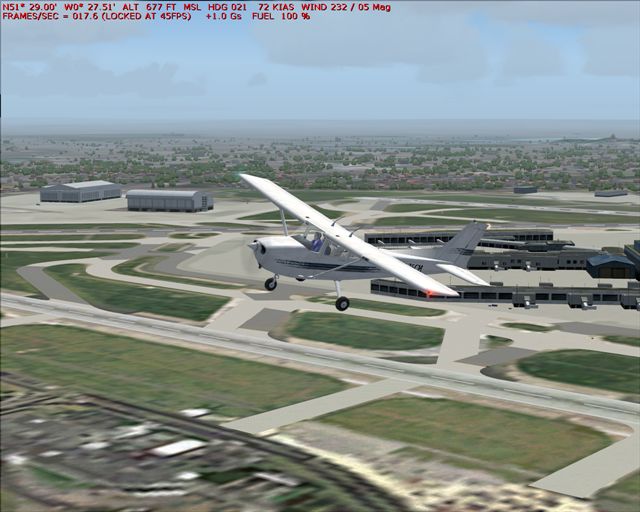
Here are three  screenies at Heathrow, with the building storms weather. Everything is maxed in the settings apart from cloud sight distance I think.
Notice how low they drop in the third (no it isn't because I pressed print screen too quick)- they can also get to the other extreme at 28 or so just as easily above 14-17 which is where they seem to hover around. ::)

Image


Image


Image
Windows 7 Pro 64bit
Intel Core 2 Duo E2180 2GHz
GA-P35-DS3L Intel P35
Kingston HyperX 4GB (2x2) DDR2 6400C4 800Mhz
GeForce 8800 GT 512MB
2 x 22" monitors
200GB Sata
Be Quiet! Straight Power 650W

Flying FS
Saitek
Lieutenant Colonel
Lieutenant Colonel
 
Posts: 5274
Joined: Thu Jun 19, 2003 3:04 pm
Location: UK

Re: Frame Rate Solution (Really Works!)

Postby commoner » Wed Mar 09, 2005 8:03 am

Saitek Here's mine..commoner

SOUND_FADER5=0.200000
SOUND_FADER6=1.000000
SOUND_QUALITY=1
[DISPLAY.Device.RADEON Drivers on Win2K/XP ]
Mode=1024x768x32
TnL=0
Image"In theory, there is no difference between theory and practice. But, in practice, there is."
User avatar
commoner
Major
Major
 
Posts: 3221
Joined: Sat Aug 28, 2004 2:26 am
Location: Yorkshire. England. UK.

Re: Frame Rate Solution (Really Works!)

Postby Saitek » Wed Mar 09, 2005 6:44 pm

Oh well it didn't work for me! :(
Never mind.

Ben :)
Windows 7 Pro 64bit
Intel Core 2 Duo E2180 2GHz
GA-P35-DS3L Intel P35
Kingston HyperX 4GB (2x2) DDR2 6400C4 800Mhz
GeForce 8800 GT 512MB
2 x 22" monitors
200GB Sata
Be Quiet! Straight Power 650W

Flying FS
Saitek
Lieutenant Colonel
Lieutenant Colonel
 
Posts: 5274
Joined: Thu Jun 19, 2003 3:04 pm
Location: UK

Re: Frame Rate Solution (Really Works!)

Postby Gary R. » Wed Mar 09, 2005 8:27 pm

I found the best frame rate fix for me.  As long as everything is humming along in a fluid manner and it looks to me like i'm really flying I simply just LEAVE MY FINGERS OFF OF [SHIFT_Z].  In fact, the only time I do use [shift_z] is to check my ramp co-ordinates when I align the INS.  I tell you guys, before I bought my 6600 GT I was constantly checking my frame rates and trying improvements of one kind or another.  Even with the 6600 turned up to 6800 clock speeds I still noticed sub 24 fps drops in high desity areas and with certain processor intensive aircraft.  It totally ruined my joy in the sim.  Therefor I decided to just not worry about it as long as it was smooth and not noticebly dragging and now I'm having fun with it again and scarecly even thinking about my fps.
AMD 2800xp on gigabyte vt600l k7 triton overclocked @ 2.3 ghz, 768 PC 3200, 128 DDR 6600GT AGP, 60 gig,5200 rpm maxtor, 160gig 7200rpm WD, Sony FD Trinitron 19
Gary R.
Captain
Captain
 
Posts: 793
Joined: Sat Aug 16, 2003 10:51 am
Location: PA, USA

Re: Frame Rate Solution (Really Works!)

Postby kernelsfan35 » Thu Mar 10, 2005 6:25 pm

here is my solution

http://img107.exs.cx/my.php?loc=img107& ... ngs9if.png

i get realy good frame rates with this

frames/sec 009.9 (locked at 10 fps)
Last edited by kernelsfan35 on Thu Mar 10, 2005 6:29 pm, edited 1 time in total.
Image
User avatar
kernelsfan35
Ground hog
Ground hog
 
Posts: 38
Joined: Fri Mar 04, 2005 3:15 pm
Location: Dubuque, Iowa

Re: Frame Rate Solution (Really Works!)

Postby commoner » Fri Mar 11, 2005 3:18 am

here is my solution

http://img107.exs.cx/my.php?loc=img107& ... ngs9if.png

i get realy good frame rates with this

frames/sec 009.9 (locked at 10 fps)


....mmm....lol..never thought of that kern..excellent solution  ;)
....seriously though, gary has made a good point if you are getting a reasonably smooth ride then move on and enjoy the SIM instead of fiddling around with settings all the time...commoner ;)
Image"In theory, there is no difference between theory and practice. But, in practice, there is."
User avatar
commoner
Major
Major
 
Posts: 3221
Joined: Sat Aug 28, 2004 2:26 am
Location: Yorkshire. England. UK.

Previous

Return to FS 2004 - A Century of Flight

Who is online

Users browsing this forum: No registered users and 266 guests