BUT:
The Maule still will not show up in Aircraft folder...don't know what I am doing wrong

Cheers...Happy Landings...Doug

Flight Simulator and other chat
 by Hagar » Mon Dec 12, 2005 2:16 pm
Okay I have the Tri-Pace downloaded...no problem
BUT:
The Maule still will not show up in Aircraft folder...don't know what I am doing wrong
Cheers...Happy Landings...Doug
Maule M7-260 Amphibian
Maule M7-260 Documents
Maule M7-260 Panels
Maule M7-260 Sounds
Maule M7-260 Spring Gear
Maule M7-260 Taildragger
Maule M7-260 Tri-cycle
Maule M7-260 Tundra Wheel
Maule M7-260 Wheel-ski



by FLYING_TRUCKER » Mon Dec 12, 2005 2:32 pm
by Hagar » Mon Dec 12, 2005 2:39 pm

by beaky » Mon Dec 12, 2005 6:52 pm
Hi Doug
No it is not auto install.
I am getting the same thing Sean is showing.
Not sure what I am doing wrong.
I am selecting all and trying to copy then paste.
It worked once but when I open up FS2004 nothing.
I even tried it again and did a restart.
Nothing.
Cheers...Happy Landings...Doug



by Hagar » Mon Dec 12, 2005 7:09 pm
I know you're pasting the Maule folders into your Aircaft folder, but you should close it and open it again to make sure they "took". I always copy and paste, so I can save the originals as backups, and also to avoid any glitches caused by dragging and dropping.
by beaky » Mon Dec 12, 2005 7:25 pm
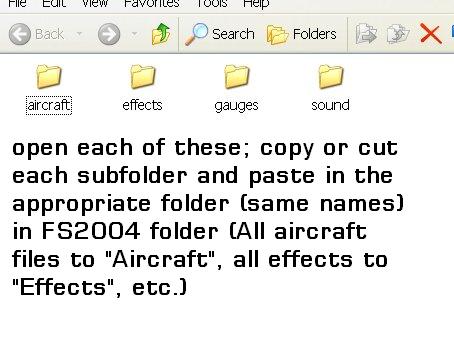
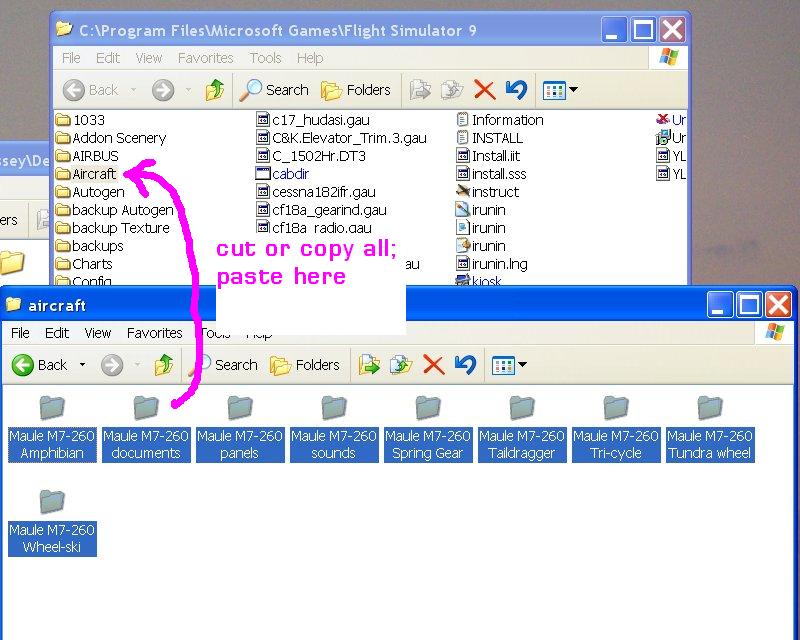

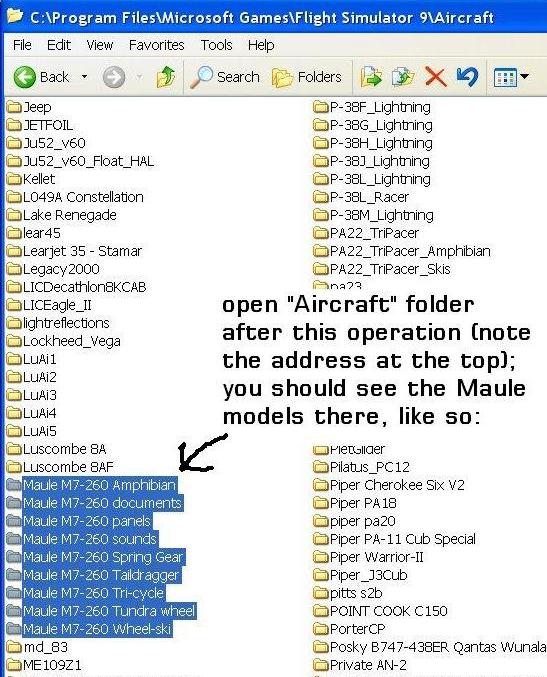
by Hagar » Mon Dec 12, 2005 7:32 pm

by beaky » Mon Dec 12, 2005 7:40 pm
Excellent.
A couple of comments. Click the Folders button to display the file tree window at the left. This makes it easier to see what's inside the folders. Also create a shortcut to your Download folder & FS9 root directory folder & paste them onto your desktop. Simply double-click the shortcuts to open the respective folders. Saves a lot of time looking for them.
by Hagar » Mon Dec 12, 2005 7:44 pm
Yup. I am showing the default folder icons there... I need to figure out how to set the default for "List" viewing; I wonder if that's possible?


by beaky » Mon Dec 12, 2005 10:04 pm
by FLYING_TRUCKER » Mon Dec 12, 2005 10:12 pm

by Hagar » Tue Dec 13, 2005 2:00 am
Understood... but how do you get it to default to that view whenever a folder is opened?
Poor Trucker; we've hijacked his thread...
by MattNW » Tue Dec 13, 2005 3:24 am
it's a pity some other aircraft manufacturers don't follow suit.


by beaky » Tue Dec 13, 2005 6:18 am
Thanks Doug and Sean
I now have the Maule downloaded and working
Not sure if there is a knee board that shows aircraft information and map but everything else is there. Did not spend a lot of time checking it out as have to go out.
I followed both your directions and the mistake I was making was not selecting each individual folder and moving it over.
Oh and where does documents and panels go, I think I put them in with the aircraft folder as I could not find a separate folder for them but Aircraft, Guages and Sound are okay.
Thanks fellas...practice makes perfect they say so shall try something else that has wheel/skis and an amphibian.
Return to FS 2004 - A Century of Flight
Users browsing this forum: No registered users and 307 guests