Problems with Beaufighter

Forum dedicated to Microsoft FS2004 - "A Century of Flight".

Re: Problems with Beaufighter

Postby Hagar » Mon Oct 10, 2005 4:05 pm

No point in getting all stressed out over a freeware aircraft that cost you nothing. I'm sorry, but this has beaten me. If nobody else has any better ideas I suggest you delete the Beaufighter & move on. Life's too short to worry about such things. ;)
Image

Founder & Sole Member - Grumpy's Over the Hill Club for Veteran Virtual Aviators
Member of the Fox Four Group
My Google Photos albums
My Flickr albums
User avatar
Hagar
Colonel
Colonel
 
Posts: 30869
Joined: Wed Jun 19, 2002 7:15 am
Location: Costa Geriatrica

Re: Problems with Beaufighter

Postby Woodlouse2002 » Mon Oct 10, 2005 4:14 pm

Download it again. Some bit might have become corrupted.
Woodlouse2002 PITA and BAR!!!!!!!!

Our Sovereign Lord the King chargeth and commandeth all persons, being assembled, immediately to disperse themselves, and peaceably to depart to their habitations, or to their lawful business, upon the pains c
User avatar
Woodlouse2002
Colonel
Colonel
 
Posts: 10369
Joined: Wed Feb 06, 2002 3:51 pm
Location: Cornwall, England

Re: Problems with Beaufighter

Postby mc602 » Mon Oct 10, 2005 4:42 pm

hello,

I had exactely the same problem with the beaufighter wich I finally deleted not being able to fix it but ill keep an eye on this topic.
Someone might come up with the answer.

MC
mc602
Ground hog
Ground hog
 
Posts: 26
Joined: Tue Nov 19, 2002 2:40 pm

Re: Problems with Beaufighter

Postby Hagar » Mon Oct 10, 2005 5:00 pm

Are you sure you installed it properly? 6 gauges are included in the zipfile & not installing them could possibly cause a problem. It worked straight out of the box for me.
Image

Founder & Sole Member - Grumpy's Over the Hill Club for Veteran Virtual Aviators
Member of the Fox Four Group
My Google Photos albums
My Flickr albums
User avatar
Hagar
Colonel
Colonel
 
Posts: 30869
Joined: Wed Jun 19, 2002 7:15 am
Location: Costa Geriatrica

Re: Problems with Beaufighter

Postby Flt.Lt.Andrew » Tue Oct 11, 2005 1:36 am

This kind of thing happened with my Lanc a while ago...I found the control surface effectiveness settings were set to 1 or 0....I bumped them up to 4, 5, 6....try that (its in the .cfg file) .


A.
Flt.Lt.Andrew
 

Re: Problems with Beaufighter

Postby Zaphod » Tue Oct 11, 2005 2:37 am

Well I've now tried both versions of this aircraft and they both have the same problem.  Can't find any "control surface effectiveness settings " in the aircraft cfg.
When the aircraft first loads the tail appears several feet above the ground and then comes to earth with a bump. Perhaps structural damage may be my problem (LOL). ;D
I've also seen a review on another site, and the reviewer gave 2 out of 10 because the aircraft wouldn't fly. Its a shame because someone has put a lot of work into this plane which looks really good.
Oh well, off to the great scrapyard in the sky. :(

Cheers all.
Zaphod
What doesn't kill you makes you stronger. But why take the risk?
Windows 10
Intel i7 950 3.06Ghz (8mb Cache)
MSI X58 Pro-E MoBo
MSI GeForce GTX 1050ti oc
Corsair MXS
User avatar
Zaphod
Captain
Captain
 
Posts: 850
Joined: Mon Oct 13, 2003 4:05 pm
Location: U.K.

Re: Problems with Beaufighter

Postby Hagar » Tue Oct 11, 2005 4:30 am

When the aircraft first loads the tail appears several feet above the ground and then comes to earth with a bump. Perhaps structural damage may be my problem (LOL). ;D

This might well explain it. It's quite likely that I tested it on minimum Realism settings. If this is the cause of the problem it should be easy enough to fix it. I shall investigate.
Image

Founder & Sole Member - Grumpy's Over the Hill Club for Veteran Virtual Aviators
Member of the Fox Four Group
My Google Photos albums
My Flickr albums
User avatar
Hagar
Colonel
Colonel
 
Posts: 30869
Joined: Wed Jun 19, 2002 7:15 am
Location: Costa Geriatrica

Re: Problems with Beaufighter

Postby Hagar » Tue Oct 11, 2005 5:04 am

OK. Problem solved - I think.

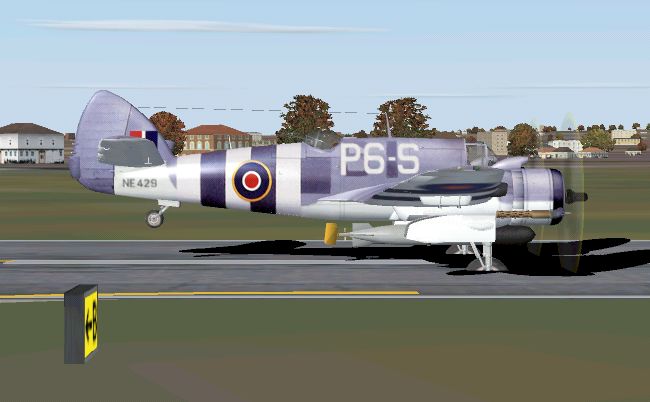
Here's the Beaufighter as it first loads in FS9. You can see this in Spot View from Slew mode by hitting the Y key.

Image

The static pitch is set incorrectly. Open Aircraft.cfg in Notepad & change this:

static_pitch=0.000000

To this:

static_pitch=12.000000

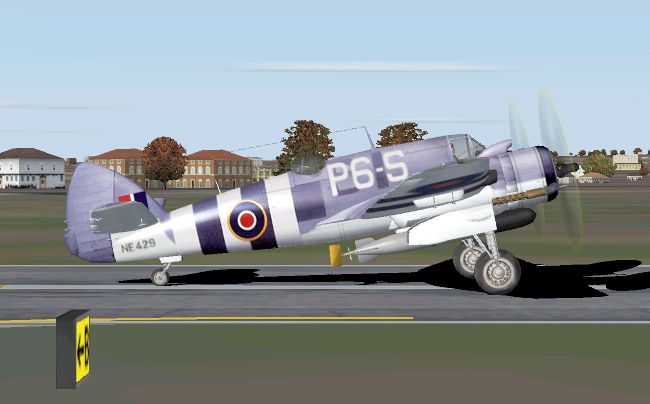
Now go & try it in FS9.

Image
Image

Founder & Sole Member - Grumpy's Over the Hill Club for Veteran Virtual Aviators
Member of the Fox Four Group
My Google Photos albums
My Flickr albums
User avatar
Hagar
Colonel
Colonel
 
Posts: 30869
Joined: Wed Jun 19, 2002 7:15 am
Location: Costa Geriatrica

Re: Problems with Beaufighter

Postby Zaphod » Tue Oct 11, 2005 5:46 am

Hagar. You are the man!!
I've just completed my first successful circiut in the beau' and she flies nice. I first tried from my default and also real life local airfield Headcorn (ever the optimist) but the runway is way to short (although I gather that during WW2 it flew Spitfires of the RCAF and later P51's). I did manage to get her up with room to spare from Manston (ex RAF) which has a very long runway.
To think I was only joking about "structural damage". Who would have thought it? (Well you obviously). ;)

Many thanks for your help.

Zaphod (Paul)
What doesn't kill you makes you stronger. But why take the risk?
Windows 10
Intel i7 950 3.06Ghz (8mb Cache)
MSI X58 Pro-E MoBo
MSI GeForce GTX 1050ti oc
Corsair MXS
User avatar
Zaphod
Captain
Captain
 
Posts: 850
Joined: Mon Oct 13, 2003 4:05 pm
Location: U.K.

Re: Problems with Beaufighter

Postby Hagar » Tue Oct 11, 2005 7:35 am

Hagar. You are the man!!
I've just completed my first successful circiut in the beau' and she flies nice.

That's what i wanted to hear. Thanks for confiming it. ;)

[I first tried from my default and also real life local airfield Headcorn (ever the optimist) but the runway is way to short (although I gather that during WW2 it flew Spitfires of the RCAF and later P51's). I did manage to get her up with room to spare from Manston (ex RAF) which has a very long runway.
To think I was only joking about "structural damage". Who would have thought it? (Well you obviously). ;)

Every little piece of info helps even if you think it sounds stupid or too obvious. It's usually the little things like this that cause these problems. I found out how to do this years ago in CFS1 & it's about the only thing I was ever any good at with FS flight dynamics. Without checking the specs I can't be sure how realistically it performs or how long the runway at Headcorn is. I imagine that darned great torpedo slung underneath wouldn't help.
Image

Founder & Sole Member - Grumpy's Over the Hill Club for Veteran Virtual Aviators
Member of the Fox Four Group
My Google Photos albums
My Flickr albums
User avatar
Hagar
Colonel
Colonel
 
Posts: 30869
Joined: Wed Jun 19, 2002 7:15 am
Location: Costa Geriatrica

Re: Problems with Beaufighter

Postby Zaphod » Tue Oct 11, 2005 10:18 am

Now, if only we can get it to turn in the taxi? Even when selecting engine one only and applying power and full right rudder she turns (but only slightly) left. The same is true when selecting engine 2 and full left rudder, she turns right.
Is it possible to assign differencial breaking to an aircraft that doesn't already have it?

All the best.
Zaphod
What doesn't kill you makes you stronger. But why take the risk?
Windows 10
Intel i7 950 3.06Ghz (8mb Cache)
MSI X58 Pro-E MoBo
MSI GeForce GTX 1050ti oc
Corsair MXS
User avatar
Zaphod
Captain
Captain
 
Posts: 850
Joined: Mon Oct 13, 2003 4:05 pm
Location: U.K.

Re: Problems with Beaufighter

Postby Hagar » Tue Oct 11, 2005 11:33 am

Now, if only we can get it to turn in the taxi? Even when selecting engine one only and applying power and full right rudder she turns (but only slightly) left. The same is true when selecting engine 2 and full left rudder, she turns right.
Is it possible to assign differencial breaking to an aircraft that doesn't already have it?

All the best.
Zaphod

I never tried taxying it. LOL
I'll check it out later.  It should be possible by tweaking the tailwheel steering angle in the [contact_points] section of Aircraft.cfg.  I'm not sure if the Beaufighter had a steerable tailwheel. Most British military aircraft at the time had fully castoring tailwheels & were steered on the ground with differential brakes. This can also be fixed if it's not already defined in those contact points. It's a while since I messed around with this stuff & it might also need a small tweak in the AIR file.
Image

Founder & Sole Member - Grumpy's Over the Hill Club for Veteran Virtual Aviators
Member of the Fox Four Group
My Google Photos albums
My Flickr albums
User avatar
Hagar
Colonel
Colonel
 
Posts: 30869
Joined: Wed Jun 19, 2002 7:15 am
Location: Costa Geriatrica

Re: Problems with Beaufighter

Postby Hagar » Tue Oct 11, 2005 12:30 pm

OK. I think this is the easiest way over it. Open Aircraft.cfg in Notepad & change the entry marked in red from 0.000000 to 35.000000

[contact_points]
point.0=1.000000,-13.550000,0.000000,-3.200000,1574.803150,0.000000,0.639029,35.000000,
0.337175,2.500000,0.691284,5.000000,5.000000,0.000000,0.000000,0.000000

point.0 is the tailwheel & this will give you a steering angle of 35 degrees left & right. You can change this to any number you wish up to 180. It already has differential braking which can be operated from F11 or F12 on the keyboard.

I'm not sure about the Beaufighter but most RAF aircraft of this period had pneumatically operated brakes which were used in conjuction with the rudder for steering on the ground. This was automatic when the brakes were operated from a lever on the joystick (rather like a push-bike brake lever). Most British types had no separate toe or heel-operated brakes as more common on US manufactured aircraft. In this case I think the tailwheel steering is the most realistic. Please try it & see what you think. Remember to keep the stick hard back when manoeuvring on the ground & use short bursts of throttle when turning.

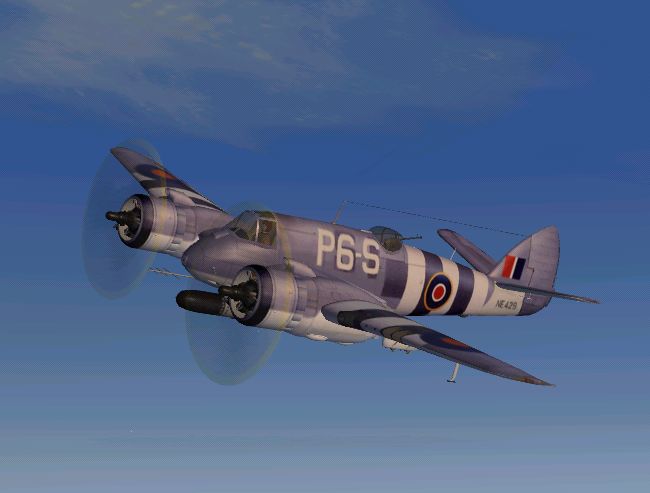
PS. I would travel almost anywhere to see this in real life.
Image
Last edited by Hagar on Tue Oct 11, 2005 12:45 pm, edited 1 time in total.
Image

Founder & Sole Member - Grumpy's Over the Hill Club for Veteran Virtual Aviators
Member of the Fox Four Group
My Google Photos albums
My Flickr albums
User avatar
Hagar
Colonel
Colonel
 
Posts: 30869
Joined: Wed Jun 19, 2002 7:15 am
Location: Costa Geriatrica

Re: Problems with Beaufighter

Postby mc602 » Tue Oct 11, 2005 12:44 pm

Good evening,


I was well advised to keep reading this topic.
I downloaded the beaufighter again and try to modify the aircraft config as shown.

IT WORKS !!!!

Hagar and this forum are the greatest.

Thanks a lot

MC
mc602
Ground hog
Ground hog
 
Posts: 26
Joined: Tue Nov 19, 2002 2:40 pm

Re: Problems with Beaufighter

Postby Zaphod » Tue Oct 11, 2005 12:44 pm

I agree, it's a gorgeous plane.

I made the changes as suggested and all that happened for me is the tailwheel disappeared into the ground and the plane won't move at all.
I've checked and double checked that I've entered it correctly.

Any ideas?

Zaphod.
What doesn't kill you makes you stronger. But why take the risk?
Windows 10
Intel i7 950 3.06Ghz (8mb Cache)
MSI X58 Pro-E MoBo
MSI GeForce GTX 1050ti oc
Corsair MXS
User avatar
Zaphod
Captain
Captain
 
Posts: 850
Joined: Mon Oct 13, 2003 4:05 pm
Location: U.K.

PreviousNext

Return to FS 2004 - A Century of Flight

Who is online

Users browsing this forum: No registered users and 222 guests