My Coastlines!

Forum dedicated to Microsoft FS2004 - "A Century of Flight".

My Coastlines!

Postby Foxtrot Sport » Sat Feb 11, 2006 2:10 pm

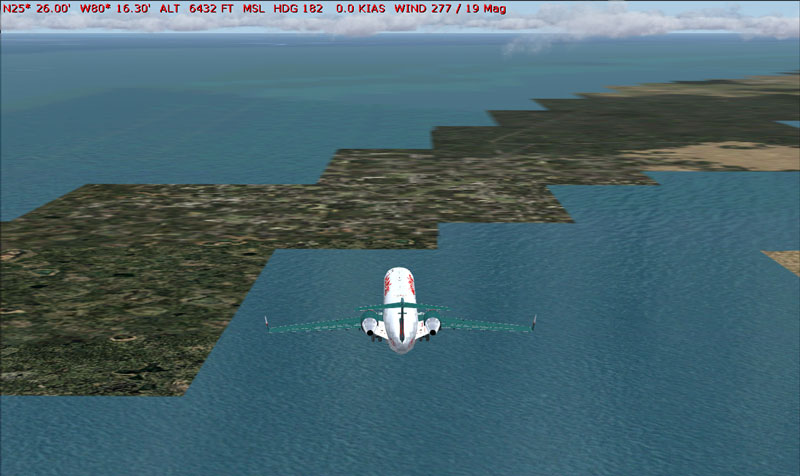
A recent error has apparently occured, and it's a tidbit hard to explain.

Image

As you can see, all my coastlines are jagged like that.  Lakes aren't, only land touching ocean.  It covers all the US, and I'm not sure about other countries/continents.  Help please?

-HF

Image
Formerly HighFlyer24
User avatar
Foxtrot Sport
Major
Major
 
Posts: 1027
Joined: Wed Jun 30, 2004 12:33 pm
Location: Sacramento, California

Re: My Coastlines!

Postby alrot » Sat Feb 11, 2006 2:54 pm

The matter is What did you add to fs9 folder after this??
it seems like a texture loosing bitmaps or in fs9/scenery/World/scenery and a *.BLG has missed to me,try to restore the most recenly point before that,..If you using win xp((i hope you know hw to do it ,if you don't try someone's help who know to deal with it),It may set back again,the things you lost,i mean A *.BLG or texture bitmaps....do it and tell me
Last edited by alrot on Sat Feb 11, 2006 2:59 pm, edited 1 time in total.
Image

Venezuela
User avatar
alrot
Lieutenant Colonel
Lieutenant Colonel
 
Posts: 8961
Joined: Wed Oct 08, 2003 10:47 am

Re: My Coastlines!

Postby Foxtrot Sport » Sat Feb 11, 2006 8:39 pm

Pardon?

Is there a simple fix where like, one could get the necessary files off a disc and replace, etc.?
Image
Formerly HighFlyer24
User avatar
Foxtrot Sport
Major
Major
 
Posts: 1027
Joined: Wed Jun 30, 2004 12:33 pm
Location: Sacramento, California

Re: My Coastlines!

Postby flyboy 28 » Sat Feb 11, 2006 9:37 pm

Pardon?


I think what Alrot means is did you add any major* scenery textures?

*Something that would encompass the whole earth


Also, if you want just reinstall. But remember to back up your favorite planes, like that CRJ you have there. :)
User avatar
flyboy 28
Colonel
Colonel
 
Posts: 10266
Joined: Thu Jun 12, 2003 4:01 pm
Location: Jacksonville, FL

Re: My Coastlines!

Postby Foxtrot Sport » Sun Feb 12, 2006 2:46 am

Also, if you want just reinstall. But remember to back up your favorite planes, like that CRJ you have there. :)

I tried a US terrain mesh or something, and I think took it out, maybe that was a deterrant.  A full reinstall is a bit out of the question, is there an easier alternative?
Image
Formerly HighFlyer24
User avatar
Foxtrot Sport
Major
Major
 
Posts: 1027
Joined: Wed Jun 30, 2004 12:33 pm
Location: Sacramento, California

Re: My Coastlines!

Postby Midnight_LS1 » Sun Feb 12, 2006 3:48 am

Missing landclass file?
-Chris
Active Camera Pro
MegaScenery NY
PSS 777-200LR
Aerosoft Scenery Manhattan
TrackIR3 Pro with Vector
ActiveSky 6
PMDG 747 'Queen of the Skies'
AlphaSim F-117
Midnight_LS1
1st Lieutenant
1st Lieutenant
 
Posts: 394
Joined: Mon Apr 05, 2004 2:30 pm

Re: My Coastlines!

Postby dave3cu » Sun Feb 12, 2006 9:28 am

Looks like missing .bgl(s) that define the coastline. I dont have a precise answer so let's see if we can narrow it down.

What is the name of the 'US terrain mesh or something' that you mention? This would help to determine if it's 'removal' might be the culprit.

Have you determined if this is a 'local' or 'global' problem? Where? This can help in locating where the 'problem' might lie, what files might be missing.

Check the Scenery Library
Last edited by dave3cu on Sun Feb 12, 2006 9:32 am, edited 1 time in total.
At that time [1909] the chief engineer was almost always the chief test pilot as well. That had the fortunate result of eliminating poor engineering early in aviation.
dave3cu
Major
Major
 
Posts: 3141
Joined: Sun May 19, 2002 9:55 am
Location: 3CU, Northern Wisconsin, USA

Re: My Coastlines!

Postby Foxtrot Sport » Sun Feb 12, 2006 1:28 pm

It was 'Ultimate Terrain:USA', and subsequently it covers the Continental US.  Alaska seems untouched, and all of Europe is fine.

Quick fix?
Image
Formerly HighFlyer24
User avatar
Foxtrot Sport
Major
Major
 
Posts: 1027
Joined: Wed Jun 30, 2004 12:33 pm
Location: Sacramento, California

Re: My Coastlines!

Postby Katahu » Sun Feb 12, 2006 2:30 pm

I don't know if there is a quick fix because I don't have Ultimate Terrain USA, but logic about scenery addons dictate that you might have a fix conflict with another scenery addon in FS.

When it comes to addons like Ultimate Terrain, I prefer the following steps:

1. Reinstall FS
2. Install the update while FS is still fresh
3. Install a major addon that can affect a huge part of the globe.

That way, you have a smaller chance of have a file conflict since no two scenery addons function the same way. It's like mixing blood type B from a donor with the blood type O of the patient. Things will clump together and might cause complications.
User avatar
Katahu
Lieutenant Colonel
Lieutenant Colonel
 
Posts: 5993
Joined: Mon Jul 22, 2002 10:29 pm

Re: My Coastlines!

Postby dave3cu » Sun Feb 12, 2006 3:50 pm

I don't know if there is a quick fix because I don't have Ultimate Terrain USA, but logic about scenery addons dictate that you might have a fix conflict with another scenery addon in FS.
...Ditto here.

As UT is payware it might be better to browse and/or post your problem at the UT support forum: http://www.simforums.com/forums/.

This post, although it addresses mainly CTD's, points out some of the problems that could have affected your 'removal': http://www.simforums.com/forums/forum_posts.asp?TID=12648&PN=1

You might also try the 'payware' forum here at Simv.

Good luck,
Dave
At that time [1909] the chief engineer was almost always the chief test pilot as well. That had the fortunate result of eliminating poor engineering early in aviation.
dave3cu
Major
Major
 
Posts: 3141
Joined: Sun May 19, 2002 9:55 am
Location: 3CU, Northern Wisconsin, USA

Re: My Coastlines!

Postby Katahu » Sun Feb 12, 2006 4:34 pm

I don't know if there is a quick fix because I don't have Ultimate Terrain USA, but logic about scenery addons dictate that you might have a fix conflict with another scenery addon in FS.


It took me a while to notice that my gramar sucked at that moment. ;D

LOL
User avatar
Katahu
Lieutenant Colonel
Lieutenant Colonel
 
Posts: 5993
Joined: Mon Jul 22, 2002 10:29 pm

Re: My Coastlines!

Postby alrot » Sun Feb 12, 2006 6:35 pm

The matter is What did you add to fs9 folder after this??
it seems like a texture loosing bitmaps or in fs9/scenery/World/scenery and a *.BLG has missed to me,try to restore the most recenly point before that,..If you using win xp((i hope you know hw to do it ,if you don't try someone's help who know to deal with it),It may set back again,the things you lost,i mean A *.BLG or texture bitmaps....do it and tell me


Trust me buddy! RESTORE! is so simple you won't have to search a cd or anything just set your computer to a moment before this issue,It won't do nothing bad and if I mean,.. IF.,, (never seen since XP came out to the market)somethings goes wrong(you may be need and exorsism ;D ;D because it will be real strange))You just simple disable the restore........ ???."Disable" ??? I realy don't know how it call in xp english version,In spanish is DESASER RESTAURACION I s an option very simple and easy,..you wanna do it the hard way reinstal FS-9 or seach the *.bgl missing wich i would consider a tidious option
Image

Venezuela
User avatar
alrot
Lieutenant Colonel
Lieutenant Colonel
 
Posts: 8961
Joined: Wed Oct 08, 2003 10:47 am

Re: My Coastlines!

Postby Foxtrot Sport » Sun Feb 12, 2006 7:50 pm

Would it be possible to get the necessary .bgl files off one of the FS CD's...?
Image
Formerly HighFlyer24
User avatar
Foxtrot Sport
Major
Major
 
Posts: 1027
Joined: Wed Jun 30, 2004 12:33 pm
Location: Sacramento, California

Re: My Coastlines!

Postby alrot » Sun Feb 12, 2006 9:18 pm

well  ::) try to unzip the cd where scenery folder is,I mean World,Same,Ocean,....etc i think in the same cd must be the texture though and replace the entire scenery folder(back up the original) i mean move it to other place perhaps to desk or C:then place the brand folder into where the other was(inside of fs9 folder),this files must be in a *. CAB so seach after descompressing each one,you may notice by waching a lot of *.BGL files,...if it doesn't fix,then go to Flight Simulator 9/add-on/and MOVE just MOVE and put somewhere else texture and scenery folder,and try,and if it doesn't work put everything back where it was and RESTORE......then Please tell me...OK?

 Good Luck ;)
Image

Venezuela
User avatar
alrot
Lieutenant Colonel
Lieutenant Colonel
 
Posts: 8961
Joined: Wed Oct 08, 2003 10:47 am

Re: My Coastlines!

Postby Foxtrot Sport » Sun Feb 12, 2006 10:25 pm

Well how many types of files am I looking at, shouldn't this be fixed by .bgl files?
Image
Formerly HighFlyer24
User avatar
Foxtrot Sport
Major
Major
 
Posts: 1027
Joined: Wed Jun 30, 2004 12:33 pm
Location: Sacramento, California

Next

Return to FS 2004 - A Century of Flight

Who is online

Users browsing this forum: No registered users and 332 guests