CPU's On Constant Overdrive/ Normal?

Forum dedicated to Microsoft FS2004 - "A Century of Flight".

CPU's On Constant Overdrive/ Normal?

Postby Clipper » Wed Oct 12, 2005 4:20 pm

Hello again y'all, it's Wednesday, so it must be time for an FS9 glitch... ;)
I've come up with yet another aggrevating situation when running FS9. I don't know if you recall, but a couple of weeks ago I mentioned that my fs9 was stuttering after months of super smooth flying.. I still haven't solved it, but I think I may have stumbled onto something. I opened the task manager recently and saw that as soon as I boot up FS9, the cpu flatlines at 100% and stays there. I'm running a P4 2.8 with a 256k nvidea so ram has never been an issue. Is it normal that the cpu is using 100% constantly when running FS9? Your help, as usual would be invaluable and greatly appreciated.
Last edited by Clipper on Wed Oct 12, 2005 4:21 pm, edited 1 time in total.
Image
User avatar
Clipper
Global Moderator
Global Moderator
 
Posts: 8420
Joined: Tue Aug 23, 2005 5:40 am

Re: CPU's On Constant Overdrive/ Normal?

Postby legoalex2000 » Wed Oct 12, 2005 4:25 pm

I run a p4 2.6, and i get the same problem. it usually occurs with a program like AIM (or trillian in my case), sometimes the firewall, or sometimes a small program that runs in the taskbar.

use fsautostart, it has reduced CPU usage. but be cafeful what you tell FSAutostart to shutdown... (personal experience...)

:)Ramos
legoalex2000
 

Re: CPU's On Constant Overdrive/ Normal?

Postby Clipper » Wed Oct 12, 2005 4:41 pm

Ramos, thanks for the help. I do use Autostart and it's the same thing either with or without it. I'm considering a complete FS9 re-install at this point. What happened when you closed Autostart?..Clipper
Image
User avatar
Clipper
Global Moderator
Global Moderator
 
Posts: 8420
Joined: Tue Aug 23, 2005 5:40 am

Re: CPU's On Constant Overdrive/ Normal?

Postby beefhole » Wed Oct 12, 2005 9:06 pm

Just thought I'd chuck in that I have a decent system and, on average, with AIM and Mozilla open, I'm getting 15% usage.  I don't understand how FS is even remotely playable when CPU is at 100%, considering it's next to impossible to even open a single folder.
Last edited by beefhole on Wed Oct 12, 2005 10:43 pm, edited 1 time in total.
User avatar
beefhole
Major
Major
 
Posts: 3804
Joined: Thu Jun 05, 2003 8:57 am
Location: Philadelphia

Re: CPU's On Constant Overdrive/ Normal?

Postby JBaymore » Wed Oct 12, 2005 9:44 pm

Look for multiple instances of fs9.exe running when it is flatlined.  I have seen this happen for some reason... when you exit the program... it doesn't really "end".

best,

...................john
Image ImageIntel i7 960 quad 3.2G LGA 1366, Asus P6X58D Premium, 750W Corsair, 6 gig 1600 DDR3, Spinpoint 1TB 720
User avatar
JBaymore
Global Moderator
Global Moderator
 
Posts: 10020
Joined: Sat May 24, 2003 9:15 am
Location: New Hampshire

Re: CPU's On Constant Overdrive/ Normal?

Postby hatter » Wed Oct 12, 2005 9:51 pm

Do you have hyper-threading enabled?
hatter
2nd Lieutenant
2nd Lieutenant
 
Posts: 162
Joined: Mon Jul 18, 2005 2:13 pm
Location: Chicago, IL

Re: CPU's On Constant Overdrive/ Normal?

Postby Clipper » Thu Oct 13, 2005 5:05 am

JBaymore, no multiples running. Hatter, I don't have hyper-threading. Beefhole, FS9 actually runs fairly well aside from the stuttering issue. I'm still working on resolving the issue....Thank you for your suggestions so far!
Last edited by Clipper on Thu Oct 13, 2005 5:27 am, edited 1 time in total.
Image
User avatar
Clipper
Global Moderator
Global Moderator
 
Posts: 8420
Joined: Tue Aug 23, 2005 5:40 am

Re: CPU's On Constant Overdrive/ Normal?

Postby Fozzer » Sat Oct 15, 2005 11:07 am

...the continuing saga of the overworked processor...!

I've had this problem for months now...;;)...!
...(also problems with my computer)...;)...!
LOL...!
Often when I change views; full screen to windowed screen, or back again, swopping over to a different aircraft, etc, via the Menu....
...even trying to close-down the program...!

The widow goes completely black and the program hangs, with the processor running at 100%...!
It can only be cancelled by Ctrl-Alt-Del, and shutting the program down.

On other occasions the program will shut-down, followed by the usual Microsoft report....often pointing to a "weather.dll", or a "panels.dll", etc, fault.

I've re-installed FS 2004, (which includes a new "weather.dll"), and using the original FS9.exe, (rather than the No-CD crack).
I have just downloaded the later FS9.1 update and installed it, but this has not cured the problem!
This is really annoying, especially when the program hangs during a long flight, or during a Multiplayer flight...!

Browsing through the 'Net, and also peeking here, it seems to be a problem which some users suffer...:'(...!
...and I hate suffering...>:(...!!
LOL...!

Any ideas, Chaps...?

Paul...

P.S. NO probs with overheating, overloading, etc... ;D...!
8)...!

...('puter spec's below)...

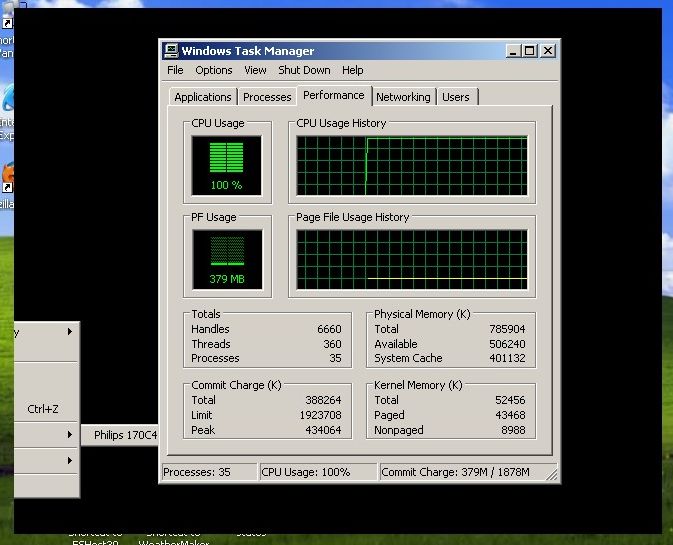
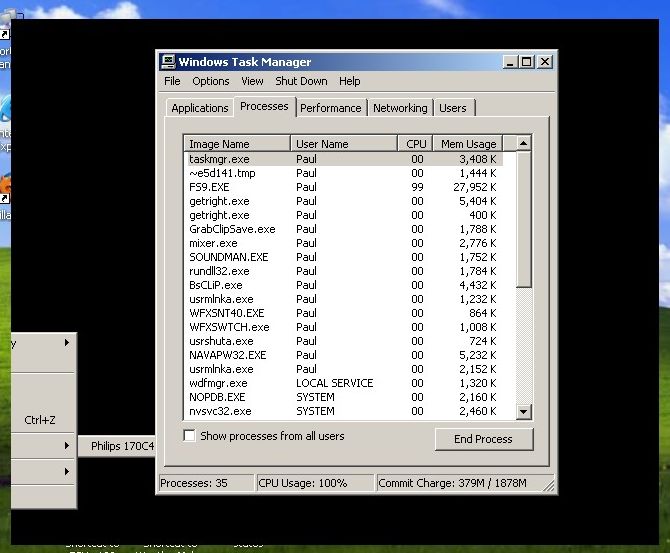
Processor running at 100%...!!!

(The black window you see in the background is the result of trying to swop from widow mode to full-screen mode...it has forced the processor into supercharged mode)...!!
Image

Image

...it's a bit of a buggar... :'(...!
... ;)... ;D...!
Last edited by Fozzer on Sat Oct 15, 2005 11:19 am, edited 1 time in total.
Win 8.1 64-bit. DX11. Advent Tower. Intel i7-3770 3.9 GHz 8-core. 8 GB System RAM. AMD Radeon HD 7700 1GB RAM. DVD ROM. 2 Terra Byte SATA Hard Drive. Philips 17" LCD Monitor. Saitek Cyborg X Fly-5 Joystick. ...and a Briggs and Stratton Petrol Lawn Mower.

User avatar
Fozzer
Colonel
Colonel
 
Posts: 27370
Joined: Thu Jan 31, 2002 3:11 pm
Location: Hereford. England. EGBS.

Re: CPU's On Constant Overdrive/ Normal?

Postby JBaymore » Sat Oct 15, 2005 11:17 am

Hum..........

What is  "~e5d141.tmp" ?

best,

............john
Image ImageIntel i7 960 quad 3.2G LGA 1366, Asus P6X58D Premium, 750W Corsair, 6 gig 1600 DDR3, Spinpoint 1TB 720
User avatar
JBaymore
Global Moderator
Global Moderator
 
Posts: 10020
Joined: Sat May 24, 2003 9:15 am
Location: New Hampshire

Re: CPU's On Constant Overdrive/ Normal?

Postby Katahu » Sat Oct 15, 2005 11:20 am

My processor got overworked whenever I started FS9 as well and that was AFTER I started to fill the sim with all the cr@b in the SimV world [too many addons]. ;D

I was flying online with Skype [a VOIP program] and someone told me that my computer's internal fan sounded like a C-130 taking off. ;D LOL
User avatar
Katahu
Lieutenant Colonel
Lieutenant Colonel
 
Posts: 5993
Joined: Mon Jul 22, 2002 10:29 pm

Re: CPU's On Constant Overdrive/ Normal?

Postby Fozzer » Sat Oct 15, 2005 11:24 am

Hum..........

What is  "~e5d141.tmp" ?

best,

............john


Gawd knows... ::)...!

Whatever it is, it's running at zero speed... ::)...!

...while FS9 is hurrying along at 99% in 5th. gear... :'(...!

LOL...!

Paul... 8)...!

...with the mouse pointer hovering over the black window, the hour glass pointer flickers into overdrive mode...including the hard drive light... :o...!
Last edited by Fozzer on Sat Oct 15, 2005 11:40 am, edited 1 time in total.
Win 8.1 64-bit. DX11. Advent Tower. Intel i7-3770 3.9 GHz 8-core. 8 GB System RAM. AMD Radeon HD 7700 1GB RAM. DVD ROM. 2 Terra Byte SATA Hard Drive. Philips 17" LCD Monitor. Saitek Cyborg X Fly-5 Joystick. ...and a Briggs and Stratton Petrol Lawn Mower.
User avatar
Fozzer
Colonel
Colonel
 
Posts: 27370
Joined: Thu Jan 31, 2002 3:11 pm
Location: Hereford. England. EGBS.

Re: CPU's On Constant Overdrive/ Normal?

Postby Pablo » Sat Oct 15, 2005 12:44 pm

Hum..........

What is  "~e5d141.tmp" ?

best,

............john


Hi John...!

That process starts at the same time that FS 2004 loads.
If I shut it down, (Ctrl+Alt+Del), FS 2004 also closes down to the desktop... ;)...!

..interesting...?

Paul.
Image
Beauty in the "B"
User avatar
Pablo
2nd Lieutenant
2nd Lieutenant
 
Posts: 117
Joined: Thu Sep 22, 2005 6:28 am

Re: CPU's On Constant Overdrive/ Normal?

Postby Marlin » Sat Oct 15, 2005 1:09 pm

Here is something real basic, have you ran a defrag lately? How about spyware?????
Marlin
1st Lieutenant
1st Lieutenant
 
Posts: 486
Joined: Thu Dec 30, 2004 1:14 am
Location: NEW Mexico

Re: CPU's On Constant Overdrive/ Normal?

Postby JBaymore » Sat Oct 15, 2005 2:02 pm

OK... I didn't remember seeing it on my machine... but I just checked... it is there too.

Marlin is heading where I am thinkling... you have something that should NOT be running that IS running.  Likely it is a corrupt program that is "hanging", spyware, or a virus.

best,

...............john
Image ImageIntel i7 960 quad 3.2G LGA 1366, Asus P6X58D Premium, 750W Corsair, 6 gig 1600 DDR3, Spinpoint 1TB 720

User avatar
JBaymore
Global Moderator
Global Moderator
 
Posts: 10020
Joined: Sat May 24, 2003 9:15 am
Location: New Hampshire

Re: CPU's On Constant Overdrive/ Normal?

Postby Zaphod » Sat Oct 15, 2005 2:27 pm

I just did a quick search on "e5d141" and one thread states it's something to do with a "copy protection" temp file which I assume is generated by FS9. I don't think this file is the problem.

Zaphod.
What doesn't kill you makes you stronger. But why take the risk?
Windows 10
Intel i7 950 3.06Ghz (8mb Cache)
MSI X58 Pro-E MoBo
MSI GeForce GTX 1050ti oc
Corsair MXS
User avatar
Zaphod
Captain
Captain
 
Posts: 850
Joined: Mon Oct 13, 2003 4:05 pm
Location: U.K.

Next

Return to FS 2004 - A Century of Flight

Who is online

Users browsing this forum: No registered users and 150 guests




