Asking For The Third Time For Help

Forum dedicated to Microsoft FS2004 - "A Century of Flight".

Asking For The Third Time For Help

Postby Hai Perso Coyone? » Wed Aug 31, 2005 6:56 am

Hi all,
Forgive me for being arrogant, but can someone please help me with a bunch of problems I have with FS9? I'll start with this really small thing:

1. Whenever I start FS9, I get a message saying: This program or something isn't compatible with FS9...it's FSound.dll....I got it when I installed the Historic Jetliners Group aircraft.

My next problem...
2. Everytime I select an aircraft, I get a message with FSUIPC Error: The program you are trying to use is not accredited to use an unregistered version of FSUIPC...I have version 3.48 unregistered....

My biggest problem of all:
3. There is no sound in FS9. Everytime I start FS9, I have to fly without sound. I press Q, FS crashes. I don't what the problem is but it's effing annoying and I really want to fly with sound...

Someone please help as this is the third time I am requesting help with the sound problem...
A thouroughly annoyed and sad,
Ashar :( :-/
User avatar
Hai Perso Coyone?
Ground hog
Ground hog
 
Posts: 0
Joined: Fri Jan 12, 2007 7:31 pm
Location: Rome, Italy

Re: Asking For The Third Time For Help

Postby Saitek » Wed Aug 31, 2005 7:02 am

I'm sure I had the first two problems myself - I just can't remember how I corrected them.
I'm not the best person to answer tough questions but,

1) Have you uninstalled that program? Does it still play up?
2) Do you have more than one version of FSUPIC? They may be conflicting.
3) Probably related to the first question. Did the problems start at the same time?
Windows 7 Pro 64bit
Intel Core 2 Duo E2180 2GHz
GA-P35-DS3L Intel P35
Kingston HyperX 4GB (2x2) DDR2 6400C4 800Mhz
GeForce 8800 GT 512MB
2 x 22" monitors
200GB Sata
Be Quiet! Straight Power 650W

Flying FS
Saitek
Lieutenant Colonel
Lieutenant Colonel
 
Posts: 5274
Joined: Thu Jun 19, 2003 3:04 pm
Location: UK

Re: Asking For The Third Time For Help

Postby Hai Perso Coyone? » Wed Aug 31, 2005 7:09 am

I'm sure I had the first two problems myself - I just can't remember how I corrected them.
I'm not the best person to answer tough questions but,

1) Have you uninstalled that program? Does it still play up?
2) Do you have more than one version of FSUPIC? They may be conflicting.
3) Probably related to the first question. Did the problems start at the same time?


Hi Ben,
Thanks for the reply. For the 2nd problem, I checked my Modules Folder and it turns out there is only one version of FSUIPC...however checking the FSUIPC log, there is one gauge that keeps repeating..."ILH_TCAS2.GAU"...I recently installed an F-16 panel made for FS2002 and I am guessing this is where it probably came from..but I am not sure...can I get rid of the gauge?

No I have not uninstalled the aircraft. They are still there. I can fly them but the same message pops up when I start FS9. As for my third problem, the sound stopped coming long before I even had FSound.dll

Thanks again,
Ashar
Last edited by Hai Perso Coyone? on Wed Aug 31, 2005 7:20 am, edited 1 time in total.
User avatar
Hai Perso Coyone?
Ground hog
Ground hog
 
Posts: 0
Joined: Fri Jan 12, 2007 7:31 pm
Location: Rome, Italy

Re: Asking For The Third Time For Help

Postby Hai Perso Coyone? » Wed Aug 31, 2005 7:19 am

Figured out for the First Problem...
I added this line in the FS9.cfg:

[OLDMODULES]
FSSound.dll=1

That got the first problem done...now the other 2 problems remain...
Cheers,
Ashar
User avatar
Hai Perso Coyone?
Ground hog
Ground hog
 
Posts: 0
Joined: Fri Jan 12, 2007 7:31 pm
Location: Rome, Italy

Re: Asking For The Third Time For Help

Postby Stratosaurus » Wed Aug 31, 2005 7:22 am

Hello Woozy. First uninstall the "problematic" planes and test the FS. If the message and the problem dissaperar.
Image
MIG-31BM
Photo: A. Melihov. Stratosaurus collection.
Stratosaurus
Captain
Captain
 
Posts: 929
Joined: Wed May 11, 2005 3:09 am

Re: Asking For The Third Time For Help

Postby Saitek » Wed Aug 31, 2005 7:23 am

Oh dear this is well out of my depth! :o :(

Unless you want to wait until someone else comes - why not try uninstalling the Jetliners aircraft and see if that solves it?

To be honest though unless you really have loads of aircraft in your hangar I would back up your scenery folder (I'm presuming you have added lots of scenery - most of us do!) and reinstall FS9. If you have had multiple errors for a long time and can't remember what you did to cause them then it can be difficult to put them right.

Before you go anywhere - wait for someone better educated than me and see if they can help, but you may find it is just easier to start afresh. ;)
Last edited by Saitek on Wed Aug 31, 2005 7:24 am, edited 1 time in total.
Windows 7 Pro 64bit
Intel Core 2 Duo E2180 2GHz
GA-P35-DS3L Intel P35
Kingston HyperX 4GB (2x2) DDR2 6400C4 800Mhz
GeForce 8800 GT 512MB
2 x 22" monitors
200GB Sata
Be Quiet! Straight Power 650W

Flying FS
Saitek
Lieutenant Colonel
Lieutenant Colonel
 
Posts: 5274
Joined: Thu Jun 19, 2003 3:04 pm
Location: UK

Re: Asking For The Third Time For Help

Postby Hagar » Wed Aug 31, 2005 7:38 am

Figured out for the First Problem...
I added this line in the FS9.cfg:

[OLDMODULES]
FSSound.dll=1

That got the first problem done...now the other 2 problems remain...
Cheers,
Ashar

You beat me to it on that one. Now for number 2. I don't know what you use FSUIPC for but the unregistered version will work with various freeware applications. You might need to register certain ones from within FS9 itself. List of supported applications with access keys here. http://forums.simflight.com/viewtopic.php?t=10812&sid=3893cb11d726a5fb3740b528087b7d82

I have no idea why you have no sound. Make sure you have the latest DX compatible drivers for your sound card. You can also run a diagnostic test by typing dxdiag in the Start/Run box.
Last edited by Hagar on Wed Aug 31, 2005 7:39 am, edited 1 time in total.
Image

Founder & Sole Member - Grumpy's Over the Hill Club for Veteran Virtual Aviators
Member of the Fox Four Group
My Google Photos albums
My Flickr albums
User avatar
Hagar
Colonel
Colonel
 
Posts: 30869
Joined: Wed Jun 19, 2002 7:15 am
Location: Costa Geriatrica

Re: Asking For The Third Time For Help

Postby Hai Perso Coyone? » Wed Aug 31, 2005 7:44 am

You beat me to it on that one. Now for number 2. I don't know what you use FSUIPC for but the unregistered version will work with various freeware applications. You might need to register certain ones from within FS9 itself. List of supported applications with access keys here. http://forums.simflight.com/viewtopic.php?t=10812&sid=3893cb11d726a5fb3740b528087b7d82

I have no idea why you have no sound. Make sure you have the latest DX compatible drivers for your sound card. You can also run a diagnostic test by typing dxdiag in the Start/Run box.


Doug...Thanks for the link!! I checked but the gauge I mentioned above namely "ILH_TCAS2.GAU" is not there in the links list...I don't know about others....
User avatar
Hai Perso Coyone?
Ground hog
Ground hog
 
Posts: 0
Joined: Fri Jan 12, 2007 7:31 pm
Location: Rome, Italy

Re: Asking For The Third Time For Help

Postby Hagar » Wed Aug 31, 2005 7:49 am

I'm not sure how up-to-date that list is. It was last updated on May 13, 2004  It's possible your gauge has a free access key. This should be mentioned in the Readme with the gauge or the aircraft/panel it's included with.
Image

Founder & Sole Member - Grumpy's Over the Hill Club for Veteran Virtual Aviators
Member of the Fox Four Group
My Google Photos albums
My Flickr albums
User avatar
Hagar
Colonel
Colonel
 
Posts: 30869
Joined: Wed Jun 19, 2002 7:15 am
Location: Costa Geriatrica

Re: Asking For The Third Time For Help

Postby Fozzer » Wed Aug 31, 2005 7:52 am

Hi Ashar...!

..as always, I wonder if you have any sound problems with any other programs....Games, etc,...Windows Media Player, playing your music files, etc...

All these are worth checking first...!

Paul... 8)...!
Win 8.1 64-bit. DX11. Advent Tower. Intel i7-3770 3.9 GHz 8-core. 8 GB System RAM. AMD Radeon HD 7700 1GB RAM. DVD ROM. 2 Terra Byte SATA Hard Drive. Philips 17" LCD Monitor. Saitek Cyborg X Fly-5 Joystick. ...and a Briggs and Stratton Petrol Lawn Mower.
User avatar
Fozzer
Colonel
Colonel
 
Posts: 27370
Joined: Thu Jan 31, 2002 3:11 pm
Location: Hereford. England. EGBS.

Re: Asking For The Third Time For Help

Postby microlight » Wed Aug 31, 2005 7:57 am

Hi Ashar - sorry you seem to be having some problems. We're not ignoring you!

You fixed the first one - this is exactly what I was going to suggest!

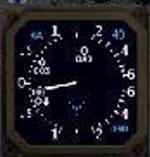
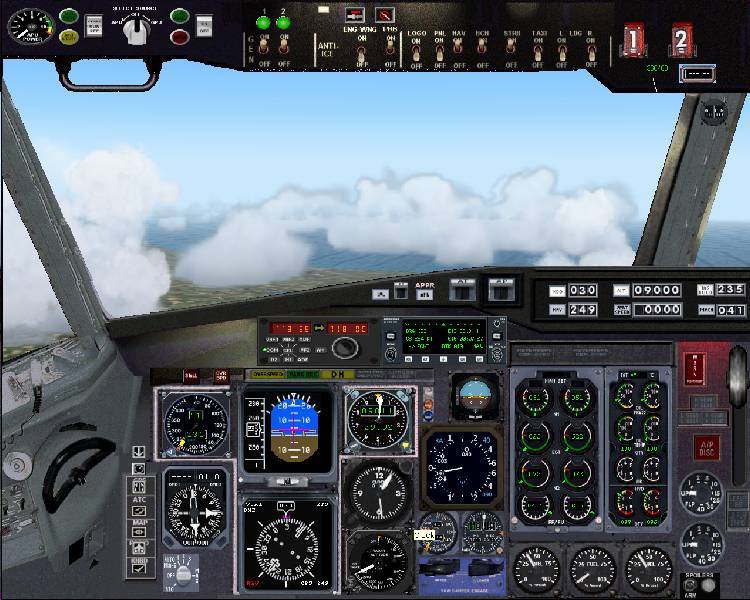
The other problems might come from some addons you've put in - and of panels rather than whole planes, because it seems to be a gauge problem. What makes me think this is that I have Fs9.1 and FSUIPC unregistered 3.4.8 like you - and I also have the ILH-TCAS gauge installed, which works faultlessly in many panels: for example my home-built 737-300 panel. Here's the gauge, and also the panel to put it in context:

Image

Image

This is a different gauge to that used with the F16 download you mention, so it must have come from somewhere else. The ILH_TCAS gauge is very good (it shows the air traffic around you) WITHOUT the use of FSUIPC. The version 4 download (ilh_tcas_v4.zip) has another module included called trafficinfo.dll that makes it work without FSUIPC - but the panel.cfg has to be set up correctly to use it. If it isn't set up properly, FSUIPC tries to use it, and discovers that it can't, hence the warning. The readme in the file tells you how to do all this.  Alternatively of course, if you don't want to use the gauge, there's no harm in removing it. Move it to another folder rather than delete it, if you don't want to lose it altogether.

If your sound only disappeared when the little warning notice started coming up, and you have all the 'sound' boxes ticked in the 'settings-sound' option, then this might be your problem.

;)
User avatar
microlight
Major
Major
 
Posts: 2076
Joined: Mon Aug 19, 2002 6:24 pm
Location: Southern UK

Re: Asking For The Third Time For Help

Postby Hagar » Wed Aug 31, 2005 7:58 am

Doug...Thanks for the link!! I checked but the gauge I mentioned above namely "ILH_TCAS2.GAU" is not there in the links list...I don't know about others....

Check this out. http://forums.simflight.com/viewtopic.php?t=10812&sid=3893cb11d726a5fb3740b528087b7d82
Good news for all the "flight simmers" who have tried to use my radar gauge or TCAS with FS2004: Pete Dowson has published all the codes so that my freeware gauges can be used with the freeware edition of FSUIPC. Thanks Pete !!
You can have a look at the Pete Dowson's forum here, or enter directly one of the following key in FSUIPC:

A320 panel - A320.gau - key: VSB5 4OK5 UVWN
Last edited by Hagar on Wed Aug 31, 2005 7:59 am, edited 1 time in total.
Image

Founder & Sole Member - Grumpy's Over the Hill Club for Veteran Virtual Aviators
Member of the Fox Four Group
My Google Photos albums
My Flickr albums
User avatar
Hagar
Colonel
Colonel
 
Posts: 30869
Joined: Wed Jun 19, 2002 7:15 am
Location: Costa Geriatrica

Re: Asking For The Third Time For Help

Postby Hai Perso Coyone? » Wed Aug 31, 2005 9:11 am

Hi Ashar...!

..as always, I wonder if you have any sound problems with any other programs....Games, etc,...Windows Media Player, playing your music files, etc...

All these are worth checking first...!

Paul... 8)...!


Fozz...all my other sounds work...games, Music, Videos...everything but the sound in FS :'( :'(
User avatar
Hai Perso Coyone?
Ground hog
Ground hog
 
Posts: 0
Joined: Fri Jan 12, 2007 7:31 pm
Location: Rome, Italy

Re: Asking For The Third Time For Help

Postby Hai Perso Coyone? » Wed Aug 31, 2005 9:19 am

Hi Ashar - sorry you seem to be having some problems. We're not ignoring you!

You fixed the first one - this is exactly what I was going to suggest!

The other problems might come from some addons you've put in - and of panels rather than whole planes, because it seems to be a gauge problem. What makes me think this is that I have Fs9.1 and FSUIPC unregistered 3.4.8 like you - and I also have the ILH-TCAS gauge installed, which works faultlessly in many panels: for example my home-built 737-300 panel. Here's the gauge, and also the panel to put it in context:

Image

Image

This is a different gauge to that used with the F16 download you mention, so it must have come from somewhere else. The ILH_TCAS gauge is very good (it shows the air traffic around you) WITHOUT the use of FSUIPC. The version 4 download (ilh_tcas_v4.zip) has another module included called trafficinfo.dll that makes it work without FSUIPC - but the panel.cfg has to be set up correctly to use it. If it isn't set up properly, FSUIPC tries to use it, and discovers that it can't, hence the warning. The readme in the file tells you how to do all this.  Alternatively of course, if you don't want to use the gauge, there's no harm in removing it. Move it to another folder rather than delete it, if you don't want to lose it altogether.

If your sound only disappeared when the little warning notice started coming up, and you have all the 'sound' boxes ticked in the 'settings-sound' option, then this might be your problem.

;)


Micro,
Thanks for the info...I was browsing my FS Backup's Folder and found a Sound.dll backed up. I don't why it's there...maybe because some add-on requested a back-up. My Sound.dll in the Modules folder reads this version:
9.1.0.40901...

I'll have a look into the Sound Settings in FS9...and should I get the newer version of the gauge? I also found which add-on put the gauge there. It's a 707 panel I found over at Avsim...
Cheers,
Ashar
User avatar
Hai Perso Coyone?
Ground hog
Ground hog
 
Posts: 0
Joined: Fri Jan 12, 2007 7:31 pm
Location: Rome, Italy

Re: Asking For The Third Time For Help

Postby microlight » Wed Aug 31, 2005 11:02 am

Ashar,

Personally I'd stick with the gauge as it's well worth it. You might want to download at least version 4 if you haven't got it (it's on >sacrilege< Avsim(!)). There's a string on the Avsim forums that I found when I googled, which has essentially the same issue as you, and they included the panel.cfg printout. This included the lines for controlling the TCAS gauge, and it didn't include the trafficinfo.dll modifer you see below. My TCAS gauge control lines for the 737 panel you saw are:

in [window00]
gaugeXX=ILH_TCAS!IVSI,570,564,115,fontscale:1.5 other:45
gaugeXX=ILH_TCAS!Logic, 0, 0, 1, 1,trafficinfo:yes volume:-300

The second line must contain the trafficinfo modifier, and the trafficinfo.dll module itself must be in the FS9/modules folder. That should cure the problem - let me know if it doesn't. You can then insert this gauge into any FS9 panel that you want to add a TCAS to.

;)
User avatar
microlight
Major
Major
 
Posts: 2076
Joined: Mon Aug 19, 2002 6:24 pm
Location: Southern UK

Next

Return to FS 2004 - A Century of Flight

Who is online

Users browsing this forum: No registered users and 217 guests