Flight Simulator Problem

Forum dedicated to Microsoft FS2004 - "A Century of Flight".

Flight Simulator Problem

Postby FlightSimKid » Mon Oct 01, 2007 3:12 pm

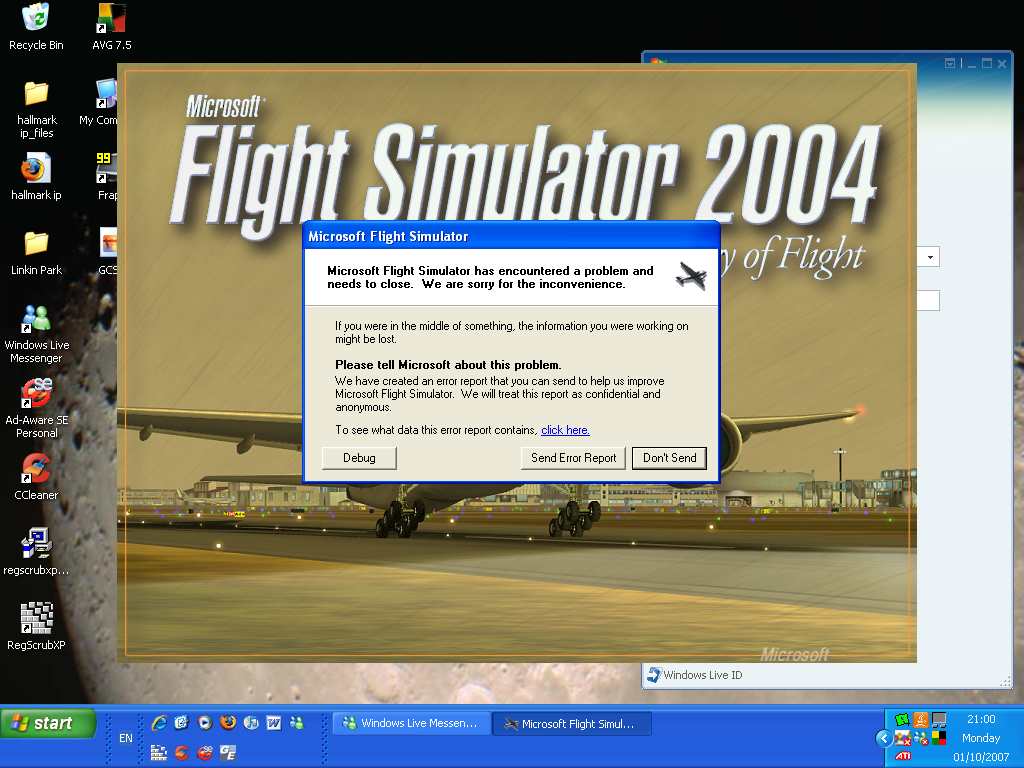
Hi there well here i am, logged on to the PC start Flight Simulator 2004 uo and this message pops up >:(

Image

Please help me discover why this is happening

Specs:

AMD Phenom 9750 Quad-Core Processor 2.4GHz
4GB RAM
ATI Radeon HD 4350
500GB Hard-drive
Blue-ray.
User avatar
FlightSimKid
2nd Lieutenant
2nd Lieutenant
 
Posts: 121
Joined: Mon Mar 19, 2007 3:14 pm
Location: East London, United Kingdom

Re: Flight Simulator Problem

Postby Hagar » Mon Oct 01, 2007 3:22 pm

Hi there well here i am, logged on to the PC start Flight Simulator 2004 uo and this message pops up >:(

Image

Please help me discover why this is happening

Hi. This might be a little difficult to track down at long range. The first thing I would suggest is to find fs9.cfg & delete it.* Then fire up FS2004 & see if that fixed it. If it didn't work we can try something else.

*You can back up fs9.cfg by renaming the file if you prefer.
Image

Founder & Sole Member - Grumpy's Over the Hill Club for Veteran Virtual Aviators
Member of the Fox Four Group
My Google Photos albums
My Flickr albums
User avatar
Hagar
Colonel
Colonel
 
Posts: 30868
Joined: Wed Jun 19, 2002 7:15 am
Location: Costa Geriatrica

Re: Flight Simulator Problem

Postby FlightSimKid » Mon Oct 01, 2007 3:34 pm

Nope hasn't worked i get the UK2000 heathrow scenery problem up before if that helps, could locate it in the Scenery.cfg, i could try and delete that and back it up.
Specs:

AMD Phenom 9750 Quad-Core Processor 2.4GHz
4GB RAM
ATI Radeon HD 4350
500GB Hard-drive
Blue-ray.
User avatar
FlightSimKid
2nd Lieutenant
2nd Lieutenant
 
Posts: 121
Joined: Mon Mar 19, 2007 3:14 pm
Location: East London, United Kingdom

Re: Flight Simulator Problem

Postby Sovien » Mon Oct 01, 2007 3:37 pm

Have you installed any add-ons (aircraft, scenery, utilities, payware or freeware) recently? If you have, delete the last thing you can remember installing to FS9 and see if that clears it up.


Is there no other error message you get? Just the "send report to microsoft message"?
Last edited by Sovien on Mon Oct 01, 2007 3:38 pm, edited 1 time in total.
Image
User avatar
Sovien
1st Lieutenant
1st Lieutenant
 
Posts: 311
Joined: Fri Mar 10, 2006 10:10 am

Re: Flight Simulator Problem

Postby Hagar » Mon Oct 01, 2007 3:41 pm

Nope hasn't worked i get the UK2000 heathrow scenery problem up before if that helps, could locate it in the Scenery.cfg, i could try and delete that and back it up.

Hmmm. You didn't mention a UK2000 scenery problem before. What's that all about?

It's most important to try & remember exactly what you did before this problem cropped up. Then we might be able to fix it.
Image

Founder & Sole Member - Grumpy's Over the Hill Club for Veteran Virtual Aviators
Member of the Fox Four Group
My Google Photos albums
My Flickr albums
User avatar
Hagar
Colonel
Colonel
 
Posts: 30868
Joined: Wed Jun 19, 2002 7:15 am
Location: Costa Geriatrica

Re: Flight Simulator Problem

Postby Wii » Mon Oct 01, 2007 3:42 pm

https://support.microsoft.com/oas/default.aspx?enty=pid&prid=6313&med=chat&gprid=35248&trl=so&ln=en-us&as=1
A link to Customer support center chat at microsoft. It's easy, and helpful. Oh, you might need the PID for the game. If someone will get it for you (can't be me cause I'm installing FS9 currently. *inserts disk 2*
User avatar
Wii
Major
Major
 
Posts: 2727
Joined: Wed Jun 13, 2007 2:33 pm
Location: Space

Re: Flight Simulator Problem

Postby FlightSimKid » Mon Oct 01, 2007 4:02 pm

Well it was fine earlier running ok, nothing wrong.come back 30mins later and it says the problem..ive deleted the entry for UK2000 Heathrow but it still shows up
Specs:

AMD Phenom 9750 Quad-Core Processor 2.4GHz
4GB RAM
ATI Radeon HD 4350
500GB Hard-drive
Blue-ray.
User avatar
FlightSimKid
2nd Lieutenant
2nd Lieutenant
 
Posts: 121
Joined: Mon Mar 19, 2007 3:14 pm
Location: East London, United Kingdom

Re: Flight Simulator Problem

Postby Hagar » Mon Oct 01, 2007 4:07 pm

Don't do anything in haste or you will probably make it worse. Did you change your default flight recently?

I've just realised that the UK2000 Heathrow scenery is payware. In that case it will probably have an uninstall option. I can't really help apart from suggesting that you reinstall it.
Image

Founder & Sole Member - Grumpy's Over the Hill Club for Veteran Virtual Aviators
Member of the Fox Four Group
My Google Photos albums
My Flickr albums
User avatar
Hagar
Colonel
Colonel
 
Posts: 30868
Joined: Wed Jun 19, 2002 7:15 am
Location: Costa Geriatrica

Re: Flight Simulator Problem

Postby FlightSimKid » Mon Oct 01, 2007 4:18 pm

Thanks guys for your help ive unistalled FS9 but the problem is i used this programe to uninstall it..and me being a moron i've just relised ive lost my disks :'(, will have to buy a new one then. Thanks alot anyway guys.
Specs:

AMD Phenom 9750 Quad-Core Processor 2.4GHz
4GB RAM
ATI Radeon HD 4350
500GB Hard-drive
Blue-ray.
User avatar
FlightSimKid
2nd Lieutenant
2nd Lieutenant
 
Posts: 121
Joined: Mon Mar 19, 2007 3:14 pm
Location: East London, United Kingdom


Return to FS 2004 - A Century of Flight

Who is online

Users browsing this forum: No registered users and 246 guests