My old computer Specs and FS recommended setups...

Forum dedicated to Microsoft FS2004 - "A Century of Flight".

My old computer Specs and FS recommended setups...

Postby Vicente C » Sun Aug 12, 2007 10:25 am

First of all, hi everybody there. I've been reading these forums for a long time looking for advice to setup better my FS9, and more other stuff, but this is my first post here. I have found you very helpful and that there is a lot of knowledge in these boards about FS setup and flying in general, so i have decided to try to ask you some questions I've been asking me recently... Thanks in advance for your patience and help.

Well, i have at this moment and old PC that I've been building for the last 4 years. So I now have an AMD Athlon XP 3200 processor, with a Gigabyte motherboard with 1 Gb DDR RAM and a Nvidia Geforce 7300 GT 512 Mb AGP Graphics Card. Not the best setup for a nice FS9 experience but I have no choice for the moment, as I have a busy moment at work with a moving from home involved... With this rig I plan to do my best in FS at less until Christmas (or next year) when I think I'll be able to upgrade (and buy a totally new one).

Th question is I have tried Nick advice here in these same forum, but I have some stutter yet when I'm in approach phase. This is enough annoying for me to quit flying for a while but I always end changing display config and trying another time... As Nick's advice seems to be for specs better than mine, I accept I'll have to rennounce to some of the eye-candy in order to gain fluidity and quality flying experience... But now I'm in a moment when I really don't know what to tweak in order to achieve this goal. So here I am, looking for help! Would be very grateful if someone could point me to the right direction.

Moreover, I have read some user's testimonials from FS-GS, and i would like to ask you if you think that with my system specs this service is worth to try, as i have read they could advice you even in the way for a system upgrade. (Oh, and I'm from Spain, are there any problems in getting the service working here in Spain?)

Thank you very much for your help, and I hope to be able to contribute a lot with this community from now.

Image
Vicente C
Ground hog
Ground hog
 
Posts: 3
Joined: Sun Aug 12, 2007 10:55 am

Re: My old computer Specs and FS recommended setup

Postby PD87 » Sun Aug 12, 2007 5:57 pm

Hey Vicente,

First off, start FS9 and go to SETTINGS>DISPLAY.
Here, you can try different settings and see what works best for your system.

Same for the AIRCRAFT tab.

Click the WEATHER tab, set SIGHT DISTANCE/ CLOUD DRAW DISTANCE to minimum, CLOUD COVERAGE DENSITY to LOW or MEDIUM with Detailed clouds. I have my 3D clouds set @ 100% but you should try different settings here as well. You could set it between 70-90% which should give you nice quality clouds at a lower FPS hit.

Click the HARDWARE tab. Set your target frame rate @ 20-25Max, Select the resolution youd like, (I run at 1280x1024). I would recommend 1024x768x32.

Place a check in RENDER TO TEXTURE/ TRANSFORM TO LIGHTING. UNCHECK Antialiasing. Set filter to Trilinear (I dont know much about your video card, but you may need to set it on Bilinear) Dabble and see which works better.

Mip-Mapping set to 4, Hardware rendered lights @ 6. Global Texture to High or Massive (Turn down if you prefer performance over quality).

Go to Create a Flight>>Select the WEATHER TAB (#3)>>User Defined weather>>Customize Weather. Here you can refine your weather settings further. It would be best to set you VISIBILITY between 10 and 20 miles (Will help in performance), ans set the rest however you like. Once youre finished, choose your favorite aircraft/location and FLY NOW. Once the flight loads, hit ALT>>FILE>>SAVE FLIGHT>>place a Check in "Make This the Default Flight" and name the file. This way you wont have to keep setting your weather every time you start the sim.

Close FS9 and go to your Nvidia Card, (should have an Icon on your task bar). There should be a tab called "PERFORMANCE AND QUALITY SETTINGS"...Here, you'll have to dabble some more. Start with a QUALITY Setting and go from there.

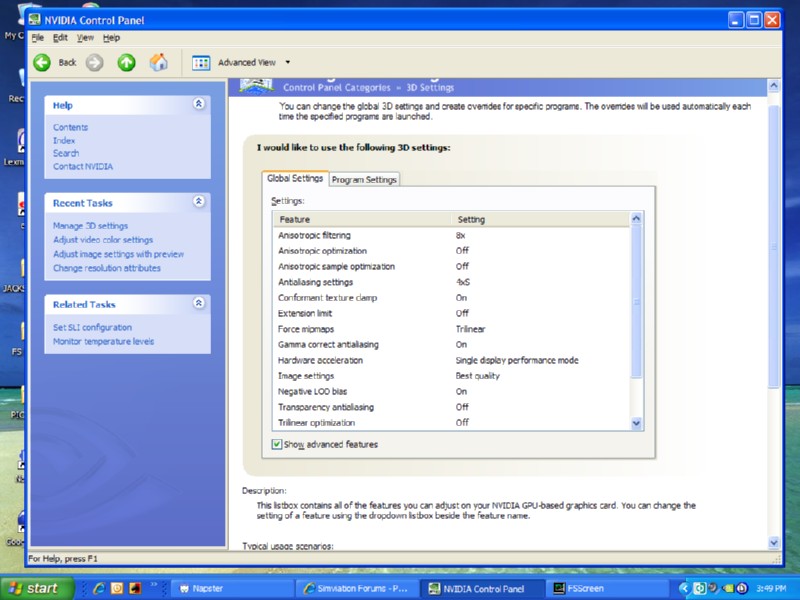
Set ANTIALIASING to 4x, ANISOTROPIC FILTERING to at Least 4x (the higher you go on this, the harder it will impact your performance.) If your card has this option, go to CONTROL PANEL>>3D SETTINGS>>MANAGE 3D SETTINGS...

Image

Make sure and set it to Bilinear, if youve decided to go that way on FS9, same with ANISOTROPIC FILTERING. There should be two more selections at the bottom which I couldnt catch in the shot>>Triple Buffering-OFF, Vertical Sync-let 3d application decide.

I hope this helps. And If I have forgotten something, anyone is welcome to chime in. 8-)

-Jack
Last edited by PD87 on Sun Aug 12, 2007 6:01 pm, edited 1 time in total.
[center]Image
Jack's New Beast - GateWay GT5628 - Vista, Intel Core2 Quad 2.4GHZ, 3GB DDR2, 500GB HD, Nvidia GeForce 8600GTS-OC 256MB DDR3, Dell 22" WS LCD[/cente
User avatar
PD87
Captain
Captain
 
Posts: 618
Joined: Sun Jul 08, 2007 2:32 pm
Location: Riverside

Re: My old computer Specs and FS recommended setup

Postby Vicente C » Sun Aug 12, 2007 6:50 pm

Hi PD87,

thank you very much for your recommendations and effort in trying to help me. They're much appreciated.

I'm running at this moment my FS9 with all sliders from the Display settings bar the ones related to additional scenery (I thought they were responsible of my stutters in approach). For the weather and aircraft tabs I replicated the settings you're suggesting and so I did for the Hardware tab (locked at 20 FPS). As well as this I have configured my Graphics Card same as you are advicing (my previous config was pretty similar to yours I found). A little question about your Visibility advice: I'm using AS6 for weather generation, doesn't it conflict with these user defined settings for Visibility (10-20 miles)?

Anyway, with these setup and the 737 from PMDG I can fly smoothly for the most part of the time when in flight. But I continue having stutters in takeoff and approach phases, what is ruining my FS experience at the moment, as these are the most interesting phases of flight when you're an "IFR lover" like me  ;)

Next thing I've tried is reducing AI traffic to 0 % and I'm having less micro-stutters now... But I would like to have some traffic active in my origin and destination airports (who doesn't? :)). It seems that the stutter comes when the program has to load all the textures from AI planes parked at the airport, as the issue gets worse as I'm approaching to final (and it gets awful some seconds before touchdown, only to return to smoothness when I'm rolling on runway :(). So I'm guessing that AI Traffic is the culprit at less in some of those stutters I'm having. Another pointer is that I'm making all my experiment with display settings at LEVC airport (Valencia) as I have a third party add-on for these airport (Spanish Airports package). May I use another airport to see if it has to do with scenery textures or some scenery malfunction... Oh God I'm getting crazy with all these parameters to tweak!  ;D

I have read experiences here and in other boards from people with rigs similar in specs to mine, and they say they're running smooth and fluid with almost all maxed. I can believe it, as I'm getting nice flying while enroute. But I don't know if they're running a lot of AI traffic, or if they're flying online or some others things thay may affect, or if they are having similar stutter problems but only in a little part of flight... So I'm continuing the experiments and we'll see. Any help continues being very wellcome!  8-)
Image
Vicente C
Ground hog
Ground hog
 
Posts: 3
Joined: Sun Aug 12, 2007 10:55 am

Re: My old computer Specs and FS recommended setup

Postby PD87 » Sun Aug 12, 2007 8:51 pm

No problem!

AS6 will cause a hit in frame rates as well. Reducing visibility helps quite a bit, and it should not conflict with AS6, it should automatically adjust to your settings.

AI and enhanced airports will hurt your FPS. It's a tradeoff (Unless you have a Great PC).
If you are getting "stutters" (sudden drop in FPS, use SHIFT+Z to check your FPS), that is why and Im afraid the only way around it is to drop some of your AI (Not all), or live with it until you can upgrade your system.

When Im at LAX (upgraded), my FPS drops from its average speed of 20-25 to 10-15 until I leave lol. Ive tweaked as much as I can and it has improved, but I need a faster system. BTW, if you dont have the cash for a new system, you could upgrade your video card and that would make a huge difference as well, depended on the model.

-Jack
[center]Image
Jack's New Beast - GateWay GT5628 - Vista, Intel Core2 Quad 2.4GHZ, 3GB DDR2, 500GB HD, Nvidia GeForce 8600GTS-OC 256MB DDR3, Dell 22" WS LCD[/cente
User avatar
PD87
Captain
Captain
 
Posts: 618
Joined: Sun Jul 08, 2007 2:32 pm
Location: Riverside

Re: My old computer Specs and FS recommended setup

Postby Vicente C » Sun Aug 12, 2007 9:06 pm

And what about FS-GS? I have read so many topics and testimonials about it that I'm pretty curious about trying it. If it works as people is saying, it would be a lot cheaper than a new PC, and it will save me a lot of time of tweaking and experimenting  ;)
Image
Vicente C
Ground hog
Ground hog
 
Posts: 3
Joined: Sun Aug 12, 2007 10:55 am

Re: My old computer Specs and FS recommended setup

Postby PD87 » Sun Aug 12, 2007 9:09 pm

Try it, worst that can happen is you wont like it and DELETE. ;)

Have you done this?http://www.simviation.com/cgi-bin/yabb2/YaBB.pl?board=FSX;action=display;num=1163028653;start=0

I HIGHLY recommend you set aside an hour or two and DO IT! Nick Rules.

Also: http://simviation.com/cgi-bin/yabb2/YaB ... 1183998514

I forgot to mention, when you adjust VISIBILITY, set your clouds to FEW if you havent already, that should help as well. :)
[center]Image
Jack's New Beast - GateWay GT5628 - Vista, Intel Core2 Quad 2.4GHZ, 3GB DDR2, 500GB HD, Nvidia GeForce 8600GTS-OC 256MB DDR3, Dell 22" WS LCD[/cente
User avatar
PD87
Captain
Captain
 
Posts: 618
Joined: Sun Jul 08, 2007 2:32 pm
Location: Riverside


Return to FS 2004 - A Century of Flight

Who is online

Users browsing this forum: No registered users and 137 guests