Plane showing up in the wrong place

Forum dedicated to Microsoft FS2004 - "A Century of Flight".

Plane showing up in the wrong place

Postby Dan Morera » Fri Aug 03, 2007 12:01 pm

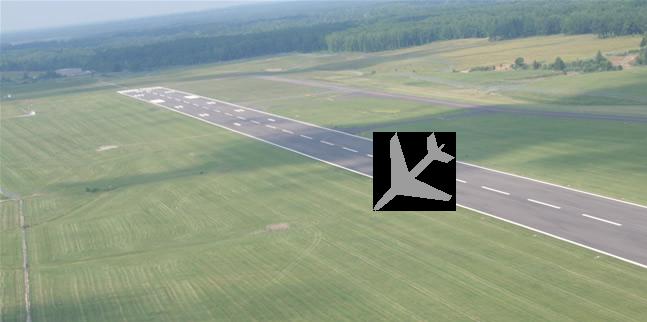
So I go ahead and plan a flight, select for the plane to show up at gate x or y, or just a parking place, but when I click fly now my plane shows up on the runway perpendicular to it like this:

Image

If after showing up on the runway I hit alt and then select go to airport and select the same gate/parking space then it shows up in the right place.

Any ideas?

Thanks
Dan

User avatar
Dan Morera
1st Lieutenant
1st Lieutenant
 
Posts: 323
Joined: Mon May 07, 2007 7:17 pm
Location: Heredia, Costa Rica

Re: Plane showing up in the wrong place

Postby a1 » Fri Aug 03, 2007 12:36 pm

Did you change the AFCAD of the airport? Is it an addon airport? ;)
Image
790i : QX9650 : 4Gb DDR3 : GeForce 8800 GTX : 1 WD Raptor : 1 WD VelociRaptor 150
User avatar
a1
Lieutenant Colonel
Lieutenant Colonel
 
Posts: 7608
Joined: Thu Jan 04, 2007 9:16 pm

Re: Plane showing up in the wrong place

Postby garymbuska » Fri Aug 03, 2007 12:36 pm

This is more than likey the result of a runway that does not have any starting places defined on it. It is more than likely missing parking places as well.

Couple of questions?
1)What airport is this at?
2)Did you make the airport?

What you need to do is to use AFCAD and open the airport you are tryng to use and check the starting points and also you more than likely need to put some paking spaces on the airport as well.
Afcad will do all of this for you you can even add taxiways a control tower and ils runways. 8-)
Gary M Buska
SYSTEM Specs ASUS P8Z68 V/GEN 3 mother board: INTELL I7 2600k 3.48 ghz Quad core CPU with Sandy bridge: 12 Gigs of 1800hz ram:
GTX 950 OVER CLOCKED: 2 Gigs Ram Windows 10 Home 64 bit Operating system. 750W Dedicated modular power supply. Two Internal 1TB hard drives 1 External 1TB 3.2 USB hard drive. SAITEK Cessna flight Yoke with throttles.
CH Rudder Peddles 27 inch Wide screen Monitor
User avatar
garymbuska
Major
Major
 
Posts: 4415
Joined: Tue Dec 30, 2003 11:10 am
Location: Jacksonville, Florida

Re: Plane showing up in the wrong place

Postby Dan Morera » Fri Aug 03, 2007 1:09 pm

Actually this has happen in 3 separate airports, KCVG, KMIA, and KYWC (not sure of Icao, Florida keys flield), only the KCVG has an AFCAD change (downloaded), the others are the default ones. I'm pretty sure this will happen on all fields, can not tell for sure since I have only tried these few.
User avatar
Dan Morera
1st Lieutenant
1st Lieutenant
 
Posts: 323
Joined: Mon May 07, 2007 7:17 pm
Location: Heredia, Costa Rica

Re: Plane showing up in the wrong place

Postby garymbuska » Fri Aug 03, 2007 2:41 pm

Actually this has happen in 3 separate airports, KCVG, KMIA, and KYWC (not sure of Icao, Florida keys flield), only the KCVG has an AFCAD change (downloaded), the others are the default ones. I'm pretty sure this will happen on all fields, can not tell for sure since I have only tried these few.


If this is happening in KMIA then you have a problem somewhere. I have the default airport for KMIA and have no problems with it .

Did you by any chance download the AFCAD directly into FS? I hope not
Last edited by garymbuska on Fri Aug 03, 2007 2:42 pm, edited 1 time in total.
Gary M Buska
SYSTEM Specs ASUS P8Z68 V/GEN 3 mother board: INTELL I7 2600k 3.48 ghz Quad core CPU with Sandy bridge: 12 Gigs of 1800hz ram:
GTX 950 OVER CLOCKED: 2 Gigs Ram Windows 10 Home 64 bit Operating system. 750W Dedicated modular power supply. Two Internal 1TB hard drives 1 External 1TB 3.2 USB hard drive. SAITEK Cessna flight Yoke with throttles.
CH Rudder Peddles 27 inch Wide screen Monitor
User avatar
garymbuska
Major
Major
 
Posts: 4415
Joined: Tue Dec 30, 2003 11:10 am
Location: Jacksonville, Florida

Re: Plane showing up in the wrong place

Postby Dan Morera » Fri Aug 03, 2007 2:50 pm

Lol maybe I explained it wrong. I'm selecting as starting point a gate, but it is setting my plane on a runway, about the middle of it.

I didn't downloaded the AFCAD directly into the FS, I did it on a folder and then copied it following the instructions.

Thanks
Dan
User avatar
Dan Morera
1st Lieutenant
1st Lieutenant
 
Posts: 323
Joined: Mon May 07, 2007 7:17 pm
Location: Heredia, Costa Rica

Re: Plane showing up in the wrong place

Postby garymbuska » Fri Aug 03, 2007 10:01 pm

Ok I got it now I still would suggest you check out KMIA using afcad it sure sounds like something has got messed up somewhere.
When you go to open KMIA using AFCAD you should only see the default file if there are others than you have found the problem,
If that is not the case I do not have a clue what could be going on. You might want to think about copying the entire scenery file from the install disks.
Gary M Buska
SYSTEM Specs ASUS P8Z68 V/GEN 3 mother board: INTELL I7 2600k 3.48 ghz Quad core CPU with Sandy bridge: 12 Gigs of 1800hz ram:
GTX 950 OVER CLOCKED: 2 Gigs Ram Windows 10 Home 64 bit Operating system. 750W Dedicated modular power supply. Two Internal 1TB hard drives 1 External 1TB 3.2 USB hard drive. SAITEK Cessna flight Yoke with throttles.
CH Rudder Peddles 27 inch Wide screen Monitor
User avatar
garymbuska
Major
Major
 
Posts: 4415
Joined: Tue Dec 30, 2003 11:10 am
Location: Jacksonville, Florida


Return to FS 2004 - A Century of Flight

Who is online

Users browsing this forum: No registered users and 387 guests

