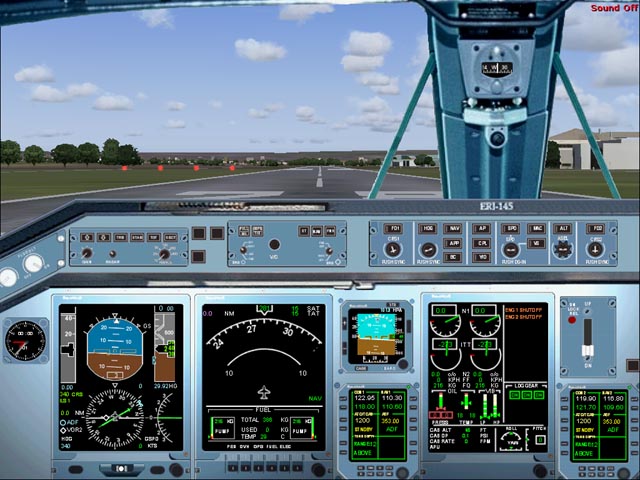
Missing gauges

Forum dedicated to Microsoft FS2004 - "A Century of Flight".

Missing gauges

Postby gypsymoth » Wed Jul 04, 2007 4:53 pm

Installation:
Copy all gauges contained in the gauge folder (files with gau extension) into the FS9 gauge folder.
Copy all files contained in the panel folder into any ERJ aircraft of your choice.
Copy the "wav" files contained in the sound folder into the main FS sound folder (not the aircraft sound folder).
Copy the GaugeSound.dll file into the main Flight Simulator 9 folder and also into the Windows/System 32 folder.
Embraer ERJ-145 panel version 1 forFS2004. By Hector Molina

I have followed his directions to the letter.  I get the panel but no gauges.  I copied the panel into Mike Stone's Lancer (what a goer!!) but it should still work, shouldn't it?

Thanks,
TerryW.  

When the c**p hits the fan, get a tent.
gypsymoth
Captain
Captain
 
Posts: 759
Joined: Tue Dec 05, 2006 7:50 pm
Location: EGHH

Re: Missing gauges

Postby garymbuska » Wed Jul 04, 2007 10:35 pm

Installation:
Copy all gauges contained in the gauge folder (files with gau extension) into the FS9 gauge folder.
Copy all files contained in the panel folder into any ERJ aircraft of your choice.
Copy the "wav" files contained in the sound folder into the main FS sound folder (not the aircraft sound folder).
Copy the GaugeSound.dll file into the main Flight Simulator 9 folder and also into the Windows/System 32 folder.
Embraer ERJ-145 panel version 1 forFS2004. By Hector Molina

I have followed his directions to the letter.  I get the panel but no gauges.  I copied the panel into Mike Stone's Lancer (what a goer!!) but it should still work, shouldn't it?

Thanks,
TerryW.  


If the Gauge folder that came with the down load had a folder inside of it and all of the gauges were inside that folder and you removed them than that is your problem. Anytime you find gauges inside of a folder other than a folder named gauges you need to leave them there and move the entire folder over to the FS9 gauge folder or they will not work the folder is what is referred to as a CAB file and must stay within the folder to work properly. I have seven folders within my FS9 gauge folder, and each folder has gauges within it. 8-)
Last edited by garymbuska on Wed Jul 04, 2007 10:37 pm, edited 1 time in total.
Gary M Buska
SYSTEM Specs ASUS P8Z68 V/GEN 3 mother board: INTELL I7 2600k 3.48 ghz Quad core CPU with Sandy bridge: 12 Gigs of 1800hz ram:
GTX 950 OVER CLOCKED: 2 Gigs Ram Windows 10 Home 64 bit Operating system. 750W Dedicated modular power supply. Two Internal 1TB hard drives 1 External 1TB 3.2 USB hard drive. SAITEK Cessna flight Yoke with throttles.
CH Rudder Peddles 27 inch Wide screen Monitor
User avatar
garymbuska
Major
Major
 
Posts: 4415
Joined: Tue Dec 30, 2003 11:10 am
Location: Jacksonville, Florida

Re: Missing gauges

Postby gypsymoth » Thu Jul 05, 2007 11:41 am

Hi Gary.  There was no folder in a folder.  I've been installing stuff for some time now & not had a problem like this before.   The instructions I pasted seem straightforward to me so I am at a loss to see why they don't appear!!   I copied the GaugeSound .dll as required too!  
When the c**p hits the fan, get a tent.
gypsymoth
Captain
Captain
 
Posts: 759
Joined: Tue Dec 05, 2006 7:50 pm
Location: EGHH

Re: Missing gauges

Postby commoner » Fri Jul 06, 2007 2:05 am

...mm...can't say why you are having trouble with this panel ......I have downloaded it to check and tried the simple install in a variety of aircraft...this is it in the Beech Baron no less ::)

Suggest you A. download it again, (preferably from a different source) in case you got a bad copy.

                   B. check that you really did follow the instructions (we all get a bit sloppy sometimes ;))

                       Otherwise nothing to offer..........commoner :-/ ;)


   Image                
Last edited by commoner on Fri Jul 06, 2007 2:06 am, edited 1 time in total.
Image"In theory, there is no difference between theory and practice. But, in practice, there is."
User avatar
commoner
Major
Major
 
Posts: 3221
Joined: Sat Aug 28, 2004 2:26 am
Location: Yorkshire. England. UK.

Re: Missing gauges

Postby gypsymoth » Fri Jul 06, 2007 3:08 am

Thanks commoner.   I got it from here as most other things but am glad to say that after deleting & reinstalling it 4 timeslast night, it suddenly works!   I was careful to follow the correct procedure each time too!

I now have to sort a friend's missing gauges out. He started his fs9 last night & all sorts of panels have missing gauges.  He assures me he's not installed or deleted anything for 6 months.   I think I'll try copying & pasting my gauges folder for him which I have in a pen drive to see if that does the trick!!
When the c**p hits the fan, get a tent.
gypsymoth
Captain
Captain
 
Posts: 759
Joined: Tue Dec 05, 2006 7:50 pm
Location: EGHH


Return to FS 2004 - A Century of Flight

Who is online

Users browsing this forum: No registered users and 240 guests