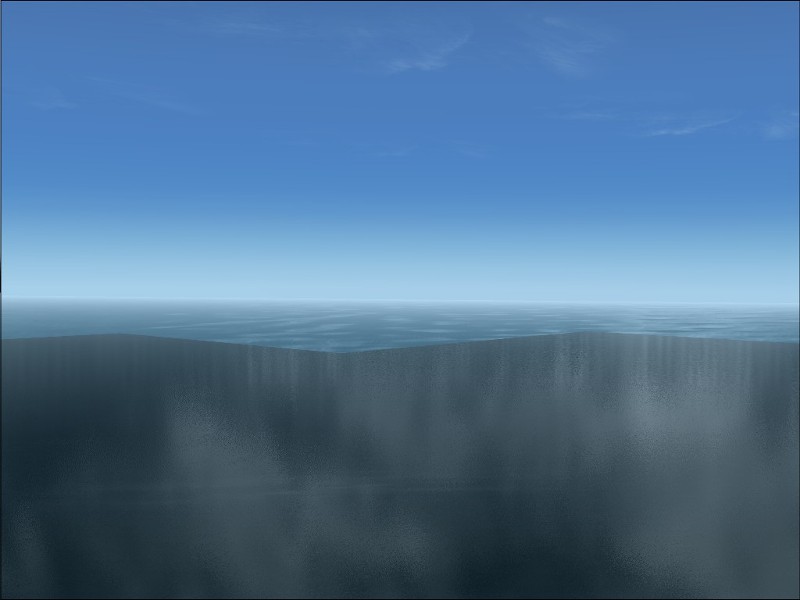

Bad Water

Forum dedicated to Microsoft FS2004 - "A Century of Flight".

Bad Water

Postby Gary1954 » Mon Jan 29, 2007 9:53 am

I've got this jagged line off the horizon showing two water textures. The foreground is Real Environment Pro (I like!). I tried decreasing visibility in user-defined weather, but to have to do this evey time I load FS! Besides, at altitude the line comes back. I tried other water packs, but want to stay with REP. Any help or ideas? Please & Thank you!Image
Last edited by Gary1954 on Mon Jan 29, 2007 10:04 am, edited 1 time in total.
Gary1954
Ground hog
Ground hog
 
Posts: 7
Joined: Mon Jan 29, 2007 10:28 am
Location: Las Vegas, NV

Re: Bad Water

Postby garymbuska » Mon Jan 29, 2007 11:59 am

Well it would help if you give some system specs here as the reply will differ depending upon your systems ablity. Without knowing your system specs it is hard to tell you what to set.
As to how to keep from having to change the settings every time you start fs what you want to do is to set up everything the way you want FS to start. Location plane type Hot or cold panel the type of weather
and anything else you can think of then save the flight and make it the default flight then when you crank up fs everything will be set the way you want it to. 8-)
Gary M Buska
SYSTEM Specs ASUS P8Z68 V/GEN 3 mother board: INTELL I7 2600k 3.48 ghz Quad core CPU with Sandy bridge: 12 Gigs of 1800hz ram:
GTX 950 OVER CLOCKED: 2 Gigs Ram Windows 10 Home 64 bit Operating system. 750W Dedicated modular power supply. Two Internal 1TB hard drives 1 External 1TB 3.2 USB hard drive. SAITEK Cessna flight Yoke with throttles.
CH Rudder Peddles 27 inch Wide screen Monitor
User avatar
garymbuska
Major
Major
 
Posts: 4415
Joined: Tue Dec 30, 2003 11:10 am
Location: Jacksonville, Florida

Re: Bad Water

Postby kilotango » Mon Jan 29, 2007 12:19 pm

Right Garymbuska, and this seems to me like a poor memory sets to some specs textures. If our freind have to change settings everytime he load the sim, it must be a hw conflict.
I would like to see Gary1954's sys too, and i would like to know if Gary1954 had installed some new hw resently.
Then i hope we can help.
kilotango
1st Lieutenant
1st Lieutenant
 
Posts: 306
Joined: Mon Dec 04, 2006 6:46 pm

Re: Bad Water

Postby Gary1954 » Mon Jan 29, 2007 12:40 pm

Hi Guys, Appreciate your time. No new HW recently installed, but, maybe these sys specs will help you point me in a direcetion.

Motherboard:
     CPU Type                                          Intel Pentium IIIE, 700 MHz (7 x 100)
     Motherboard Name                              
Last edited by Gary1954 on Mon Jan 29, 2007 12:50 pm, edited 1 time in total.
Gary1954
Ground hog
Ground hog
 
Posts: 7
Joined: Mon Jan 29, 2007 10:28 am
Location: Las Vegas, NV

Re: Bad Water

Postby born_2_fly » Mon Jan 29, 2007 12:51 pm

Your GPU looks like the problem there. It's not nearly powerful enough to run FS with medium-high settings, and so it's being bottlenecked trying to render the water textures in the distance.

The only way to really fix the problem would to get an entirely new Graphics card, although your whole system could do with being upgraded.  ::)
born_2_fly
 

Re: Bad Water

Postby kilotango » Mon Jan 29, 2007 1:12 pm

I am allways saying things right out in the open.
And to be frankly, your cpu, along with the ram, has to much work to do. Therefore you're getting those strange looks.
Have you tried to minimize the settings in the game, and with your video card, don't set the AA higher than 4+.
Dont thouch AA in the game, set it on the card.
Along with the cpu and your ram, the video card is having a blood cirkulation that will kill anything.
kilotango
1st Lieutenant
1st Lieutenant
 
Posts: 306
Joined: Mon Dec 04, 2006 6:46 pm

Re: Bad Water

Postby ashaman » Mon Jan 29, 2007 9:37 pm

People, people, people, people, please.

No matter how powerful your PC might be, there's no cure against shoddy coding.

The problem depicted exists in EVERY FS9 ever existed and that will ever exists. Please thank the coders for their great work.

Only solution is to BUY FSUIPC and define inside there a lesser visibility field.

Oh, by the way, remember to thank M$ for their great work.


PS
I'm not joking. The problem depicted has ALWAYS existed and NO solution has EVER been found, beside make the visibility field smaller... but only PAYING for another software.

Thank you M$
Last edited by ashaman on Mon Jan 29, 2007 9:45 pm, edited 1 time in total.
There's but one real cure for human stupidity. It's called DEATH.

At the moment mourning the assassination of sarcasm and irony for the good of the "higher".

Proud FSIX user. Active user of FS98, X-plane and novic
User avatar
ashaman
Major
Major
 
Posts: 1741
Joined: Thu Nov 27, 2003 9:08 am
Location: LIRN

Re: Bad Water

Postby Gary1954 » Tue Jan 30, 2007 8:31 am

Ashaman, Thank you. You've saved my old Gateway from an early demise. And Guys, I've been wanting a new system for a while. (Actually, when I discovered the world of FS!) That's moved way up my want list, so thanks for the motivating kick in the PC. :)
Gary1954
Ground hog
Ground hog
 
Posts: 7
Joined: Mon Jan 29, 2007 10:28 am
Location: Las Vegas, NV

Re: Bad Water

Postby swordfish1227 » Tue Jan 30, 2007 9:28 pm

that is completely normal. the same thing happens over land but it is harder to notice. if you press ctrl+s and go into the top down mode, zoom out a few times and look at the cross shaped area that is detail around your plane. you can thank uncle bill and his minions for that one
Image
Image
User avatar
swordfish1227
1st Lieutenant
1st Lieutenant
 
Posts: 407
Joined: Mon Dec 04, 2006 6:04 pm

Re: Bad Water

Postby Gary1954 » Wed Jan 31, 2007 1:48 pm

Swordfish1227, You're right. I see it. Thanks
Gary1954
Ground hog
Ground hog
 
Posts: 7
Joined: Mon Jan 29, 2007 10:28 am
Location: Las Vegas, NV


Return to FS 2004 - A Century of Flight

Who is online

Users browsing this forum: No registered users and 390 guests