Weather problems

Forum dedicated to Microsoft FS2004 - "A Century of Flight".

Weather problems

Postby FridayChild » Sat Jan 06, 2007 2:44 pm

Today two problems arose with my FS9 install.

1) Creating a flight at TCNM (default) with RealAir C172, daytime, summer, gravy and rainy weather resulted (I tried multiple times, same result) in a CTD. The CTD occurs just after the progress bar appears (0% in loading scenery). The crashing module is weather.dll. This does NOT occur if I set the weather to clear skies and then change to gravy and rainy after the aircraft appears.

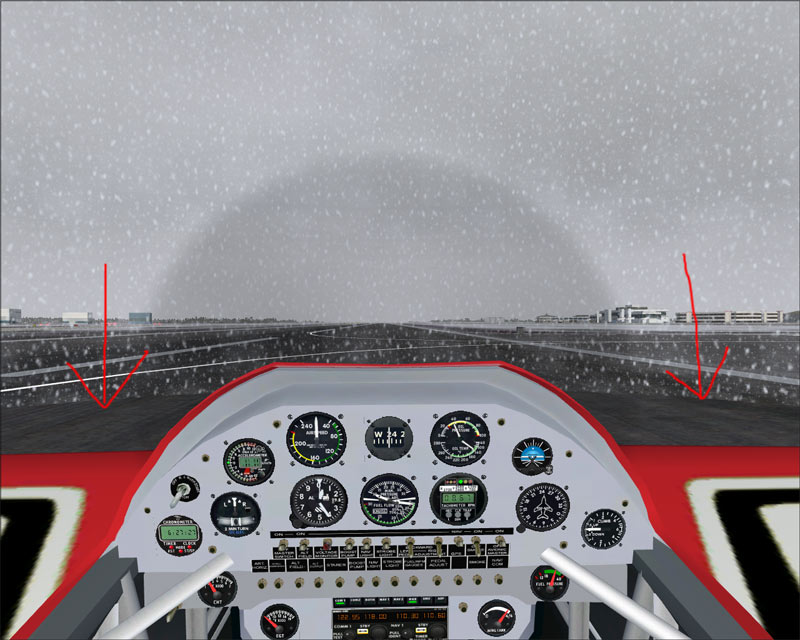
2) look at this (heavy snow, Anchorage Alaska)
Image

As you can see, when I'm grounded there's a circle around the aircraft in which there is no snow. When I take off this disappears.

Why?????

Founder of A.A.A.A.A.A.A. (Aircraft Amateurs' Association Against Absurd Aviation Acronyms) My system specifications: FLIGHT SIMULATOR 2004 - AMD Athlon 64 3200+ CPU - 3 GB PC-3200 DDR400 dual channel RAM - 500 GB Seagate B
User avatar
FridayChild
Major
Major
 
Posts: 1570
Joined: Thu Dec 23, 2004 11:22 am
Location: Italia

Re: Weather problems

Postby NDSP » Sat Jan 06, 2007 3:15 pm

Ive seen it in my game too. Flight Simulator is a game of flying, so dont pay attention to the ground 10 feet infront of you.

I think that problem doesnt occur in FSX though.

Nick
NDSP
Major
Major
 
Posts: 1879
Joined: Tue Dec 12, 2006 4:20 pm
Location: Queens, New York City

Re: Weather problems

Postby FridayChild » Sat Jan 06, 2007 6:54 pm

OK for 2), but 1) is driving me crazy.
Now it seems that EVERY TIME I start any flight with any aircraft using a weather "theme" the sim crashes at 0% while loading scenery.
Help!
Founder of A.A.A.A.A.A.A. (Aircraft Amateurs' Association Against Absurd Aviation Acronyms) My system specifications: FLIGHT SIMULATOR 2004 - AMD Athlon 64 3200+ CPU - 3 GB PC-3200 DDR400 dual channel RAM - 500 GB Seagate B
User avatar
FridayChild
Major
Major
 
Posts: 1570
Joined: Thu Dec 23, 2004 11:22 am
Location: Italia

Re: Weather problems

Postby Conan Edogawa » Sun Jan 07, 2007 2:47 am

Hey FridayChild, this circle around you plane is normal in the world of FS9. If you just look straight to heaven you see this:

     Image

I hope you can see that there is a kind of "pipe" without snow.

Now to your second problem. I'm not sure how it crashes, is there any error report or something coming up or does the program just hang up itself? I think when it crashes at 0%, it is not a problem with you weather (but with your scenery), because weather themes starts loading at about 75%.
Image

Specs: Intel Core2Quad Q6600 2,4GHz; 3,25GB RAM; nVidia EN8800GTS 512MB; Flight Simulator 9.1.
User avatar
Conan Edogawa
1st Lieutenant
1st Lieutenant
 
Posts: 488
Joined: Tue Dec 26, 2006 5:14 pm
Location: Hamburg, Germany

Re: Weather problems

Postby FridayChild » Sun Jan 07, 2007 6:16 am

I'm under the same impression, expecially since this problem apparently arose after I installed several italian airports.
But the error report says that the crashing module is weather.dll.
Founder of A.A.A.A.A.A.A. (Aircraft Amateurs' Association Against Absurd Aviation Acronyms) My system specifications: FLIGHT SIMULATOR 2004 - AMD Athlon 64 3200+ CPU - 3 GB PC-3200 DDR400 dual channel RAM - 500 GB Seagate B
User avatar
FridayChild
Major
Major
 
Posts: 1570
Joined: Thu Dec 23, 2004 11:22 am
Location: Italia

Re: Weather problems

Postby pepper_airborne » Sun Jan 07, 2007 6:57 am

The snow is build up in layers, and serval of those circles are stacked up so you get the idea of snow. This is the only disadvantages with the method. Its quite normal. Nowadays one could try to use sprites following a random path.
User avatar
pepper_airborne
Major
Major
 
Posts: 2268
Joined: Thu Mar 23, 2006 6:42 am

Re: Weather problems

Postby justpassingthrough » Sun Jan 07, 2007 9:15 am

Just a thought

Is render to texture enabled in the graphics settings? If so, disable it and see if the problem continues. If it stops, there is a defective texture involved, probably a DXT3 cloud. Chris Willis cloud fix from years ago caused the same issue. His first DXT3 reduced cloud textures were defective forcing render to texture to cause a crash.

Another thought

Did you install the FS9.1 update? If so, did you put the updater inside the Flight Simulator 9 folder before running it? If not, the weather.dll module may have been corrupted.

Don't know if any of those items may help.

The snow visual is normal in FS9. It usually seen when the zoom level is pulled back in a VC and you are on the ground.
Last edited by justpassingthrough on Sun Jan 07, 2007 9:17 am, edited 1 time in total.
justpassingthrough
Captain
Captain
 
Posts: 651
Joined: Thu Dec 21, 2006 2:43 am

Re: Weather problems

Postby FridayChild » Sun Jan 07, 2007 3:33 pm

Render to texture is enabled; I will try to disable it and see what happens.
I have installed the 9.1 patch and I can't recall what I did since it was 18 months ago, but I'm sure I followed the readme instructions word by word as I always do it.
Anyway, it's strange because the problem only occurs if I try to start a flight choosing a predefined weather theme *except Fair weather*, and never occurs if I load the theme *after* starting the flight.

EDIT: disabled render to texture, no difference, still crashes.  :'( The hard drive trashes a few seconds, then the error message appears and the sim quits.
Last edited by FridayChild on Sun Jan 07, 2007 4:39 pm, edited 1 time in total.
Founder of A.A.A.A.A.A.A. (Aircraft Amateurs' Association Against Absurd Aviation Acronyms) My system specifications: FLIGHT SIMULATOR 2004 - AMD Athlon 64 3200+ CPU - 3 GB PC-3200 DDR400 dual channel RAM - 500 GB Seagate B
User avatar
FridayChild
Major
Major
 
Posts: 1570
Joined: Thu Dec 23, 2004 11:22 am
Location: Italia

Re: Weather problems

Postby justpassingthrough » Sun Jan 07, 2007 4:52 pm

The only other suggestion I could make is try to load a default microsoft plane at one of the larger default airports very far away from where you have been booting (another country) and see if it still happens.

If it doesn't then something in the scenery or aircraft may be causing it.

Otherwise, I do not know what else to suggest other than uninstall the FS9.1 update, delete the backup folder and then reinstall the update and see if that may have a positive result.

I also assume you have not installed any replacement textures for weather.
Last edited by justpassingthrough on Sun Jan 07, 2007 4:53 pm, edited 1 time in total.
justpassingthrough
Captain
Captain
 
Posts: 651
Joined: Thu Dec 21, 2006 2:43 am

Re: Weather problems

Postby Sir_Crashalot » Sun Jan 07, 2007 6:32 pm

He, that is a coincidence. The same thing happend to me yesterday. I set up a flight on Emma Field. Weather theme Winter Wonderland. Sim crashes to desktop. I take the same aircraft, same airfield but now leave it in Real World Weather (in which I normally fly) and everything is fine again.

Crash ;)

PS I tried Winter Wonderland 3 times, got CTD 3 times.
Last edited by Sir_Crashalot on Sun Jan 07, 2007 6:33 pm, edited 1 time in total.
Sir_Crashalot
 

Re: Weather problems

Postby FridayChild » Mon Jan 08, 2007 3:05 am

So I'm not alone!
I'm sorry you CTD too, but this can be useful... let's try to figure out what our installations have in common, and maybe we'll track the problem down. We could continue this conversation in private if you don't mind, and if we figure out the culprit post it here afterwards.
Anyway before that I was thinking along the lines of disabling ALL addon sceneries and enable them one at a time to see when it crashes.
Founder of A.A.A.A.A.A.A. (Aircraft Amateurs' Association Against Absurd Aviation Acronyms) My system specifications: FLIGHT SIMULATOR 2004 - AMD Athlon 64 3200+ CPU - 3 GB PC-3200 DDR400 dual channel RAM - 500 GB Seagate B
User avatar
FridayChild
Major
Major
 
Posts: 1570
Joined: Thu Dec 23, 2004 11:22 am
Location: Italia

Re: Weather problems

Postby Sir_Crashalot » Mon Jan 08, 2007 12:05 pm

Sending you a PM right now.

Crash ;)
Sir_Crashalot


Return to FS 2004 - A Century of Flight

Who is online

Users browsing this forum: No registered users and 192 guests