Adding Scenery

Forum dedicated to Microsoft FS2004 - "A Century of Flight".

Re: Adding Scenery

Postby Fozzer » Mon Sep 25, 2006 11:35 am

[quote]

Time to fire up the old "DHC-3 Otter" and go out and buzz some boats, canoes, trains, trucks.....
......and maybe just maybe take down the odd clothes line. :o
Win 8.1 64-bit. DX11. Advent Tower. Intel i7-3770 3.9 GHz 8-core. 8 GB System RAM. AMD Radeon HD 7700 1GB RAM. DVD ROM. 2 Terra Byte SATA Hard Drive. Philips 17" LCD Monitor. Saitek Cyborg X Fly-5 Joystick. ...and a Briggs and Stratton Petrol Lawn Mower.
User avatar
Fozzer
Colonel
Colonel
 
Posts: 27369
Joined: Thu Jan 31, 2002 3:11 pm
Location: Hereford. England. EGBS.

Re: Adding Scenery

Postby Hagar » Mon Sep 25, 2006 12:11 pm

Well now I have gone and done it!

I have lost all or most of the guages, GPS and radios in all of the aircraft and that includes when I bring up the default flight.

Anyone got any ideas how to reinstall them or is there something that should be turned on with add-on scenery?

I have no idea what you've gone & done now. Adding scenery should have no effect on the aircraft whatsoever. ::) ???

PS. You most likely deleted some of the default gauges. The later "XML gauges" are in CAB format & might look like zipfiles. If this is the case you can retrieve them from FS2004 CD-1.
Last edited by Hagar on Mon Sep 25, 2006 2:28 pm, edited 1 time in total.
Image

Founder & Sole Member - Grumpy's Over the Hill Club for Veteran Virtual Aviators
Member of the Fox Four Group
My Google Photos albums
My Flickr albums
User avatar
Hagar
Colonel
Colonel
 
Posts: 30868
Joined: Wed Jun 19, 2002 7:15 am
Location: Costa Geriatrica

Re: Adding Scenery

Postby FLYING_TRUCKER » Mon Sep 25, 2006 2:27 pm

Hi Doug:

Will try that...thanks :)

Cheers...Happy Landings...Doug
FLYING_TRUCKER
 

Re: Adding Scenery

Postby Hagar » Mon Sep 25, 2006 2:31 pm

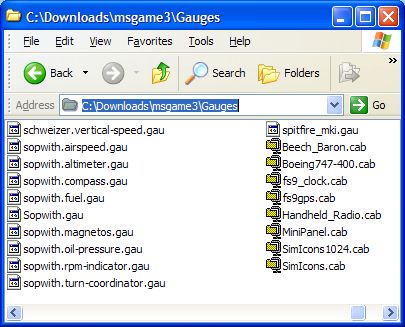
Just to confuse things the gauges are in a CAB file on the CD. This is named msgame3.cab. This is similar to a zipfile & you can extract the complete thing to a Temp folder on your HD in the usual way. Then look for the included Gauges folder. You can paste the complete contents of this folder into FS9\Gauges if you wish.

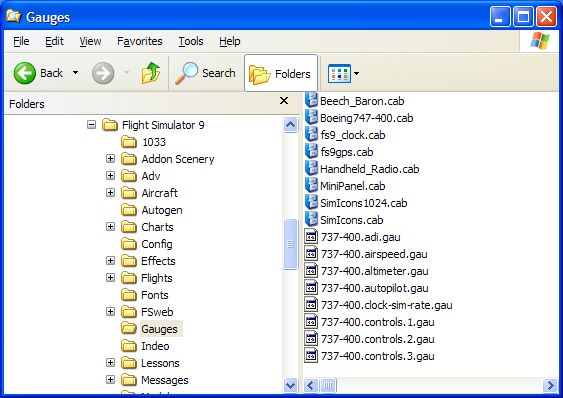
PS. These are the default XML gauges in msgame3.cab. They look like zipfiles on my system as I have WinZip installed. Do NOT extract them but paste them directly to FS9\Gauges.
Image

This is what CAB files look like if you don't have WinZip.
Image
Last edited by Hagar on Mon Sep 25, 2006 2:47 pm, edited 1 time in total.
Image

Founder & Sole Member - Grumpy's Over the Hill Club for Veteran Virtual Aviators
Member of the Fox Four Group
My Google Photos albums
My Flickr albums
User avatar
Hagar
Colonel
Colonel
 
Posts: 30868
Joined: Wed Jun 19, 2002 7:15 am
Location: Costa Geriatrica

Previous

Return to FS 2004 - A Century of Flight

Who is online

Users browsing this forum: No registered users and 213 guests