Full Aircraft?????

Forum dedicated to Microsoft FS2004 - "A Century of Flight".

Full Aircraft?????

Postby obayda » Tue Jan 31, 2006 1:08 pm

Hi im obayda, i am new I love flight sim I currently have flight simulator 2000-2004 love them both just 1 thing, i got fed up with playing with the same planes and wanted better, nicer aircraft, so I downloadaed a few and dont have a clue what to do with them. All I was told is to install them into ur aircraft folder wht does tht mean. I no where it is its just that files like texture, panel do I have to download every 1 seperately or does it come with 1 do i need a convertor or some sort of program please need help urgentley. Thanx

P.S and could u give me full aircrafts, etc programs tht would be really helpful thx

obayda
Ground hog
Ground hog
 
Posts: 8
Joined: Thu Jan 05, 2006 11:12 am

Re: Full Aircraft?????

Postby zeberdee » Tue Jan 31, 2006 2:28 pm

Hi, on the first page of simv ( where you get the option of going to forums site map etc ) scroll down to the right of centre there is a blue bar with help and tutorials the first topic is "help installing aircraft" have a read there that should tell you what you want to know ;) if not come back and ask away some one will help
If your not part of the answer    your part of the problem!  
I've often wanted to drown my troubles, but I can't get my wife to go swimming.
User avatar
zeberdee
1st Lieutenant
1st Lieutenant
 
Posts: 423
Joined: Thu Oct 02, 2003 3:45 pm
Location: Sunny Bradford Yorks uk

Re: Full Aircraft - ?????

Postby highfive » Tue Jan 31, 2006 3:11 pm

Having WinZip or equivalent is a must. Once this software unpacks your downloaded files then you can move them to the appropriate locations (see zeberdee post above). Remember do not download add-ons directly in FS. Have another directory (ie FS2004 download/aircraft to do the dirty work). Best of luck!

Highfive
Our doubts are traitors and make us lose the good we oft might win by failing to attempt. -
William Shakespeare

Have patience - everything is difficult before it is easy. - Saadi

The world is a dangerous place, not because of
highfive
Ground hog
Ground hog
 
Posts: 45
Joined: Thu Dec 15, 2005 12:31 am
Location: Cherry Hill, NJ

Re: Full Aircraft - ?????

Postby Ecko » Tue Jan 31, 2006 3:20 pm

Having WinZip or equivalent is a must.


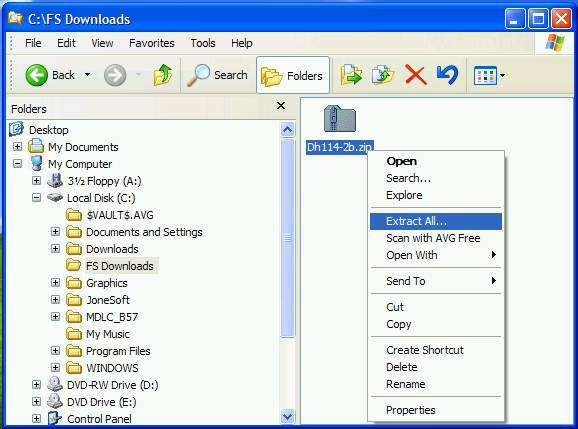
Or you can use the 'built in' extract function, if you're running XP that is. :)
Image
User avatar
Ecko
Major
Major
 
Posts: 3684
Joined: Fri May 13, 2005 4:47 pm
Location: Denmark

Re: Full Aircraft - ?????

Postby Hagar » Tue Jan 31, 2006 3:25 pm

Or you can use the 'built in' extract function, if you're running XP that is. :)

Indeed. If you're using WinXP (as most people are these days) WinZip is no longer necessary for extracting zipfiles. The install tute is here. http://www.simviation.com/acinstall.htm
Image

Founder & Sole Member - Grumpy's Over the Hill Club for Veteran Virtual Aviators
Member of the Fox Four Group
My Google Photos albums
My Flickr albums
User avatar
Hagar
Colonel
Colonel
 
Posts: 30868
Joined: Wed Jun 19, 2002 7:15 am
Location: Costa Geriatrica

Re: Full Aircraft?????

Postby highfive » Tue Jan 31, 2006 3:41 pm

Or you can use the 'built in' extract function, if you're running XP that is.

:-[ I didn't know that.
Last edited by highfive on Tue Jan 31, 2006 3:44 pm, edited 1 time in total.
Our doubts are traitors and make us lose the good we oft might win by failing to attempt. -
William Shakespeare

Have patience - everything is difficult before it is easy. - Saadi

The world is a dangerous place, not because of
highfive
Ground hog
Ground hog
 
Posts: 45
Joined: Thu Dec 15, 2005 12:31 am
Location: Cherry Hill, NJ

Re: Full Aircraft?????

Postby obayda » Wed Feb 01, 2006 1:15 pm

hi, thx for all the help ill do everything u guys told me to do thx alot for ur great help
obayda
Ground hog
Ground hog
 
Posts: 8
Joined: Thu Jan 05, 2006 11:12 am

Re: Full Aircraft?????

Postby wealthysoup » Wed Feb 01, 2006 1:46 pm

windows xp seems to cope fine if you just drag the files from the zip folder into the folder you are placing them in ( i think it unzips as it is transferred), ive never had a any problems doing it this way.
My PC specs:
AMD Athlon 64 3200 (@ 2.2ghz)
Asus K8v se deluxe motherboard
1.5gb pc3200 RAM
128mb palit geforce 6600gt
200gb+80gb hard drives
21 inch CRT
5.1 creative surround sound speakers
wealthysoup
Captain
Captain
 
Posts: 804
Joined: Mon Apr 18, 2005 2:40 pm
Location: Newtownards, Northern Ireland

Re: Full Aircraft?????

Postby Hagar » Wed Feb 01, 2006 2:05 pm

windows xp seems to cope fine if you just drag the files from the zip folder into the folder you are placing them in ( i think it unzips as it is transferred), ive never had a any problems doing it this way.

I believe it is possible to do that as the WinXP default utility treats zipfiles as compressed folders instead of files. This actually makes it more confusing for anyone used to the old system. It might be easier to use the right-click 'Extract All' option & follow the wizard.
Image

In the end it's all a matter of preference & what you find easiest.
Image

Founder & Sole Member - Grumpy's Over the Hill Club for Veteran Virtual Aviators
Member of the Fox Four Group
My Google Photos albums
My Flickr albums
User avatar
Hagar
Colonel
Colonel
 
Posts: 30868
Joined: Wed Jun 19, 2002 7:15 am
Location: Costa Geriatrica

Re: Full Aircraft?????

Postby maulepilot117 » Wed Feb 01, 2006 5:17 pm

i just open the .zip file...dig into it till i find the root and click "move fill", find "aircraft" and move it...seems to work fine for me...i do the same w/ the guages and effects folders too

maule
P.S. welcome to simV!
System Specs
Acer TravelMate 8204 (voted number 1 notebook by PC Magazine 2006)
http://global.acer.com/products/notebook/tm8200.htm#
http://www.pcmag.com/article2/0,1895,1907007,00.asp
Intel Centrino Duo (2GHz 2Mb L2 Cache)
120 Gb
maulepilot117
Captain
Captain
 
Posts: 500
Joined: Wed Nov 09, 2005 4:29 pm
Location: Ashburn, VA


Return to FS 2004 - A Century of Flight

Who is online

Users browsing this forum: No registered users and 266 guests