WindowsXP x64 and Flight Simulator 9: UPDATE

Forum dedicated to Microsoft FS2004 - "A Century of Flight".

Re: WindowsXP x64 and Flight Simulator 9: UPDATE

Postby NicksFXHouse » Sat Jan 21, 2006 6:49 pm

first few questions about XP:


:)ramos


How good is wireless support? Same as XP32?

It is the same as Windows X32. The OS looks exactly the same with the same services along with some additional ones. My wireless Linksys router works fine with x64


How well do 32bit programs run on 64?

They run fine... and in many load intensive processes, faster.


How often does windows have updates and service packs?

Same as WindowsXP x32. There is a list of security updates at Windows Update to be installed as soon as the OS is installed. The version I installed already has x64 Service Pack 1. There is no x64 Service Pack 2 as of yet.


What popular programs for sure DON'T work on XP64?

Registry and disk maintenance programs appear to be the biggest issue. Besides those, all my 32bit software runs just fine with the exception of my ATI TV tuner software and Adobe Premiere 6.5. I have Premiere Pro 7.1 so that is not a problem and replaced the AIT TV tuner with a 3rd party. All other Adobe software works fine on x64.

I did find my HP printer did not have x64 drivers but HP has a workaround posted at their site which works just fine.


One of the advantages to dual booting is that you can experiment without loss of your original installation. You can switch back and forth between OS's as needed.


Here are some usefull links:

http://www.microsoft.com/windowsxp/64bit/default.mspx

http://www.microsoft.com/windowsxp/usin ... 64faq.mspx

http://www.neowin.net/forum/lofiversion ... 30290.html

http://www.ukgamer.com/article.php4?action=win64

http://www.3dvelocity.com/articles/win6 ... ftlist.htm

http://forums.viaarena.com/messageview. ... erthread=y


I would also check your motherboard site for any updated BIOS
Last edited by NicksFXHouse on Sat Jan 21, 2006 7:09 pm, edited 1 time in total.
NicksFXHouse
 

Re: WindowsXP x64 and Flight Simulator 9: UPDATE

Postby legoalex2000 » Sat Jan 21, 2006 10:01 pm

last 2 questions

After i upgrded to my new comptuer, after i deleted Linux Ubuntu cause it was a pain to work with, i have this 10gb partition lying in my C drive.

will that be big enough for windows?

#2 now Linux used GRUB to switch between OS' during startup, what do i o (or use) for switching between 32 and 64?

thanks for the info, i intend to switch soon.

:)ramos
legoalex2000
 

Re: WindowsXP x64 and Flight Simulator 9: UPDATE

Postby NicksFXHouse » Sat Jan 21, 2006 10:15 pm

last 2 questions

After i upgrded to my new comptuer, after i deleted Linux Ubuntu cause it was a pain to work with, i have this 10gb partition lying in my C drive.

will that be big enough for windows?

#2 now Linux used GRUB to switch between OS' during startup, what do i o (or use) for switching between 32 and 64?

thanks for the info, i intend to switch soon.

:)ramos


10gig is small.... with xp64 the page file wants to be 2-4 times the size of your physical ram. 10gig will work but with your software it might be too small. I have 20gig of software installed and run a 150gb RAID-0 (2xSATA) setup.

Assuming WindowsXP x32 is not on the "C" partition, WindowsXP x64 should install its own boot loader menu automatically because it will look for other Windows installations during the install process. I am assuming it will overwrite the linux boot setup.
NicksFXHouse
 

Re: WindowsXP x64 and Flight Simulator 9: UPDATE

Postby legoalex2000 » Sat Jan 21, 2006 11:25 pm

well, linux is gone... mostly because i tried to install linux for x64, but i opted out of it.

now i only need the 10gb partition for XP64, can i still read anything i want off my D drive (ie FS9 and train sim?)

:)Ramos

PS: i'm saving up money for an 80-120GB SATA drive... but that'll be a while later.
Last edited by legoalex2000 on Sat Jan 21, 2006 11:26 pm, edited 1 time in total.
legoalex2000
 

Re: WindowsXP x64 and Flight Simulator 9: UPDATE

Postby 4_Series_Scania » Sun Jan 22, 2006 9:22 am

Interesting!

I think I may well give this a whirl,a 120 day free trial can't be bad eh?

I have an NForce 3 Motherboard though, I wonder if its supported? - I think I'dd be ok with my other hardware, GeForce 6800GT & Audigy 2 Soundcard. ???
Posting drivel here since Jan 31st, 2002. - That long!
"He who laughs last, thinks slowest."
User avatar
4_Series_Scania
Major
Major
 
Posts: 3194
Joined: Thu Jan 31, 2002 4:34 pm
Location: Newport Shropshire U.K.

Re: WindowsXP x64 and Flight Simulator 9: UPDATE

Postby NicksFXHouse » Sun Jan 22, 2006 1:41 pm


now i only need the 10gb partition for XP64, can i still read anything i want off my D drive (ie FS9 and train sim?)


x64 works just like x32.... It will see your other drives/partitions in the system. You will have to install MSFS and MSTS on x64 in order for them to run. That is why 10gig may be a bit small... but you could install them in x64 but change the installation path to the D:\ partition in order to keep the smaller partition from being loaded up.

I am not sure about the layout of the drive your C:\ partition is on however if it is a single hard drive with 2 partitions on it, (C and D) you could use the software PARTITION MAGIC to increase the size of your C:\ partition by allocating free space from D.
NicksFXHouse
 

Re: WindowsXP x64 and Flight Simulator 9: UPDATE

Postby NicksFXHouse » Sun Jan 22, 2006 1:49 pm

Interesting!

I think I may well give this a whirl,a 120 day free trial can't be bad eh?

I have an NForce 3 Motherboard though, I wonder if its supported? - I think I'dd be ok with my other hardware, GeForce 6800GT & Audigy 2 Soundcard. ???


A64 processor + A64 motherboard = supported

All of the hardware in your system will need to be investigated for 64-bit driver support. Make a list of ALL your hardware and visit the manufactures websites to collect all the 64bit drivers well before you start the project.

Make VERY SURE you have any motherboard drivers needed for onboard controllers such as NvRAID/SATA, VIA RAID/SATA or PROMISE RAID/SATA. WindowsXP will need the drivers (properly laid out on a floppy disk) for the onboard SATA or RAID controller your boot or x64 installation drive is located on.

Installing WindowsXP x64 is just like installing WindowsXP x32. Make sure to research all your drivers and critical software needs.
Last edited by NicksFXHouse on Sun Jan 22, 2006 1:50 pm, edited 1 time in total.
NicksFXHouse
 

Re: WindowsXP x64 and Flight Simulator 9: UPDATE

Postby NicksFXHouse » Mon Jan 23, 2006 4:35 pm

WindowsXP x64 BOOT OPTIMIZE AND SYSTEM DEFRAGMENTING


Unlike WindowsXP x32, x64 is not automatically set up for boot optimizing and BOOTVIS DOES NOT WORK on x64. The following method makes x64 boot and run like a rocket.

Install O&O Defrag PROFESSIONAL v8.0 for x64 (MAKE SURE IT IS THE x64 version): http://www.oo-software.com

The x64 version is BETA right now but works fine... it also is PAYWARE (45 bucks) but will work (FULLY FUNCTIONAL) for 30 days FREE. After installation DO NOT RUN IT YET... follow the instructions below...

After installing x64 and ALL YOUR SOFTWARE:

1.
Open REGEDIT,

Browse to:

HKEY_LOCAL_MACHINE\SOFTWARE\Microsoft\Dfrg\BootOptimizeFunction
Make sure
Last edited by NicksFXHouse on Mon Jan 23, 2006 6:40 pm, edited 1 time in total.
NicksFXHouse
 

Re: WindowsXP x64 and Flight Simulator 9: UPDATE

Postby NicksFXHouse » Mon Jan 23, 2006 4:41 pm

What popular programs for sure DON'T work on XP64?

Actually... I remembered one other bugger, CD burn software... it must be x64 driver certified.

I had to upgrade my NERO burning software to x64 support. The WindowsXP burner works fine but ANY AND ALL 3rd PARTY CD BURNING software must be designed with x64 driver support.


You cannot UPGRADE the software from x32 to x64,.. it must be a full install of the x64 supported burn software!!
NicksFXHouse
 

Re: WindowsXP x64 and Flight Simulator 9: UPDATE

Postby NicksFXHouse » Mon Jan 23, 2006 4:55 pm

BEWARE OF ANY TYPE OF WINDOWS XP X32 OPTIMIZER PROGRAM SUCH AS TWEAKERS BECAUSE THEY ALTER THE REGISTRY WHICH IS DIFFERENT IN WINDOWS XP X64

MAKE SURE ANY TWEAK PROGRAM IS X64 CERTIFIED AND EVEN THEN, BE WARY IF THE X64 VERSION OF THE SOFTWARE IS NEW....


x64 needs very little to run good... tweakers are really  a waste of time
NicksFXHouse
 

Re: WindowsXP x64 and Flight Simulator 9: UPDATE

Postby NicksFXHouse » Wed Jan 25, 2006 1:28 pm

After flying for several days (all scenery sliders to maximum, ultra high aircraft settings and above uultra high settings for weather/clouds) in and out of many busy airports (LAX, KSEA, Chicago, Heathrow, New York) with 92% Ultimate Traffic (w/ all GA traffic enabled) I must say WindowsXP x64 has earned my respect for delivering the resources I was missing in XP x32.

Comparing the two operating systems in dual boot and flying the same routes (IFR flight plans and same time and day) with the PMDG 747-400 and Real World weather enabled, even the extreme frame drops (sometimes as low as 11fps) were no where near as visually choppy and annoying in x64... texture loads were 2X-4X faster and in many cases I did not even see the texture load take place.

Booting the program,  FS9 tends to load a bit slower in x64 but once loaded there is no mistaking the difference in performance.
NicksFXHouse
 

Re: WindowsXP x64 and Flight Simulator 9: UPDATE

Postby legoalex2000 » Wed Jan 25, 2006 11:03 pm


x64 works just like x32.... It will see your other drives/partitions in the system. You will have to install MSFS and MSTS on x64 in order for them to run. That is why 10gig may be a bit small... but you could install them in x64 but change the installation path to the D:\ partition in order to keep the smaller partition from being loaded up.

I am not sure about the layout of the drive your C:\ partition is on however if it is a single hard drive with 2 partitions on it, (C and D) you could use the software PARTITION MAGIC to increase the size of your C:\ partition by allocating free space from D.


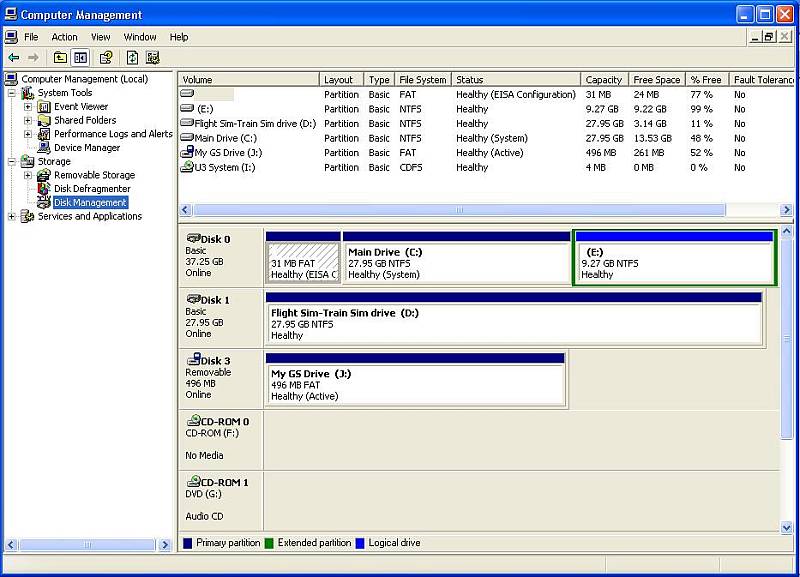
ok here's the layout:
(SATA drives coming soon, saving up money)

40gb IDE
has 2 partitions: C:\ (XP32) and E:\ (used to be linux)
used for all programs, files, etc...

30gb IDE
has 1 partition:  D:\
for all my games, addons, and game related software.

any help there? i'll post a snapshot

Image

:)Ramos
legoalex2000
 

Re: WindowsXP x64 and Flight Simulator 9: UPDATE

Postby NicksFXHouse » Mon Jan 30, 2006 1:02 pm

[quote]


ok here's the layout:
(SATA drives coming soon, saving up money)

40gb IDE
has 2 partitions: C:\ (XP32) and E:\ (used to be linux)
used for all programs, files, etc...

30gb IDE
has 1 partition:
NicksFXHouse
 

Previous

Return to FS 2004 - A Century of Flight

Who is online

Users browsing this forum: No registered users and 267 guests