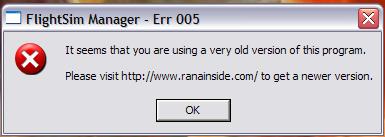

Is it just me....

Forum dedicated to Microsoft FS2004 - "A Century of Flight".

Is it just me....

Postby Saitek » Fri Dec 23, 2005 6:48 pm

or is everyone else having problems with Flight Sim Manager that has it? I uninstalled it and got the latest (though I think it was the same one anyway) and it still says it.


Image
Last edited by Saitek on Fri Dec 23, 2005 6:48 pm, edited 1 time in total.
Windows 7 Pro 64bit
Intel Core 2 Duo E2180 2GHz
GA-P35-DS3L Intel P35
Kingston HyperX 4GB (2x2) DDR2 6400C4 800Mhz
GeForce 8800 GT 512MB
2 x 22" monitors
200GB Sata
Be Quiet! Straight Power 650W

Flying FS
Saitek
Lieutenant Colonel
Lieutenant Colonel
 
Posts: 5274
Joined: Thu Jun 19, 2003 3:04 pm
Location: UK

Re: Is it just me....

Postby Hagar » Fri Dec 23, 2005 7:05 pm

I've never used it but has it ever worked properly or does it work after you click OK. If so, I suspect that this is a simple reminder to check for updates. If not then I suspect that something from your previous version remained in the Windows registry after you uninstalled it.
Image

Founder & Sole Member - Grumpy's Over the Hill Club for Veteran Virtual Aviators
Member of the Fox Four Group
My Google Photos albums
My Flickr albums
User avatar
Hagar
Colonel
Colonel
 
Posts: 30869
Joined: Wed Jun 19, 2002 7:15 am
Location: Costa Geriatrica

Re: Is it just me....

Postby Saitek » Fri Dec 23, 2005 7:14 pm

It used to work, then I tried to click the shortcut and it failed (came up with that message). So I decided the easiest option was to get the latest incae that one wasn't. Although I doubted this was the reason, I thought file may have been corrupted. But it still came up with the same error message. So I'm dumbfounded. ::)
Windows 7 Pro 64bit
Intel Core 2 Duo E2180 2GHz
GA-P35-DS3L Intel P35
Kingston HyperX 4GB (2x2) DDR2 6400C4 800Mhz
GeForce 8800 GT 512MB
2 x 22" monitors
200GB Sata
Be Quiet! Straight Power 650W

Flying FS
Saitek
Lieutenant Colonel
Lieutenant Colonel
 
Posts: 5274
Joined: Thu Jun 19, 2003 3:04 pm
Location: UK

Re: Is it just me....

Postby Hagar » Fri Dec 23, 2005 7:39 pm

The site seems to be down right now but there's something about this on the support forum. http://www.google.co.uk/search?hl=en&q=flightsim+manager+err+005&btnG=Search&meta=
Image

Founder & Sole Member - Grumpy's Over the Hill Club for Veteran Virtual Aviators
Member of the Fox Four Group
My Google Photos albums
My Flickr albums
User avatar
Hagar
Colonel
Colonel
 
Posts: 30869
Joined: Wed Jun 19, 2002 7:15 am
Location: Costa Geriatrica

Re: Is it just me....

Postby Marlin » Sat Dec 24, 2005 1:00 am

Well thanks for the heads up, I'll have to remember to NOT use it while I'm on line.

The last time this happened to me it was about two maybe three months ago.

Great program by the way, it sure does make life easier.
Marlin
1st Lieutenant
1st Lieutenant
 
Posts: 486
Joined: Thu Dec 30, 2004 1:14 am
Location: NEW Mexico

Re: Is it just me....

Postby Saitek » Sat Dec 24, 2005 4:02 pm

I don't get it - so I guess it is payware now? ??? ::)
Windows 7 Pro 64bit
Intel Core 2 Duo E2180 2GHz
GA-P35-DS3L Intel P35
Kingston HyperX 4GB (2x2) DDR2 6400C4 800Mhz
GeForce 8800 GT 512MB
2 x 22" monitors
200GB Sata
Be Quiet! Straight Power 650W

Flying FS
Saitek
Lieutenant Colonel
Lieutenant Colonel
 
Posts: 5274
Joined: Thu Jun 19, 2003 3:04 pm
Location: UK

Re: Is it just me....

Postby Hagar » Sat Dec 24, 2005 4:08 pm

I don't get it - so I guess it is payware now? ??? ::)

The site's fixed now so I just read the comments from the link I posted. If I'm reading it correctly they're suggesting that it's a limited free trial, rather like the latest WinZip. It works for a trial period then you have to pay to continue using it. I have no idea if this is correct but nobody has denied it.

PS. You might like to check this out. http://www.softwares.ranainside.com/forum/viewtopic.php?t=411&view=previous&sid=4fe6cbf6717742969d1c6ab3fce00270
what regional setting do you have set on your system: is it dd/mm/yyyy or mm/dd/yyyy - also can you please confirm to see what your system date is set to.

While a software is still being developed, I normally put a date limit in it - this ensures that the user will use latest version.... somehow on your pc, FSm is getting the wrong system date.

let me know what you find.
Last edited by Hagar on Sat Dec 24, 2005 4:11 pm, edited 1 time in total.
Image

Founder & Sole Member - Grumpy's Over the Hill Club for Veteran Virtual Aviators
Member of the Fox Four Group
My Google Photos albums
My Flickr albums
User avatar
Hagar
Colonel
Colonel
 
Posts: 30869
Joined: Wed Jun 19, 2002 7:15 am
Location: Costa Geriatrica

Re: Is it just me....

Postby Saitek » Sat Dec 24, 2005 5:30 pm

Thanks, I posted there and see what he says.
Windows 7 Pro 64bit
Intel Core 2 Duo E2180 2GHz
GA-P35-DS3L Intel P35
Kingston HyperX 4GB (2x2) DDR2 6400C4 800Mhz
GeForce 8800 GT 512MB
2 x 22" monitors
200GB Sata
Be Quiet! Straight Power 650W

Flying FS
Saitek
Lieutenant Colonel
Lieutenant Colonel
 
Posts: 5274
Joined: Thu Jun 19, 2003 3:04 pm
Location: UK


Return to FS 2004 - A Century of Flight

Who is online

Users browsing this forum: No registered users and 406 guests
