Okey dokey, here's your sequence for starting up/shutting down the Alphajet
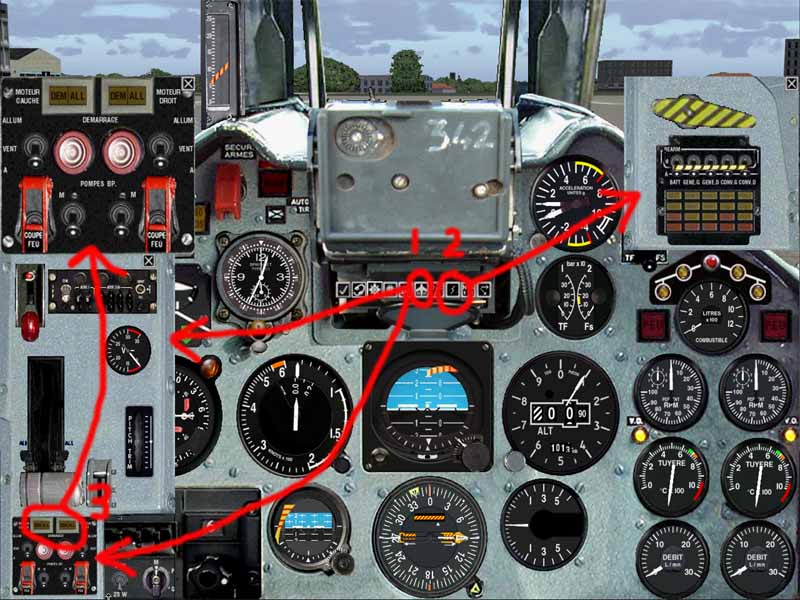
1. Click icon 1 (see below) to bring up the throttle and engine startup panels
2. Click icon 2 to bring up the electrics panel
3. Click on either of the small windows 3 to bring up the extended engine startup panel
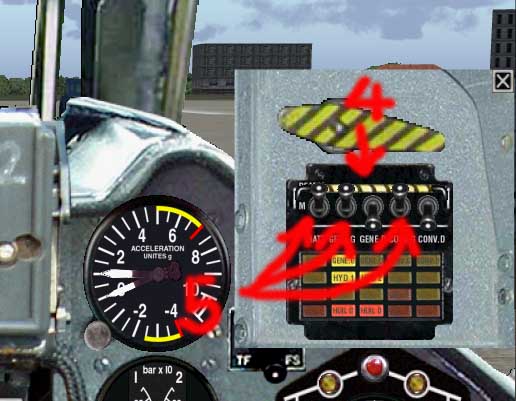
4. Click on the black/yellow battery switch guard to raise it
5. Switch (click) on the main battery switch and the switches labelled 'g' on the electrics panel (g = gauche = left)
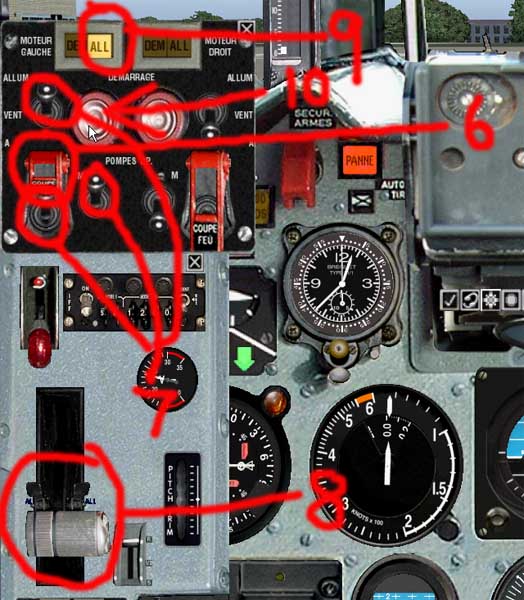
6. Raise (click on) 6 the left engine main switch guard
7. Switch (click) on all the 3 left engine switches
8. Open the throttle 8 slowly just until the left engine ignition light 9 comes on
9. Press (click on) and hold the left engine starter 10 until the engine starts then release. Lower the left engine main switch guard.
10. Repeat for the right engine (switches labelled 'd' - d = droite = right)
To switch off:
Close throttle
Raise the engine main switch guards
Turn main engine switches off
Turn all other engine switches off (engine panel)
Lower engine main switch guards
Switch off engine switches labelled 'g' and 'd' on battery panel and switch off main battery switch
** Can do all of the last step above just by flicking the black/yellow battery switch bar down
Steering angle.
Forget about differential braking. Doesn't work with this baby (try it if you like, but you'll end up disappearing into the scenery ;) )
To edit steering angle, open up aircraft.cfg file with Wordpad or Notepad, scroll down to Contact_Points section.
Change the number 180 shown in red below to 80 or even a bit less (say 70). Then you'll be able to steer while taxying, but take care because this one accelerates very quickly even at fairly modest power settings.
// Train 0 1 2 3 4 5 6 7 8 9 10 11 12 13 14 15
point.0=1, 12.15, 0.000,-5.50, 2600, 0, 0.354715,
180, 0.250000, 4.00, 0.577863, 3.5, 4.5, 0,0.000000,0.000000 // roulette av.
point.1=1, -2.50,-4.1,-5.10, 2600, 1, 0.574715, 0, 0.390256, 2.50, 0.577863, 4.5, 5.5, 2,0.000000,0.000000
point.2=1, -2.50, 4.1,-5.10, 2600, 2, 0.574715, 0, 0.390256, 2.50, 0.577863, 5.0, 6.0, 3,0.000000,0.000000
Let us know how you get on - and especially if you have any problems with any of the above.