DC-9 Autopilot?

Forum dedicated to Microsoft FS2004 - "A Century of Flight".

DC-9 Autopilot?

Postby tennm1980 » Fri Sep 09, 2005 8:45 pm

Hey yeah well this is probably really ignorant, but is there a way to arm the DC-9 with an autopilot? I love the plane, but its not a very fast flyer. Any information is really really appreciated.
tennm1980
2nd Lieutenant
2nd Lieutenant
 
Posts: 100
Joined: Sun Jun 05, 2005 2:58 pm
Location: Bristol TN (KTRI)

Re: DC-9 Autopilot?

Postby tennm1980 » Fri Sep 09, 2005 9:07 pm

hmmm....DC-9 doesnt sound right, maybe its DC-3? i dunno, im at work and im drawing a complete blank, whatever the default douglas aircraft is in MFS. thanks!;-)
tennm1980
2nd Lieutenant
2nd Lieutenant
 
Posts: 100
Joined: Sun Jun 05, 2005 2:58 pm
Location: Bristol TN (KTRI)

Re: DC-9 Autopilot?

Postby NicksFXHouse » Fri Sep 09, 2005 9:31 pm

hmmm....DC-9 doesnt sound right, maybe its DC-3? i dunno, im at work and im drawing a complete blank, whatever the default douglas aircraft is in MFS. thanks!;-)


opppsssss... did not read this one..

no problem, I will post the aircraft.cfg and panel.cfg edits in a bit
Last edited by NicksFXHouse on Fri Sep 09, 2005 11:03 pm, edited 1 time in total.
NicksFXHouse
 

Re: DC-9 Autopilot?

Postby Jakemaster » Fri Sep 09, 2005 10:30 pm

also, just to help.  David garwoods Avro Anson has a great autopilot.  I have added it to the s-43.  I opened the panel.cfg for the anson, copied the stuff for the autopilot(it has its own window) and pasted it in th s-43 panel.cfg.  The reason why I like it so much is it is really simple.  All you do is get to the height and heading you want, then turn on the power switch, turn on the elevator and the aileron channels, and hit the master switch.  

If that isn't clear and you are interested, pm me, and I'll try to help you out.
Jakemaster
 

Re: DC-9 Autopilot?

Postby NicksFXHouse » Fri Sep 09, 2005 10:51 pm

hmmm....DC-9 doesnt sound right, maybe its DC-3? i dunno, im at work and im drawing a complete blank, whatever the default douglas aircraft is in MFS. thanks!;-)


I have to put this in 2 posts because of its length....


Here ya go... all tested and works great. It is a simple autopilot that will tie into the DC-3 heading on the main panel. You will not have autothrottle but will have alt, heading and v/s. Hit SHIFT-7 to have it pop up when needed.

Follow these directions to edit your configuration files:

1. Open the panel folder for the DC-3. Right clight the panel.cfg file and select COPY, then PASTE in the same directory which will create a backup copy of the original panel.cfg file named: Copy of panel.cfg

2. Open the panel.cfg file in notepad. Copy the following list BUT KEEP IN MIND IT IS IN 2 POSTS:

-----------------------------------------------------

// This Panel.cfg file created by FS Panel Studio panel editor utility - http://www.fspanelstudio.com
// Built Friday, September 09, 2005 at 20:33 FSPS Build:14852

[Window Titles]
Window00=Main Panel
Window01=Radios
Window02=GPS
Window03=Throttle Quadrant
Window04=Other Controls
Window05=Electrical Panel
Window06=Mini Panel
Window07=Autopilot


[VIEWS]
VIEW_FORWARD_WINDOWS=MAIN_PANEL,RADIO_STACK_PANEL,GPS_PANEL,THROTTLE_PANEL,150,125,MINIPANEL,80

VIEW_FORWARD_DIR=0.000, 0.000, 0.000


//--------------------------------------------------------
[Window00]
file=DC3_background.bmp
size_mm=1024,768
position=7
visible=1
ident=MAIN_PANEL

gauge00=Douglas_DC3!annunciator_vacuum,
Last edited by NicksFXHouse on Sat Sep 10, 2005 12:20 pm, edited 1 time in total.
NicksFXHouse
 

Re: DC-9 Autopilot?

Postby NicksFXHouse » Fri Sep 09, 2005 10:54 pm

//--------------------------------------------------------
[Window02]
Background_color=0,0,0
size_mm=545,354
position=2
visible=0
ident=GPS_PANEL
window_size= 0.500, 0.362
window_pos= 0.000, 0.000

gauge00=fs9gps!gps_295,
Last edited by NicksFXHouse on Fri Sep 09, 2005 10:59 pm, edited 1 time in total.
NicksFXHouse
 

Re: DC-9 Autopilot?

Postby Nav » Sat Sep 10, 2005 7:04 am

No need to go to all that trouble, really - just see the flight notes in the Learning Centre.

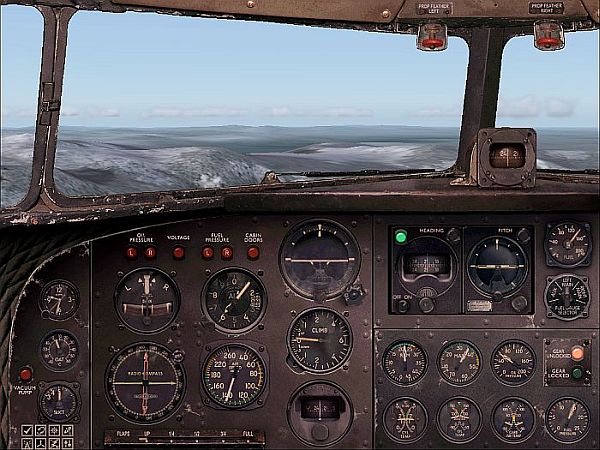
The default DC3 already HAS an autopilot - the darker sub-panel with the green light to the right of the 'artificial horizon'.  :)

Image
Nav
Captain
Captain
 
Posts: 717
Joined: Thu Sep 30, 2004 11:29 pm

Re: DC-9 Autopilot?

Postby NicksFXHouse » Sat Sep 10, 2005 12:03 pm

[quote]No need to go to all that trouble, really - just see the flight notes in the Learning Centre.

The default DC3 already HAS an autopilot - the darker sub-panel with the green light to the right of the 'artificial horizon'.
Last edited by NicksFXHouse on Sat Sep 10, 2005 12:17 pm, edited 1 time in total.
NicksFXHouse
 

Re: DC-9 Autopilot?

Postby tennm1980 » Sat Sep 10, 2005 2:29 pm

OK, so the tiny switch with the "Off-On" options under the green light is the autopilot?
tennm1980
2nd Lieutenant
2nd Lieutenant
 
Posts: 100
Joined: Sun Jun 05, 2005 2:58 pm
Location: Bristol TN (KTRI)

Re: DC-9 Autopilot?

Postby NicksFXHouse » Sat Sep 10, 2005 10:01 pm

OK, so the tiny switch with the "Off-On" options under the green light is the autopilot?


Yep.. Turn that on and adjust heading, etc from there
NicksFXHouse
 

Re: DC-9 Autopilot?

Postby Nav » Sun Sep 11, 2005 9:00 am

That's right, tennm1980.

Fair warning though - as befits a 'period' aeroplane, it doesn't perform as many tricks as a modern autopilot.

There's no autothrottle, for a start; you have to handle the speed yourself, by careful use of the throttles. Very easy to get the hang of, with a bit of practice.

Secondly, the autopilot will hold an altitude and a heading for you, but it won't hold a 'course' (in the sense of a 'vector') - if there's a wind blowing you off-course, it's up to you to adjust the heading to compensate.

One thing that will help is that there are key controls. Go to 'Aircraft/Kneeboard/Keys', scroll down to autopilot, and you'll find them. 'Ctrl-H' will hold a heading and 'Ctrl-Z' will hold an altitude.

Best way, after takeoff, is to set the 'Heading Hold' early, then manage the climb yourself until you get to the height you want. Then press 'Altitude Hold' and you can take your hands right off.

Incidentally, I checked the DC3 out today (in your honour :)) and found that 'Ctrl-A' actually holds an ILS path for you.
Last edited by Nav on Sun Sep 11, 2005 9:00 am, edited 1 time in total.
Nav
Captain
Captain
 
Posts: 717
Joined: Thu Sep 30, 2004 11:29 pm


Return to FS 2004 - A Century of Flight

Who is online

Users browsing this forum: No registered users and 226 guests