
STRM

Forum dedicated to Microsoft FS2004 - "A Century of Flight".

Re: STRM

Postby Saitek » Sat Jun 04, 2005 12:35 pm

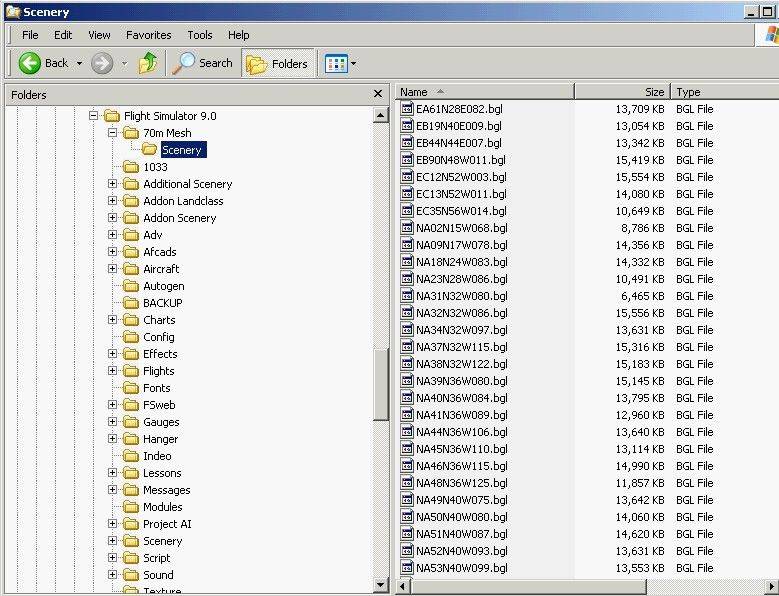
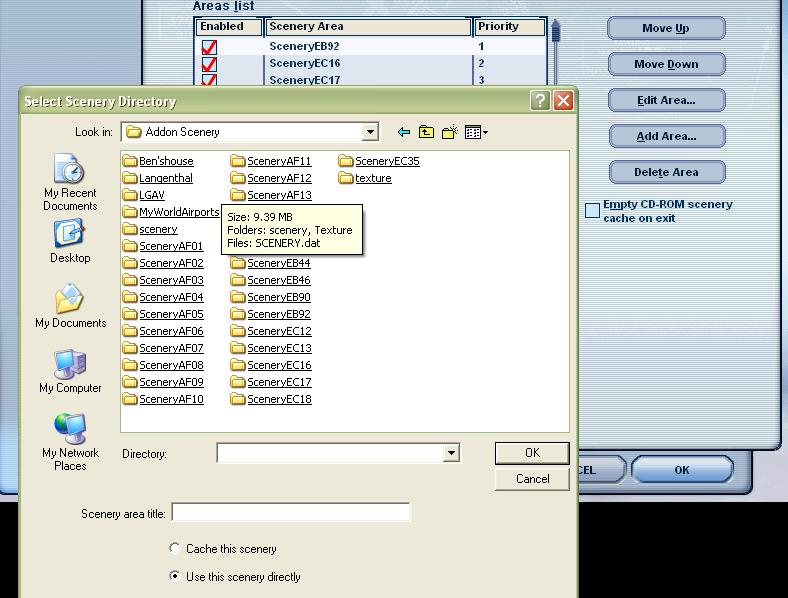
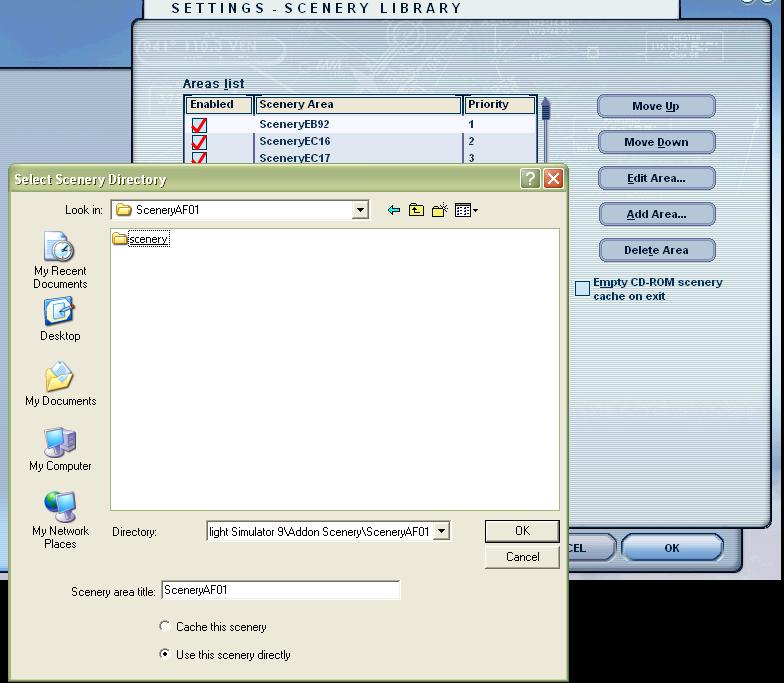
Here is what you should have.


Image


Image
Last edited by Saitek on Sat Jun 04, 2005 12:35 pm, edited 1 time in total.
Windows 7 Pro 64bit
Intel Core 2 Duo E2180 2GHz
GA-P35-DS3L Intel P35
Kingston HyperX 4GB (2x2) DDR2 6400C4 800Mhz
GeForce 8800 GT 512MB
2 x 22" monitors
200GB Sata
Be Quiet! Straight Power 650W

Flying FS
Saitek
Lieutenant Colonel
Lieutenant Colonel
 
Posts: 5274
Joined: Thu Jun 19, 2003 3:04 pm
Location: UK

Re: STRM

Postby commoner » Sat Jun 04, 2005 12:37 pm

just select the folder ...dont OPEN it....
Image"In theory, there is no difference between theory and practice. But, in practice, there is."
User avatar
commoner
Major
Major
 
Posts: 3221
Joined: Sat Aug 28, 2004 2:26 am
Location: Yorkshire. England. UK.

Re: STRM

Postby Airbus_eurofighter » Sat Jun 04, 2005 12:38 pm

o! at least
Thx to all

Zitin
Spitfire dreamer

Image

Im Who is trying to learn to overlock, to learn photoshop, to learn AFCAD, Jac's paintshop pro, Gmax... No time enough :(
User avatar
Airbus_eurofighter
2nd Lieutenant
2nd Lieutenant
 
Posts: 281
Joined: Thu May 12, 2005 6:29 pm

Re: STRM

Postby Souichiro » Sat Jun 04, 2005 12:44 pm

Really Addon scenery and then in that folder the scenery! it works for me! ADDON scenery is allready listed in my Scenery Library. Everytime you throw something new in it FS loads it ;D Trust me it works! ;D
Image
User avatar
Souichiro
Ground hog
Ground hog
 
Posts: 0
Joined: Tue Aug 28, 2007 11:34 am

Re: STRM

Postby commoner » Sat Jun 04, 2005 12:49 pm

Really Addon scenery and then in that folder the scenery! it works for me! ADDON scenery is allready listed in my Scenery Library. Everytime you throw something new in it FS loads it ;D Trust me it works! ;D


....lol..no question that I wouldn't trust you old son...but as I said ..each to his own............commoner ;)
Image"In theory, there is no difference between theory and practice. But, in practice, there is."
User avatar
commoner
Major
Major
 
Posts: 3221
Joined: Sat Aug 28, 2004 2:26 am
Location: Yorkshire. England. UK.

Re: STRM

Postby Souichiro » Sat Jun 04, 2005 12:59 pm


....lol..no question that I wouldn't trust you old son...but as I said ..each to his own............commoner ;)


Yup ;D True
Image
User avatar
Souichiro
Ground hog
Ground hog
 
Posts: 0
Joined: Tue Aug 28, 2007 11:34 am

Re: STRM

Postby Fozzer » Sat Jun 04, 2005 1:08 pm

...Ding..Ding...!
End of contest...
...and the winner is....

... ;)... 8)... ;D...!

Paul....(No...not me!...)... ;)...!
Win 8.1 64-bit. DX11. Advent Tower. Intel i7-3770 3.9 GHz 8-core. 8 GB System RAM. AMD Radeon HD 7700 1GB RAM. DVD ROM. 2 Terra Byte SATA Hard Drive. Philips 17" LCD Monitor. Saitek Cyborg X Fly-5 Joystick. ...and a Briggs and Stratton Petrol Lawn Mower.
User avatar
Fozzer
Colonel
Colonel
 
Posts: 27369
Joined: Thu Jan 31, 2002 3:11 pm
Location: Hereford. England. EGBS.

Re: STRM

Postby dave3cu » Sat Jun 04, 2005 5:34 pm

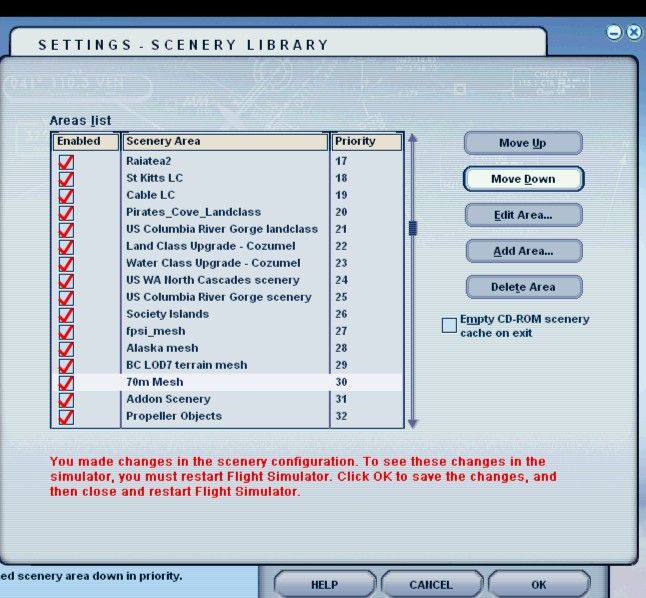
This reply relates only to how I handle the 'Global 70m Terrain Mesh' (SRTM) files.
Image

Image

Easy to create, only have to use 'Scenery Setup' the first time.

Easy to add new mesh, just drop new .bgl's into the 'scenery'
Last edited by dave3cu on Sat Jun 04, 2005 5:48 pm, edited 1 time in total.
At that time [1909] the chief engineer was almost always the chief test pilot as well. That had the fortunate result of eliminating poor engineering early in aviation.
dave3cu
Major
Major
 
Posts: 3141
Joined: Sun May 19, 2002 9:55 am
Location: 3CU, Northern Wisconsin, USA

Re: STRM

Postby MattNW » Sat Jun 04, 2005 5:39 pm

Just dropping it into the add on scenery folder works OK but that can be troublesome if you do have a scenery problem down the road. You won't know exactly which scenery file is related to what so you will have to remove each one a file at a time to troubleshoot. By putting each one into it's own folder you have a reference to go by if there's an incompatability or a scenery file gets corrupted.

Also don't be too cryptic when you create folder names. This is from experience. I once named all my add on scenery folders with nice names like "SA005" for South Atlantic scenery #5. Over a year later I had a problem and for the life of me I couldn't remember the naming system. Ended up taking all the folders out and adding them one at a time until I found the problem.  :-[

Now my add on scenery folders have easily recognized names like, "South Pacific Rangiroa Hut," or "Texas Lodge." I do learn from experience now and then.  ;D
In Memory of John Consterdine (FS Tipster)1962-2003
User avatar
MattNW
Major
Major
 
Posts: 1705
Joined: Tue Mar 25, 2003 2:34 pm
Location: Indiana

Re: STRM

Postby Saitek » Sat Jun 04, 2005 5:42 pm

Well I love Dave's suggested method! Much easier. I'm going down that street I think. 8)
Windows 7 Pro 64bit
Intel Core 2 Duo E2180 2GHz
GA-P35-DS3L Intel P35
Kingston HyperX 4GB (2x2) DDR2 6400C4 800Mhz
GeForce 8800 GT 512MB
2 x 22" monitors
200GB Sata
Be Quiet! Straight Power 650W

Flying FS
Saitek
Lieutenant Colonel
Lieutenant Colonel
 
Posts: 5274
Joined: Thu Jun 19, 2003 3:04 pm
Location: UK

Re: STRM

Postby dave3cu » Sat Jun 04, 2005 5:58 pm

Saitek,

Remember that before you remove/move the folders/files from your HD you MUST first 'delete' each 'Area' from the 'Scenery Setup' window.

Not doing so can corrupt your 'scenery.cfg' file

Dave
At that time [1909] the chief engineer was almost always the chief test pilot as well. That had the fortunate result of eliminating poor engineering early in aviation.
dave3cu
Major
Major
 
Posts: 3141
Joined: Sun May 19, 2002 9:55 am
Location: 3CU, Northern Wisconsin, USA

Re: STRM

Postby commoner » Sat Jun 04, 2005 11:28 pm

Well I love Dave's suggested method! Much easier. I'm going down that street I think. 8)

......I personally like to keep all my areas seperate with names I can relate to...........then I can switch off/on individual areas as I wish.....I find it is less confusing and worth the little extra time..Dave's method means it is all OFF or all ON......commoner ;)
Image"In theory, there is no difference between theory and practice. But, in practice, there is."
User avatar
commoner
Major
Major
 
Posts: 3221
Joined: Sat Aug 28, 2004 2:26 am
Location: Yorkshire. England. UK.

Previous

Return to FS 2004 - A Century of Flight

Who is online

Users browsing this forum: No registered users and 174 guests