Scenery Simplicity

Forum dedicated to Microsoft FS2004 - "A Century of Flight".

Scenery Simplicity

Postby Scorpiоn » Sat Mar 26, 2005 9:55 am

Just a frustration I've had for awhile.

I remember with my first FS2002 install, I had great scenery I would dodge around in with the F4U, but on subsequent installs, it went down to nil.  This still holds true in FS2004.

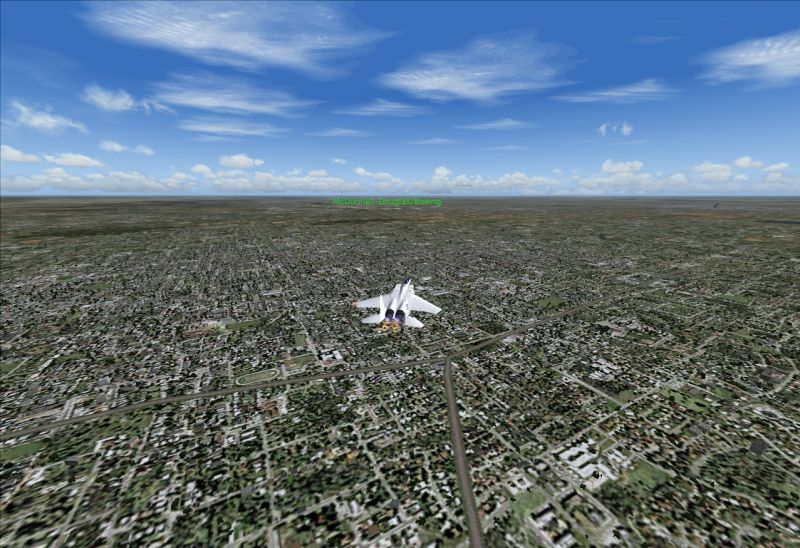
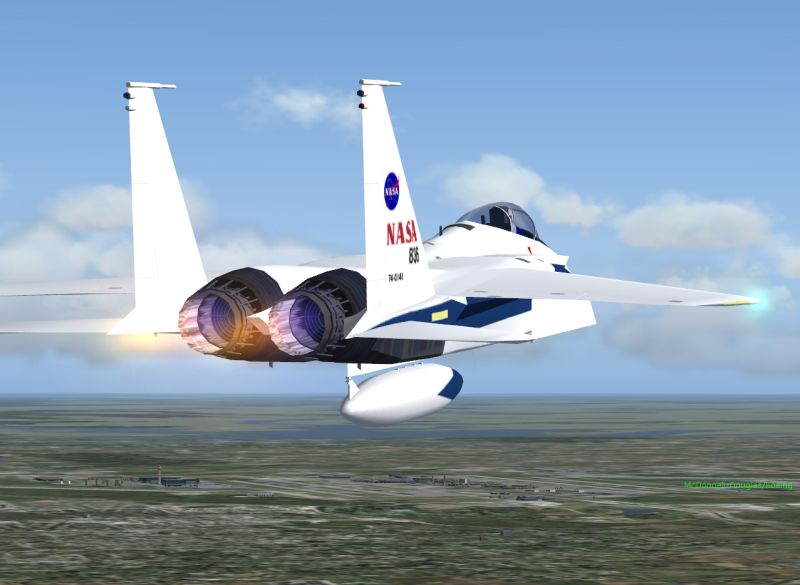
The terrain and scenery directly underneath the aircraft are excellent, of course:
Image

But shift the focus a few degrees up:
Image

This is all default scenery (except mesh), with full sliders with every single field.

Basic Specs:
  • AMD Athlon64 3000+
  • BFG GeForce 6800OC (Shipped OC, no OC on my part tho')
  • 1GB DDRAM

You get the jist.  I don't think performance is an issue.  Only clouds pose a real problem, but I'm not too bothered about that.  I'm used to low FPSs from my 500Mhz days.

Is there a magic .cfg somewhere where I can crank up the draw distance or something?

Last edited by Scorpiоn on Sat Mar 26, 2005 9:56 am, edited 1 time in total.
The Devil's Advocate.
Image
User avatar
Scorpiоn
Major
Major
 
Posts: 3734
Joined: Thu Jan 31, 2002 7:32 pm
Location: The Alamo

Re: Scenery Simplicity

Postby willg » Sat Mar 26, 2005 10:22 am

make sure 'extended draw distance' or something like that's ticked. You might wanna fiddle around with things on the hardware tab, including putting tabs 'Max Global Texture Size' and 'Mip Mapping Quality' all the way.

You could also try right clicking on the desktop, properties, settings, advanced, and making sure you have anti aliasing and anistropic filtering set to application control. its also worth experimenting with a few other settings there.

good luck
Willg
Image


Having Landing Or Approach Problems? Visit Nav's Excellent Thread At http://www.simviation.com/cgi-bin/yabb/ ... i?board=CO
User avatar
willg
2nd Lieutenant
2nd Lieutenant
 
Posts: 142
Joined: Thu Mar 17, 2005 4:43 pm
Location: Oxford, England, UK

Re: Scenery Simplicity

Postby _526th_Fireman » Sat Mar 26, 2005 10:37 am

Check what your FPS is locked to and the Autogen settings.

If FPS is locked high, then it will knock out lots of autogen to keep the frame rates up there.

There have been posts on some settings in the FS9.cfg that help the look. I played with these and for me, mine look fine.

Here is what I have. Back yours up and then have a go and see if it helps you out.

Scroll down the cfg to get to this section in Display:

[TERRAIN]
TERRAIN_ERROR_FACTOR=100.000000
TERRAIN_MIN_DEM_AREA=10.000000
TERRAIN_MAX_DEM_AREA=96.000000
TERRAIN_MAX_VERTEX_LEVEL=19
TERRAIN_TEXTURE_SIZE_EXP=8
TERRAIN_AUTOGEN_DENSITY=2
TERRAIN_USE_GRADIENT_MAP=1
TERRAIN_EXTENDED_TEXTURES=1
TERRAIN_DEFAULT_RADIUS=9.500000      //Default is 2.5//
TERRAIN_EXTENDED_RADIUS=9.500000    //Default is 4.0//
TERRAIN_EXTENDED_LEVELS=900             //Was 1242456

Above are the settings I have at the moment.

Good luck and hope it helps.
Last edited by _526th_Fireman on Sat Mar 26, 2005 10:38 am, edited 1 time in total.
Systemax Sabre Ultimate gaming rig.

I got all the goodies and all the power I need to run anything thrown at me for the next two months!
User avatar
_526th_Fireman
Major
Major
 
Posts: 1142
Joined: Mon Feb 04, 2002 8:41 am
Location: Joshua Texas

Re: Scenery Simplicity

Postby Clipper » Sat Mar 26, 2005 12:21 pm

Check what your FPS is locked to and the Autogen settings.

If FPS is locked high, then it will knock out lots of autogen to keep the frame rates up there.

Thanks for putting out that fire. Great piece of info!!! :)
Image
User avatar
Clipper
Global Moderator
Global Moderator
 
Posts: 8420
Joined: Tue Aug 23, 2005 5:40 am

~

Postby Scorpiоn » Sun Mar 27, 2005 7:36 am

make sure 'extended draw distance' or something like that's ticked. You might wanna fiddle around with things on the hardware tab, including putting tabs 'Max Global Texture Size' and 'Mip Mapping Quality' all the way.

You could also try right clicking on the desktop, properties, settings, advanced, and making sure you have anti aliasing and anistropic filtering set to application control. its also worth experimenting with a few other settings there.


Hence:

with full sliders with every single field.


Thanks for the information Fireman, that's exactly what I wanted to hear! :D But one thing... erm... where's the FS9.cfg located? :-[ I did a full PC search for it... nothin'.  I also searched the FS9 folder for any files containing the word [terrain]: also nothing. :-X :'(
Last edited by Scorpiоn on Sun Mar 27, 2005 7:37 am, edited 1 time in total.
The Devil's Advocate.
Image
User avatar
Scorpiоn
Major
Major
 
Posts: 3734
Joined: Thu Jan 31, 2002 7:32 pm
Location: The Alamo

~

Postby Scorpiоn » Sun Mar 27, 2005 7:40 am

Nevermind!  Silly me!  Shoulda read the FAQs! ::) :P ;)

Okay, I made the adjustments, and now FS is quite tolerable. :) But just for the hoot, I really cranked up the numbers to get some really good autogen, but, nothing changed.

???

What's the secret variable to autogen draw distance?  I played with the last three, and the autogen did not display differently than with the initial adjustment. :'(
Last edited by Scorpiоn on Sun Mar 27, 2005 8:12 am, edited 1 time in total.
The Devil's Advocate.
Image
User avatar
Scorpiоn
Major
Major
 
Posts: 3734
Joined: Thu Jan 31, 2002 7:32 pm
Location: The Alamo

Re: Scenery Simplicity

Postby _526th_Fireman » Sun Mar 27, 2005 9:34 am

The only other thing that can affect Autogen is where you have your Frames Per Sec. set at as far as MINIMUMs go.

I usually leave mine around 20, you can even get down around 15 and still have a smooth flight. This leaves computing power for producing Autogen to it's max if you have it set high.

With a combination of frame rate friendly cloud textures, the newer fps friendly autogen textures...........you can crank your settings up a tad farther without the frame rate hit.

Keep in mind that FS9, and other flight sims., do the scenery display in a "RING" set up. There are numerous rings, and in each ring scenery is displayed at certain complexity. Playing with those numbers in the section above gives varying results.

At the moment, I am trying to remember where I read the info on this thing.............DERRRRRR, click, clunk wurrrrr......

AH, here it is. You might have already seen this. Bookmark it and use it. This doc. has really been valuable for me in playing with settings for the tweaking of FS9.

http://members.lycos.nl/vairkennis/FS9tips.txt

Here you will get a better idea of the "RING" thing going on in FS9 and what settings to toy with.

Good Luck and hope you get your eye candy exactly where you like it!! Nothing better than a great looking flight with a great acft.
Last edited by _526th_Fireman on Sun Mar 27, 2005 9:40 am, edited 1 time in total.
Systemax Sabre Ultimate gaming rig.

I got all the goodies and all the power I need to run anything thrown at me for the next two months!
User avatar
_526th_Fireman
Major
Major
 
Posts: 1142
Joined: Mon Feb 04, 2002 8:41 am
Location: Joshua Texas

Re: Scenery Simplicity

Postby _526th_Fireman » Sun Mar 27, 2005 10:50 am

Well, did a little checking. Here is a pic. of my settings:

Image

Autogen set to Dense will still get plenty of trees etc. out there. This setting will REALLY affect your FPS.

Note Scenery Complexity is pegged. This setting really seems to get the buildings out there.

Also adjusted some figures in the fs9.cfg...here are my new ones:

[TERRAIN]
TERRAIN_ERROR_FACTOR=100.000000
TERRAIN_MIN_DEM_AREA=10.000000
TERRAIN_MAX_DEM_AREA=100.000000
TERRAIN_MAX_VERTEX_LEVEL=18
TERRAIN_TEXTURE_SIZE_EXP=8
TERRAIN_AUTOGEN_DENSITY=3
TERRAIN_USE_GRADIENT_MAP=1
TERRAIN_EXTENDED_TEXTURES=1
TERRAIN_DEFAULT_RADIUS=19.000000            
TERRAIN_EXTENDED_RADIUS=9.500000              
TERRAIN_EXTENDED_LEVELS=9  

Then went and flew with the new entries and settings above.

In the next two pictures, I am flying in southern Arlington, right in the middle of the Dallas-Fort Worth Metroplex, appx. 5-6 south of  DFW Airport. You can see that the buildings are generated out there a bit. In the Zoomed view, you can see DFW and all it's bulildings are even drawn out that far.

Image


Image


Now I have a gaming machine so these settings might cause yours to start smoking! But maybe gives you an idea on what to play with in your settings.

Good luck again Skorpion
Last edited by _526th_Fireman on Sun Mar 27, 2005 10:59 am, edited 1 time in total.
Systemax Sabre Ultimate gaming rig.

I got all the goodies and all the power I need to run anything thrown at me for the next two months!
User avatar
_526th_Fireman
Major
Major
 
Posts: 1142
Joined: Mon Feb 04, 2002 8:41 am
Location: Joshua Texas

!

Postby Scorpiоn » Mon Mar 28, 2005 6:12 am

Thanks a bunch Rifleman!  I shall test that out and report back, espicially with that link!  However, 'tis 5:12 'round my parts, so I'm goin' to bed!  On the morrow! ;D ;)
The Devil's Advocate.
Image
User avatar
Scorpiоn
Major
Major
 
Posts: 3734
Joined: Thu Jan 31, 2002 7:32 pm
Location: The Alamo


Return to FS 2004 - A Century of Flight

Who is online

Users browsing this forum: No registered users and 391 guests