
Simviation Forums
Flight Simulator and other chat
Flight Simulator and other chat
 by JakesF14 » Fri Feb 26, 2010 3:38 am



by Fr. Bill » Fri Feb 26, 2010 10:47 am
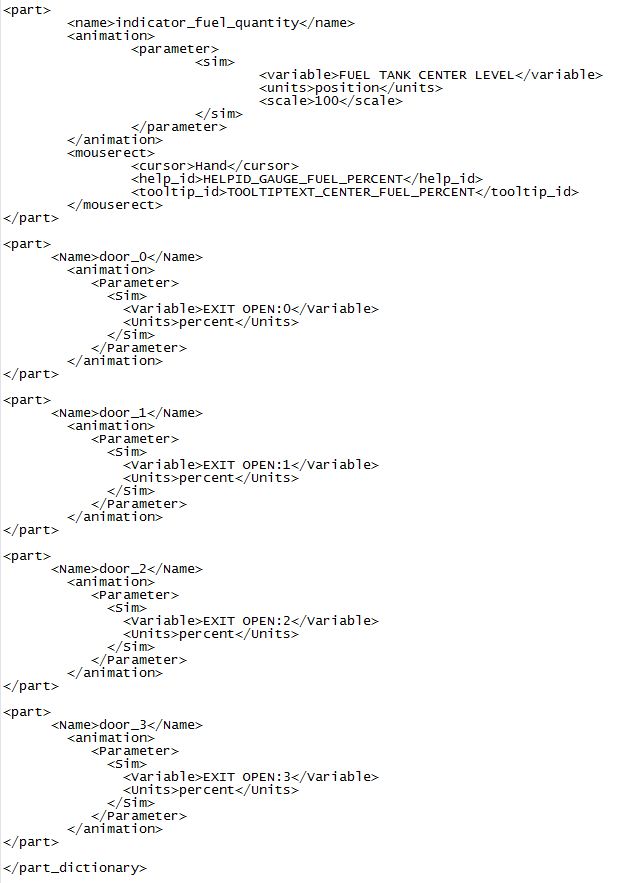
    <part>
      <Name>door_0</Name>
        <animation>
           <Parameter>
             <Sim>
               <Variable>EXIT OPEN:0</Variable>
               <Units>percent</Units>
             </Sim>
           </Parameter>
        </animation>
    </part>
    <part>
      <Name>door_1</Name>
        <animation>
           <Parameter>
             <Sim>
               <Variable>EXIT OPEN:1</Variable>
               <Units>percent</Units>
             </Sim>
           </Parameter>
        </animation>
    </part>
    <part>
      <Name>door_2</Name>
        <animation>
           <Parameter>
             <Sim>
               <Variable>EXIT OPEN:2</Variable>
               <Units>percent</Units>
             </Sim>
           </Parameter>
        </animation>
    </part>
    <part>
      <Name>door_3</Name>
        <animation>
           <Parameter>
             <Sim>
               <Variable>EXIT OPEN:3</Variable>
               <Units>percent</Units>
             </Sim>
           </Parameter>
        </animation>
    </part>
 Gauge Programming - 3d Modeling Eaglesoft Development Group Intel Core 2 Quad Q6600-4GB DDR2 Crucial PC6400-800 GB SATA-ATI Radeon HD2400 Pro 256MB DX10 [i
by JakesF14 » Mon Mar 01, 2010 2:17 am
by JakesF14 » Thu Mar 11, 2010 8:26 am
by garryrussell » Thu Mar 11, 2010 10:18 am
by Fr. Bill » Thu Mar 11, 2010 2:47 pm
Ok, Ive added the above to the MakeMDL.parts.xml file, and I've named the door R_Canopy, and tried R_Canopy01, door_01 as well, but still I cannot get it to open. I am sure it is some small thing I miss?
Gauge Programming - 3d Modeling Eaglesoft Development Group Intel Core 2 Quad Q6600-4GB DDR2 Crucial PC6400-800 GB SATA-ATI Radeon HD2400 Pro 256MB DX10 [iby JakesF14 » Fri Mar 12, 2010 1:08 am
by Fr. Bill » Sun Mar 14, 2010 4:12 pm
 Gauge Programming - 3d Modeling Eaglesoft Development Group Intel Core 2 Quad Q6600-4GB DDR2 Crucial PC6400-800 GB SATA-ATI Radeon HD2400 Pro 256MB DX10 [i
by JakesF14 » Mon Mar 15, 2010 1:02 am
by jaime » Mon Mar 15, 2010 8:13 pm
 ...will try to relocate the main thread to post more...great work on the 2.0 one though and nice paint scheme love the medical scheme!!
Return to Aircraft & 3D Design
Users browsing this forum: No registered users and 804 guests