Page 1 of 1

BU0836A Physical Connections

PostPosted: Sat Jan 05, 2008 1:59 pm
by Mobius
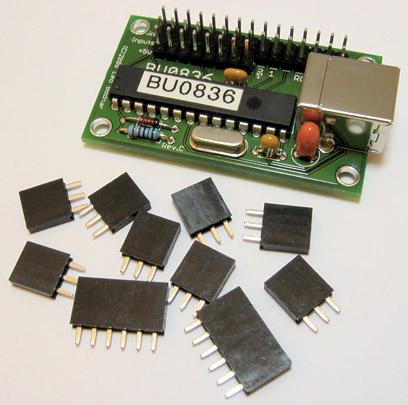
Hey all, I'm working on a little project with the BU036A and I have the wiring all figured out, but I've never really done anything like this.  What I'm wondering is how to physically connect the wires to the pins on the included connectors and on the switches.  Do I solder it or is there some connector I can buy?  

Thanks for any help.

Re: BU0836A Physical Connections

PostPosted: Sat Jan 05, 2008 8:46 pm
by JBaymore
Mobius,

It looks like it comes with a set of solder on connectors:

http://www.leobodnar.com/products/BU083 ... ectors.jpg

That is the image from the site you posted.

best,

....................john

Re: BU0836A Physical Connections

PostPosted: Sat Jan 05, 2008 10:37 pm
by Mobius
Yeah, I was wondering how to use those.  Do you happen to know the procedure for soldering them?  I have very limited experience with soldering (I can connect two wires, but nothing fancy), is that what you do here, just put the connector pin and wire end together and drop a bead of molten solder on them?  Also, do you happen to know if there is anywhere where I could buy more so I could interchange them if I wanted?

Thanks for the help John. :)

Re: BU0836A Physical Connections

PostPosted: Sat Jan 05, 2008 11:07 pm
by JSpahn
The proper way to solider would be to use a 30/60 rosin core. Prep the leads on the connectors by cleaning them with alcohol  and tin the wires, apply heat to the lead of the connector using a thin tip on the iron, place the tinned wire in position and apply the 30/60.

This all happens pretty quickly so as not to melt the plastic connectors. I would practice your technique before an actual attempt ;)

Re: BU0836A Physical Connections

PostPosted: Sat Jan 05, 2008 11:26 pm
by Mobius
Thanks Masternerd. :)

Re: BU0836A Physical Connections

PostPosted: Sun Jan 06, 2008 1:07 am
by SilverFox441
Excellent advise from Masternerd but I would add one thing...

You need some way to hold the connector anyway, so use a pair of fine needlenose pliers. Gently hold the specific metal section of the connector that you are soldering to. The pliers will act like a heat sink and give you more working time before the heat can affect the plastic part of the connector. Spring-loaded tweezers work like a charm for this as well.

Re: BU0836A Physical Connections

PostPosted: Sun Jan 06, 2008 7:13 am
by JBaymore
One last bit on soldering to build on the above........

The needlnose pliers (or other clamp to hold the parts) goes between the location you are soldering and the plastic section.  Acts as a heat "barrier" of sorts.

best,

............john

PS>  As to getting extra connectors.......... likely they are standard parts..... email the supplier with the questions.

Re: BU0836A Physical Connections

PostPosted: Sun Jan 06, 2008 9:59 am
by JSpahn
Now thats some great advice guys ;)

Re: BU0836A Physical Connections

PostPosted: Sun Jan 06, 2008 1:45 pm
by beaky
Some more advice:
Heat the work, not the solder... touch the solder to the work and when the work is hot enough to melt the solder, it should make a good joint. Otherwise, you have a blob of usually- overcooked solder stuck temporarily to the cold work... a "cold solder". It will fail soon.

A solder joint is good when it is shiny after cooling; dull look means "cold"; or you've overdone it and boiled so much of the good metal out of the solder that it may fail or not conduct well.

Keep a wet sponge (or wet rag or paper towel) handy to wipe off the tip intermittently. Just dab it. Keeps the sludge to a minimum, which is important. You don't want to introduce some impure old solder that's been cooking on the tip into a fresh solder joint. Don't worry about getting imputrities from your sponge or rag onto the tip- is it is dripping wet with water, at 700 degrees you'll get a nice steam-cleaning action each time you wipe. Works great.

Beware of using tools as heat sinks (if you're grasping an uninsulated part)- it's easy to draw too much heat away from the joint. Winds up taking too long, and the temptation to heat the solder becomes great.
Tweezers or very light pliers are best. I've been soldering professionally in the field and shop for ages and rarely use anything but my fingers.  Sometimes the wires, etc get a bit hot- especially soldering 10AWGspeaker wire, which sadly I still have to do sometimes... but it's not too bad.
If you have girly "IT guy" hands, maybe you should wear gloves for stuff like that. ;) ;D

Less is more. Do not count on big blobs of solder to provide mechanical strenghth, or to bridge gaps. Even plumbers don't solder like that. ;D

Re: BU0836A Physical Connections

PostPosted: Sun Jan 06, 2008 1:49 pm
by Mobius
Thanks again everyone for the excellent soldering lesson.  Now if I mess anything up, I'll only have my own stupidity to blame instead of lack of instruction. ;D ;)

Re: BU0836A Physical Connections

PostPosted: Sun Jan 06, 2008 4:03 pm
by machineman9
Hmm, another thing you might consider is heat shrink or some electric-resistant rubber tape (both can be bought at B&A or somewhere similar). Just because the contacts do look quite close and they look liable to bending.

For the heat shrink put it on the wire (not on the pins on the controller) and slide it down the wire a bit so you have enough metal showing to solder it. Solder it (as mentioned above, but I go for the typical solder+iron and nothing else method) and then slide the heatshrink over the wire and the connector so it is shielding it. Run the soldering iron over the heat shrink and as the name suggests, the heat shrink will become contract around the wire holding it in place a bit, and stopping the resistant shield from sliding off.

-I love soldering  ;D. Got an A and A* at it last year and the year before at school. The teacher said we would have trouble with the thyristors but I managed to solder it to the PCB first time round and it worked fine.