Cockpit Construction Continued (Part 29) -FSXpand-

Only for Genuine FS fanatics! Taking this hobby from Real to Surreal? Or maybe just combining 4 hobbies into 1 ;)

Cockpit Construction Continued (Part 29) -FSXpand-

Postby JBaymore » Sun Apr 08, 2007 3:07 pm

FSXpand Version 5.3 released

I have purchased the FSXpand flight controls / gauge software finally.

Last edited by JBaymore on Thu Apr 12, 2007 11:19 am, edited 1 time in total.
Image ImageIntel i7 960 quad 3.2G LGA 1366, Asus P6X58D Premium, 750W Corsair, 6 gig 1600 DDR3, Spinpoint 1TB 720

User avatar
JBaymore
Global Moderator
Global Moderator
 
Posts: 10020
Joined: Sat May 24, 2003 9:15 am
Location: New Hampshire

Re: Cockpit Construction Continued (Part 29)

Postby JBaymore » Sun Apr 08, 2007 7:12 pm

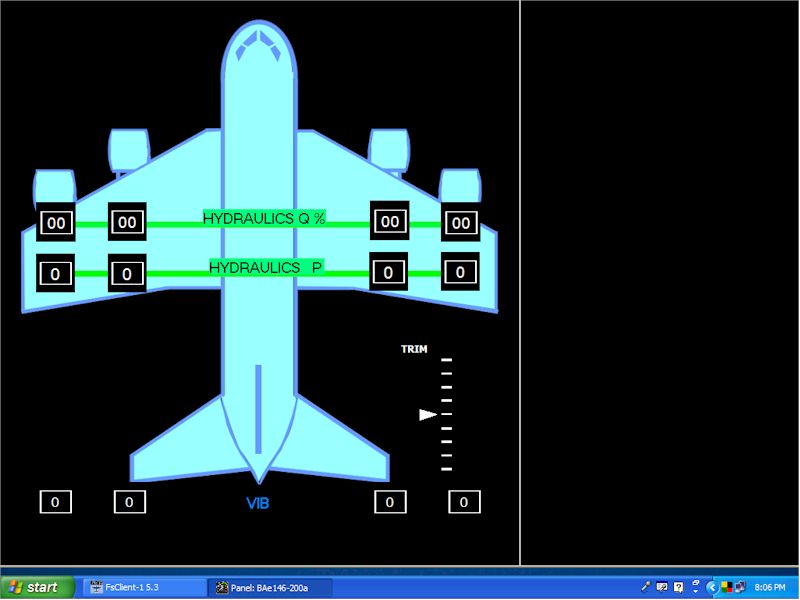
OK..... here is version two of the synoptic page for hydraulics:

Image

I changed the aircraft diagram to be functional for a number of synoptic functions for other screens, like doors, control surfaces, and so on.  I also cleaned up the drawing a lot.

This is fun!

best,

...................john
Image ImageIntel i7 960 quad 3.2G LGA 1366, Asus P6X58D Premium, 750W Corsair, 6 gig 1600 DDR3, Spinpoint 1TB 720
User avatar
JBaymore
Global Moderator
Global Moderator
 
Posts: 10020
Joined: Sat May 24, 2003 9:15 am
Location: New Hampshire

Re: Cockpit Construction Continued (Part 29)

Postby JBaymore » Sun Apr 08, 2007 7:55 pm

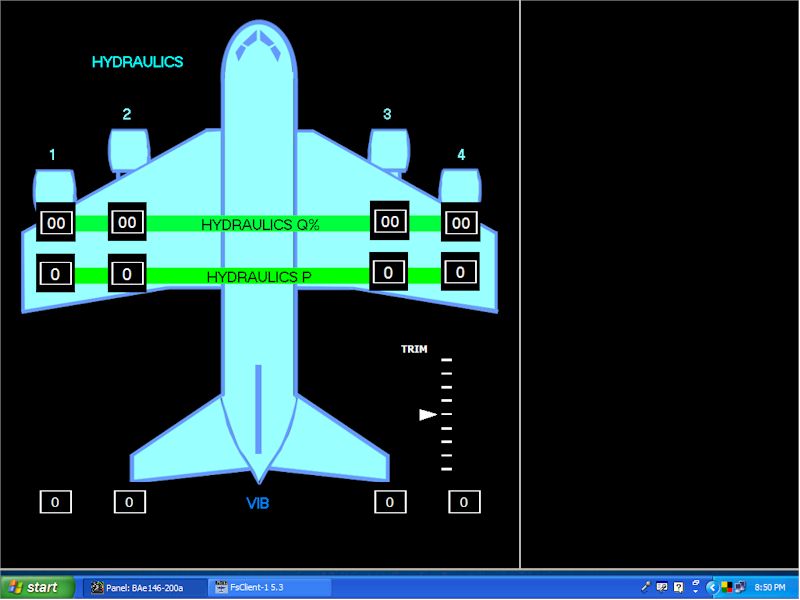
And yet the THIRD revision.  This one takes into account that the colors for the labels are not "holding" for certain of the label functions when pasted OVER the enlarged bitmap image.  Had to remove them and use another "tactic".

Image

Added a "title" to the information page of "HYDRAULICS"..... all of the pages will have a title in the same position.  Also added engine numbers.

best,

......................john
Image ImageIntel i7 960 quad 3.2G LGA 1366, Asus P6X58D Premium, 750W Corsair, 6 gig 1600 DDR3, Spinpoint 1TB 720
User avatar
JBaymore
Global Moderator
Global Moderator
 
Posts: 10020
Joined: Sat May 24, 2003 9:15 am
Location: New Hampshire

Re: Cockpit Construction Continued (Part 29)

Postby JBaymore » Sun Apr 08, 2007 9:11 pm

Now moving on to a fuel management synoptic panel.
Last edited by JBaymore on Sun Apr 08, 2007 9:12 pm, edited 1 time in total.
Image ImageIntel i7 960 quad 3.2G LGA 1366, Asus P6X58D Premium, 750W Corsair, 6 gig 1600 DDR3, Spinpoint 1TB 720
User avatar
JBaymore
Global Moderator
Global Moderator
 
Posts: 10020
Joined: Sat May 24, 2003 9:15 am
Location: New Hampshire

Re: Cockpit Construction Continued (Part 29)

Postby SilverFox441 » Sun Apr 08, 2007 11:12 pm

It looks very interesting John!
Steve (Silver Fox) Daly
User avatar
SilverFox441
Major
Major
 
Posts: 1335
Joined: Sun Apr 13, 2003 12:54 am
Location: Mississauga, Ontario, Canada

Re: Cockpit Construction Continued (Part 29)

Postby JBaymore » Mon Apr 09, 2007 9:38 am

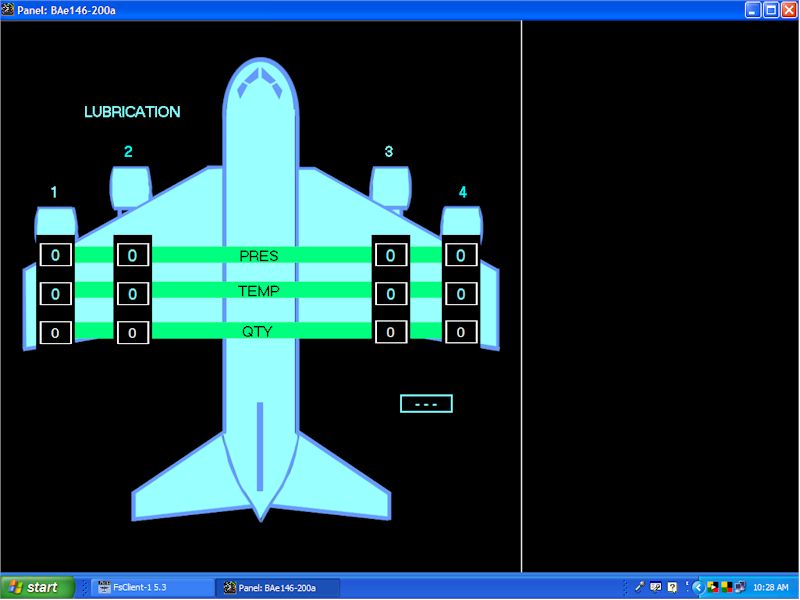
And..... one more added........

Image


best,

....john
Image ImageIntel i7 960 quad 3.2G LGA 1366, Asus P6X58D Premium, 750W Corsair, 6 gig 1600 DDR3, Spinpoint 1TB 720
User avatar
JBaymore
Global Moderator
Global Moderator
 
Posts: 10020
Joined: Sat May 24, 2003 9:15 am
Location: New Hampshire

Re: Cockpit Construction Continued (Part 29)

Postby JBaymore » Mon Apr 09, 2007 12:05 pm
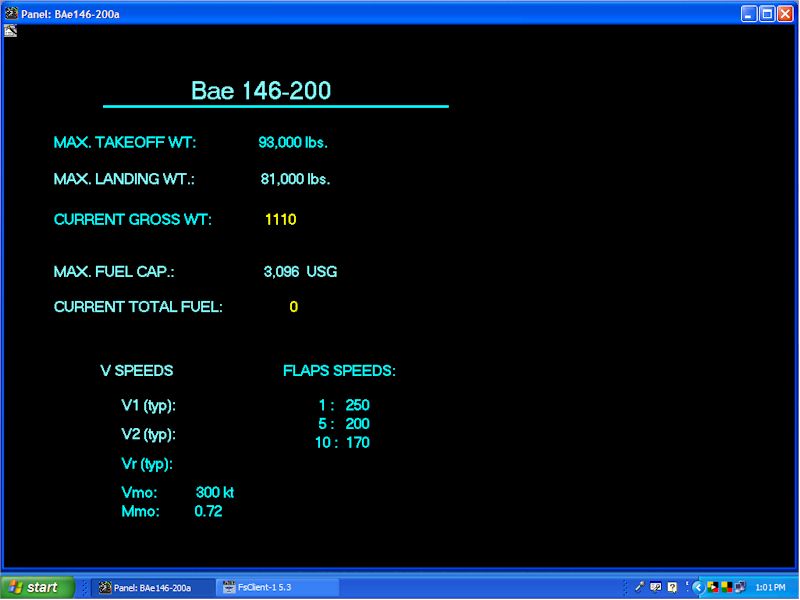
And another panel (just started on this one....not done yet) that will be #1 in the switchable views:

Image


best,

.........john
Image ImageIntel i7 960 quad 3.2G LGA 1366, Asus P6X58D Premium, 750W Corsair, 6 gig 1600 DDR3, Spinpoint 1TB 720
User avatar
JBaymore
Global Moderator
Global Moderator
 
Posts: 10020
Joined: Sat May 24, 2003 9:15 am
Location: New Hampshire

Re: Cockpit Construction Continued (Part 29)

Postby JSpahn » Tue Apr 10, 2007 6:44 am

Cool Im gonna purchase fsxpand to fill in the gap that free fd leaves, Im impressed with how you programed fsxpand into a custom solution!

Is the programming of fsxpand pretty easy, and a tutorial, if you have time, would be nice!
Last edited by JSpahn on Tue Apr 10, 2007 6:46 am, edited 1 time in total.
Image
User avatar
JSpahn
Major
Major
 
Posts: 1768
Joined: Wed Apr 04, 2007 9:12 pm
Location: Philadelphia,PA

Re: Cockpit Construction Continued (Part 29)

Postby JBaymore » Tue Apr 10, 2007 8:37 am

masternerd,

You won't regret it!
Last edited by JBaymore on Tue Apr 10, 2007 9:07 am, edited 1 time in total.
Image ImageIntel i7 960 quad 3.2G LGA 1366, Asus P6X58D Premium, 750W Corsair, 6 gig 1600 DDR3, Spinpoint 1TB 720
User avatar
JBaymore
Global Moderator
Global Moderator
 
Posts: 10020
Joined: Sat May 24, 2003 9:15 am
Location: New Hampshire

Re: Cockpit Construction Continued (Part 29)

Postby JBaymore » Tue Apr 10, 2007 8:48 am

It looks very interesting John!


Thanks Steve!
Last edited by JBaymore on Tue Apr 10, 2007 8:49 am, edited 1 time in total.
Image ImageIntel i7 960 quad 3.2G LGA 1366, Asus P6X58D Premium, 750W Corsair, 6 gig 1600 DDR3, Spinpoint 1TB 720
User avatar
JBaymore
Global Moderator
Global Moderator
 
Posts: 10020
Joined: Sat May 24, 2003 9:15 am
Location: New Hampshire

Re: Cockpit Construction Continued (Part 29)

Postby JBaymore » Tue Apr 10, 2007 11:50 am

The following screen shows a "CONCEPT idea screen that I am HOPING might be someday avaialbe in FSXpand.
Last edited by JBaymore on Tue Apr 10, 2007 11:56 am, edited 1 time in total.
Image ImageIntel i7 960 quad 3.2G LGA 1366, Asus P6X58D Premium, 750W Corsair, 6 gig 1600 DDR3, Spinpoint 1TB 720
User avatar
JBaymore
Global Moderator
Global Moderator
 
Posts: 10020
Joined: Sat May 24, 2003 9:15 am
Location: New Hampshire

Re: Cockpit Construction Continued (Part 29)

Postby SilverFox441 » Wed Apr 11, 2007 4:26 pm

This is looking very cool John... I have a couple of questions if you don't mind.

To start, how do you change screens? Is it an assigned keypress of a switch input? Are screens direct accessed or is the selection sequential? What I mean is do you have a switch that accesses the hydraulics page, or do you have to cycle through the pages to get there?

Most of my flying is twin corporate types and light tubeliners (737/CRJ) or the Baron, this seems pretty ideal for the task of making a panel... what might it be missing at the moment?
Last edited by SilverFox441 on Wed Apr 11, 2007 8:08 pm, edited 1 time in total.
Steve (Silver Fox) Daly
User avatar
SilverFox441
Major
Major
 
Posts: 1335
Joined: Sun Apr 13, 2003 12:54 am
Location: Mississauga, Ontario, Canada

Re: Cockpit Construction Continued (Part 29)

Postby JBaymore » Thu Apr 12, 2007 11:07 am

This is looking very cool John... I have a couple of questions if you don't mind.

To start, how do you change screens? Is it an assigned keypress of a switch input? Are screens direct accessed or is the selection sequential? What I mean is do you have a switch that accesses the hydraulics page, or do you have to cycle through the pages to get there?

Most of my flying is twin corporate types and light tubeliners (737/CRJ) or the Baron, this seems pretty ideal for the task of making a panel... what might it be missing at the moment?


Steve,

I haven't yet set up the screen changing thing ........ but from reading the docs it seems that you can set it up so that you can select a SPECIFIC page.
Last edited by JBaymore on Thu Apr 12, 2007 11:29 am, edited 1 time in total.
Image ImageIntel i7 960 quad 3.2G LGA 1366, Asus P6X58D Premium, 750W Corsair, 6 gig 1600 DDR3, Spinpoint 1TB 720
User avatar
JBaymore
Global Moderator
Global Moderator
 
Posts: 10020
Joined: Sat May 24, 2003 9:15 am
Location: New Hampshire

Re: Cockpit Construction Continued (Part 29)

Postby JBaymore » Thu Apr 12, 2007 11:12 am

FSXpand Synoptic Panel Bitmaps

While I was at it with my own four engine jet work for my own use, I drew up a set of panel backgrounds to fit most configurations of air transport craft.
Last edited by JBaymore on Thu Apr 12, 2007 11:14 am, edited 1 time in total.
Image ImageIntel i7 960 quad 3.2G LGA 1366, Asus P6X58D Premium, 750W Corsair, 6 gig 1600 DDR3, Spinpoint 1TB 720
User avatar
JBaymore
Global Moderator
Global Moderator
 
Posts: 10020
Joined: Sat May 24, 2003 9:15 am
Location: New Hampshire

Re: Cockpit Construction Continued (Part 29) -FSXp

Postby SilverFox441 » Thu Apr 12, 2007 11:32 am

Thanks for the info John... this is really starting to look like the missing piece in my cockpit development.

The generic guage system you describe would be a real boon... and shouldn't be too hard.

I'm going to watch you developments keenly... my own cockpit is getting closer everyday and I'd really like to know what I'm doing with the panel before I get that far!
Steve (Silver Fox) Daly
User avatar
SilverFox441
Major
Major
 
Posts: 1335
Joined: Sun Apr 13, 2003 12:54 am
Location: Mississauga, Ontario, Canada

Next

Return to Home Cockpits and Setups

Who is online

Users browsing this forum: No registered users and 194 guests